HM Revenue & Customs
Fill out Form 64-8 online
Authorising your agent
Form 64-8 is HMRC's paper authority that lets a professional agent, such as an accountant or tax adviser, deal with HMRC on your behalf. You name the agent, tick the taxes the authority covers (for example Self Assessment, Corporation Tax, PAYE, VAT or the Construction Industry Scheme) and give the reference numbers for each. HMRC's guidance says to use it when you cannot authorise the agent through an online service or your business tax account. A new 64-8 overrides any earlier authority given to HMRC, and you remain legally responsible for your own tax.
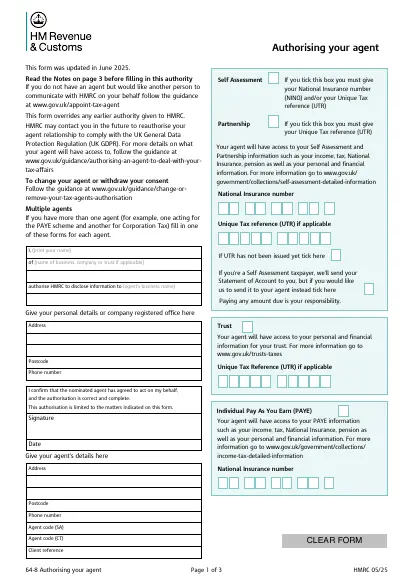
The form opens in our PDF editor with its own fields ready to type into. To download it, the filled PDF is sent to GuruPDF to prepare the file and is deleted from our servers one hour later. You can fill it in without an account; downloading the filled PDF needs a free account. A free account gets 15 credits a day, enough for one form a day.
- Country
- United Kingdom
- Edition
- HMRC 05/25 (updated June 2025)
- Pages
- 3
- Fillable fields
- 77
- Last checked at the source
- November 13, 2026
GuruPDF is an independent PDF editor, not a government agency, and is not affiliated with any government. This page explains the form in plain words; it is not legal or tax advice. Always check the official instructions before you file.
Who uses Form 64-8
- Individuals who want an accountant or tax adviser to handle their Self Assessment or personal PAYE affairs
- Companies appointing an agent for Corporation Tax or employers' PAYE
- Partnerships and trusts authorising an agent for the partnership return or the trust
- Contractors in the Construction Industry Scheme and VAT-registered businesses
- Agents preparing the form for a new client to sign
Before you start
- The agent's business name, address, phone number and the agent codes they give you (Agent code (SA), Agent code (CT))
- Your National Insurance number and/or Unique Taxpayer Reference (UTR) for Self Assessment
- Company Registration number and company UTR for Corporation Tax
- Your VAT Registration number, if the authority is for VAT
- CIS or employer PAYE reference numbers, plus the agent's Government Gateway identifier and PAYE agent ID code if they need online access
- Your address (or the company's registered office) and phone number
How to fill out Form 64-8
Page 1: who is authorising whom
After 'I, (print your name)' enter your name, then the name of the business, company or trust if the authority is for one. Under 'authorise HMRC to disclose information to' enter the agent's business name. Give your personal details or the company's registered office: address, postcode and phone number. Then sign and date the confirmation that the agent has agreed to act for you and that the authorisation is correct and complete.
Page 1: your agent's details
Enter the agent's address, postcode and phone number, and the agent codes they hold: 'Agent code (SA)' for Self Assessment and 'Agent code (CT)' for Corporation Tax. HMRC asks that each box holds only what it asks for; for example, the SA agent code box takes the 6-character code and nothing else. 'Client reference' is the agent's own reference for you, if they have one.
Page 1: Self Assessment, Partnership, Trust and Individual PAYE
Fill in only the boxes for the taxes you want the agent to handle. Self Assessment needs your National Insurance number and/or UTR; tick the box if no UTR has been issued yet, and tick the other box if you want your Statement of Account sent to the agent instead of you. Partnership and Trust each need the UTR. Individual PAYE needs your National Insurance number and gives the agent access to your PAYE records.
Page 2: Corporation Tax, tax credits, VAT and the DIY Housebuilder Scheme
Corporation Tax takes the Company Registration number and the company's UTR. The tax credits box takes your National Insurance number, and for a joint claim the other claimant gives their name and National Insurance number and signs. VAT takes the VAT Registration number, or tick 'If not registered yet'. The form says it cannot authorise an agent for Making Tax Digital for VAT, which is done online. The VAT DIY Housebuilder Scheme box takes your National Insurance number.
Page 2: Construction Industry Scheme and Employers' PAYE
For CIS, enter the CIS reference number and PAYE reference number. For Employers' PAYE (only if you are an employer operating PAYE) enter the PAYE reference number. In both sections, if the agent needs online access, add the agent's Government Gateway identifier and PAYE agent ID code, then tick how the agent should receive information: through the online services, and/or by phone and in writing.
Page 3: notes to keep
Page 3 explains who should sign, how HMRC uses your information, and other options such as form CH995 for the High Income Child Benefit Charge and a separate form for compliance checks. Do not send page 3; keep it for your records.
After you fill it out
Print pages 1 and 2, sign and date them, and post them to HMRC at the address given in the notes on page 3; the notes list exceptions, for example when the form accompanies other correspondence, is only for Corporation Tax or has been requested by a particular HMRC office. HMRC asks you not to add a covering letter unless it contains information essential to process the form. HMRC's guidance says to use this paper form only if the agent cannot be authorised through an online service or your business tax account, and GOV.UK says your agent will tell you how to authorise them. To change or remove an agent later, follow HMRC's 'Change or remove your tax agent's authorisation' guidance.
Signing: HMRC's instructions are to sign and date the form and post it. Who signs depends on whose tax affairs it covers: you for your personal tax, the company secretary or another responsible officer for a company, the partner responsible for the partnership's tax affairs for a partnership, and one or more trustees for a trust. For a joint tax credits claim both claimants must sign.
Watch out for
- A 64-8 overrides any earlier authority HMRC holds for the same taxes, and you still remain legally responsible for your own tax.
- Do not write outside the boxes, do not strike through unused boxes and do not add extra information in a field: HMRC asks for exactly what each box requests.
- The form cannot authorise an agent for Making Tax Digital for VAT, and for trusts it does not give the agent access to the online trust service.
- HMRC no longer accepts form 64-8 for limited authorisation (an agent who only talks to HMRC for you); that needs a signed letter instead.
- Only send pages 1 and 2. Fill in one form for each agent if you use different agents for different taxes.
Questions about Form 64-8
Do I have to use the paper 64-8?
Not always. HMRC says that depending on the taxes involved, you can authorise an agent through an online service, a link the agent sends you, or your business tax account. Use form 64-8 if you cannot authorise the agent in one of those ways.
Can I use form 64-8 to let a friend or relative deal with HMRC?
No. The form is for professional agents such as accountants and tax advisers. HMRC has separate ways to let a friend or relative help, such as becoming a 'trusted helper' online or giving them authority to talk to HMRC for you.
What if I have more than one agent?
Fill in a separate form for each agent, for example one agent for the PAYE scheme and another for Corporation Tax. Each form covers only the taxes ticked on it.
Who signs for a company or partnership?
For a company, the secretary or another responsible officer signs. For a partnership, the partner responsible for the partnership's tax affairs signs, and the authority applies only to the partnership; individual partners sign separate forms for their own tax.
How do I stop an agent acting for me?
Send a new authority for another agent, which replaces the old one, or remove the agent's authorisation as described in HMRC's 'Change or remove your tax agent's authorisation' guidance, including online through your business or personal tax account.
Official information
- Authorising an agent to deal with your tax affairs (HMRC)
- Appoint someone to deal with HMRC on your behalf
- Change or remove your tax agent's authorisation
Page text last reviewed November 13, 2026.