Office of the Revenue Commissioners
Fill out Revenue Form 12 online
Income Tax Return for the year 2025 - Form 12 (Employees, Pension Recipients & Non-Proprietary Directors)
Form 12 is the Irish Revenue Commissioners' paper income tax return for people whose main income is from a PAYE job or pension, and for non-proprietary company directors who pay all their income tax through PAYE. This edition is for the year 1 January to 31 December 2025. It declares income that is not fully taxed at source, such as small amounts of rental, deposit or foreign income, and claims tax credits and reliefs such as health expenses, rent tax credit, medical insurance or tuition fees. Revenue says the quickest way is the online return in myAccount; the paper form is signed and posted to your Revenue office.
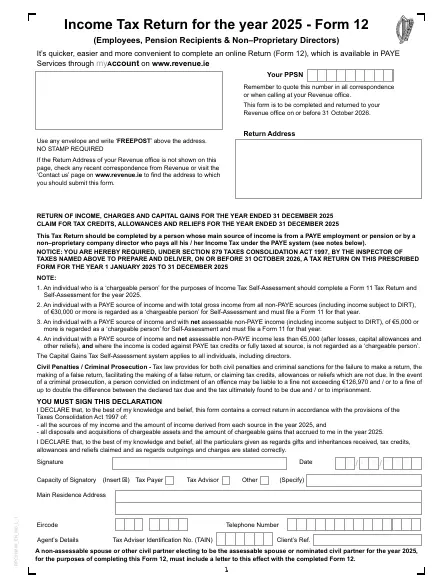
This form has no fillable fields, so it opens in our PDF editor with the Text tool ready: click where an answer goes and type. To download it, the filled PDF is sent to GuruPDF to prepare the file and is deleted from our servers one hour later. You can fill it in without an account; downloading the filled PDF needs a free account. A free account gets 15 credits a day, enough for one form a day.
- Country
- Ireland
- Edition
- Tax year 2025 (1 January to 31 December 2025)
- Pages
- 20
- Fillable fields
- Type anywhere
- Last checked at the source
- November 13, 2026
GuruPDF is an independent PDF editor, not a government agency, and is not affiliated with any government. This page explains the form in plain words; it is not legal or tax advice. Always check the official instructions before you file.
Who uses Revenue Form 12
- PAYE employees and pensioners who need to declare extra income not taxed at source
- PAYE taxpayers claiming tax credits, reliefs or employment expenses not already given through their tax credits
- Non-proprietary company directors who pay all their income tax under PAYE
- People Revenue has asked to file a return for 2025
- Personal representatives completing a return for a PAYE taxpayer who has died
Before you start
- Your PPSN (Personal Public Service Number), and your spouse's or civil partner's if you are jointly assessed
- Your final 2025 payslips, showing pay and tax and USC paid for each employment and pension
- Each employer's or pension payer's name and PAYE registered number
- Details of any Department of Social Protection payments, rental income, deposit interest, dividends and foreign income for 2025
- Receipts and amounts for the credits and reliefs you claim (health expenses, rent, medical insurance, tuition fees, pension contributions)
- Your IBAN and BIC for any refund
How to fill out Revenue Form 12
Page 1: PPSN, declaration and signature
This is a flat form with no fields, so you type each entry in the boxes next to its printed label; the form asks for capital letters, a 'T' in tick boxes, DD/MM/YYYY dates, whole euro amounts where .00 is printed, and blank panels where nothing applies. Page 1 carries your PPSN, the declaration that you must sign and date, the capacity of the signatory (taxpayer, tax adviser or other), your main residence address, Eircode and phone number, and any agent's TAIN and client reference. The notes on page 1 explain who should file Form 11 instead.
Page 2: bank details
Enter your IBAN and BIC so any refund is paid to your account; refunds cannot be paid to a foreign account outside SEPA. If you are married or in a civil partnership and opted for joint assessment, add your spouse's or civil partner's IBAN and BIC.
Panels 1 to 3: personal details
Panel 1 is only for a return made on behalf of someone who has died, plus the dates of birth of you and your spouse or civil partner. Panel 2 is your civil status, any change in 2025 and its date, and, if married or in a civil partnership, your basis of assessment (joint, separate or single treatment) and your spouse's or civil partner's name and PPSN. It also covers residence status, split year treatment, Non-Resident Aggregation Relief and whether either of you held a full medical card. Panel 3 lists any non-proprietary directorships with the percentage shareholding.
Panels 4 to 13: employments, pensions and social welfare
For each PAYE employment (panel 4) and pension (panel 5), give the employer's or payer's name and PAYE registered number, and from your final 2025 payslip the pay for USC, USC paid, pay for income tax and income tax paid. Panels 6 to 10 cover AVC withdrawals, pension lump sums, Department of Social Protection payments such as State Pension or Illness Benefit, ARF and PRSA distributions and other payments. Panel 11 is the Foreign Earnings Deduction, panel 12 taxable benefits not taxed at source, and panel 13 employment or pension income not taxed under PAYE.
Panels 14 to 29: other Irish income
Panels 14 and 15 cover trade or professional income and Professional Services Withholding Tax. Panels 16 to 25 are fees and commissions, Rent-a-Room Relief, rental income reliefs and rental income from property in the State (with the number of properties and Residential Tenancies registration), maintenance payments, other untaxed income, Irish deposit interest and credit union dividends, income taxed at source and Irish dividends. Panels 26 to 28 are exempt income (childcare services, other exempt income, personal injury) and panel 29 the property relief surcharge.
Panels 30 to 54: foreign income, payments and pension contributions
Panels 30 to 45 cover foreign income in euro: UK, US, Canadian and other dividends, foreign pensions and lump sums, foreign employment income, foreign rents, and foreign deposit and other interest. Panels 46 to 53 are payments you made: rent paid to a non-resident landlord, retainable charges, maintenance, covenants, and pension contributions (AVCs, PRSAs and PEPPs, retirement annuity contracts and overseas pension plans). Panel 54 is the Mortgage Interest Tax Credit.
Panels 55 to 80: tax credits, allowances and reliefs
Tick or fill in only what you claim: Home Carer, Employee (PAYE) and Earned Income tax credits, employment expenses including flat rate expenses (58), Blind Person's credit, dependent relative, single person child carer and other credits, employing a carer, income protection, medical insurance (66), investment reliefs, tuition fees (70), and others for specific groups. Panel 78 is health expenses, panel 79 the Rent Tax Credit with details of each tenancy, and panel 80 notes that a Help to Buy refund must be claimed online.
Panels 81 to 83: gifts, capital gains and property incentives
Panel 81 asks whether you or your spouse or civil partner received a gift or inheritance in 2025, and explains when a separate Capital Acquisitions Tax return (Form IT 38) is needed. Panel 82 gives details of chargeable gains from disposals of assets such as land or shares in 2025. Panel 83 lists property-based incentive schemes on which relief is claimed.
After you fill it out
Sign and date the declaration on page 1, then post the whole return to your Revenue office. The form says to use the return address printed on it, or the one on recent correspondence from Revenue, or the 'Contact us' page on revenue.ie, and that you can use any envelope marked 'FREEPOST' with no stamp. Page 1 says the 2025 return is due on or before 31 October 2026. Revenue says the quickest way is the online Income Tax Return in PAYE Services in myAccount, which also gives you a Statement of Liability, and that a return can be made up to four years after the end of the tax year. For routine affairs, Revenue also has a simplified paper return, Form 12S.
Signing: The page 1 declaration must be signed and dated ('YOU MUST SIGN THIS DECLARATION'), and you mark whether the signatory is the taxpayer, a tax adviser or another person. A non-assessable spouse or civil partner who elects to be the assessable one for 2025 must enclose a letter saying so.
Watch out for
- Form 12 is not for 'chargeable persons'. The notes on page 1 say that PAYE taxpayers whose non-PAYE income is above the limits printed there must file Form 11 instead.
- Leave panels that do not apply blank. Use whole euro where .00 is shown, rounding income down and credits, reliefs and tax paid up, and do not write the € symbol.
- Keep your receipts: for health expenses the form says you do not send them, but must keep them for six years.
- Rent Tax Credit is not due where you get HAP, RAS or another State housing support for the tenancy, or the landlord is a housing authority or association.
- Tax law provides civil penalties and criminal sanctions for failing to make a return, making a false return or claiming credits that are not due.
Questions about Revenue Form 12
Do I have to use the paper Form 12?
No. Revenue says the quickest and easiest way is the online Income Tax Return through PAYE Services in myAccount ('Review your tax for the previous 4 years'). For people with routine tax affairs who cannot use the online service, Revenue also has a simplified paper return, Form 12S.
What is the difference between Form 12 and Form 11?
Form 12 is for people whose main income is from PAYE employment or pension, and directors who pay all their income tax through PAYE. Self-assessed 'chargeable persons', including PAYE taxpayers with non-PAYE income above the limits on page 1 of Form 12, file Form 11.
What is the deadline?
Page 1 of this edition requires the return for 2025 on or before 31 October 2026. Revenue's PAYE page says Income Tax Returns can be submitted within four years after the end of the tax year to which they relate, for example to claim a refund.
Which year does this Form 12 cover?
The year 1 January 2025 to 31 December 2025. Returns for earlier years use that year's edition, which Revenue lists under 'Related forms' on its tax return forms page.
Where do I find my pay and tax figures?
The form says the pay for USC, USC paid, pay for income tax and income tax paid for each employment or pension are on your final payslip for 2025. Revenue says the online return in myAccount includes the information held on your Revenue record, while a paper return does not, so on paper you enter these figures yourself.
Official information
Page text last reviewed November 13, 2026.