Social Security Administration
Fill out Form SSA-1696 online
Claimant's Appointment of a Representative
Form SSA-1696 is how you tell Social Security in writing that you appoint a representative, an attorney or a qualified non-attorney, to act for you on a claim or appeal. You complete your sections, the representative completes theirs and agrees to SSA's rules, and both of you sign. The same form is used to update an existing appointment, such as the claim types covered or the fee arrangement. SSA recognizes the representative only after it receives the completed form.
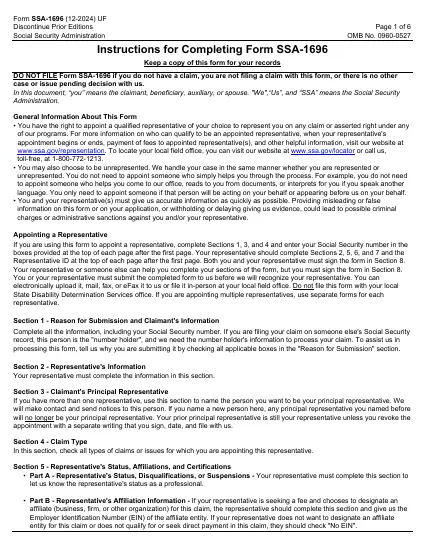
The form opens in our PDF editor with its own fields ready to type into. To download it, the filled PDF is sent to GuruPDF to prepare the file and is deleted from our servers one hour later. You can fill it in without an account; downloading the filled PDF needs a free account. A free account gets 15 credits a day, enough for one form a day.
- Country
- United States
- Edition
- (12-2024)
- Pages
- 6
- Fillable fields
- 91
- Last checked at the source
- November 13, 2026
GuruPDF is an independent PDF editor, not a government agency, and is not affiliated with any government. This page explains the form in plain words; it is not legal or tax advice. Always check the official instructions before you file.
Who uses Form SSA-1696
- People with a Social Security disability, SSI, retirement, Medicare or Special Veterans Benefits claim or appeal who want someone to act for them
- Beneficiaries with a continuing disability review or a post-entitlement issue such as an overpayment or a suspension
- Attorneys and non-attorney representatives registered with SSA, who complete Sections 2, 5, 6 and 7
- Claimants and representatives updating an existing appointment
Before you start
- Your name and Social Security number, and the number holder's name and Social Security number if your claim is on someone else's record
- The representative's name and SSA Representative ID (Rep ID); every representative must register with SSA first
- The types of claims or issues the representative will handle
- The fee arrangement you have agreed with the representative
- Names and Social Security numbers of any children or spouse claiming with you who have not appointed their own representative
How to fill out Form SSA-1696
Section 1 - Reason for Submission and Claimant's Information
Check Appoint a new representative, or Update information you previously submitted and the sections you are updating. Enter your first name, initial, last name and Social Security number. If your claim is based on another person's work or earnings, such as a spouse or parent, also give that number holder's name and Social Security number. Put your Social Security number at the top of each later page.
Section 2 - Representative's Information
The representative enters their name and registered Rep ID, and their Rep ID at the top of each later page. Registration is done on Form SSA-1699, which is also how a representative updates their registration details.
Sections 3 and 4 - Principal Representative and Claim Type
Complete Section 3 only if you have more than one representative: name the one SSA should contact and send notices to. In Section 4, check every claim or issue this representative handles: Title II or Title XVI disability, Title XVI benefits, retirement, Medicare or Special Veterans Benefits, a continuing disability review, or a post-entitlement issue such as benefit amount, representative payee, suspension, termination or overpayment.
Section 5 - Representative's Status, Affiliations and Certifications
The representative completes this section. Part A says whether they are an attorney, a non-attorney eligible for direct payment, or a non-attorney not eligible, and discloses any disbarment, suspension or disqualification. Part B names an affiliated firm and its EIN, or No EIN. Part C assigns or rescinds direct payment of the fee to that entity. In Part D the representative initials to certify they accept the appointment and will follow SSA's rules.
Section 6 - Fee Arrangement
The representative checks one box: requesting a fee with direct payment from past-due benefits, requesting a fee without direct payment, waiving the fee because a third-party entity pays it, or waiving the fee entirely. The form says that if an eligible representative leaves this blank, SSA assumes they will seek direct payment. For the first two choices SSA must authorize the fee; where a third party pays from its own funds, the form says SSA does not need to authorize it if all regulatory conditions apply.
Sections 7 and 8 - Other Claimants and Signatures
In Section 7, list any auxiliary claimants, such as a child or spouse, who have not appointed their own representative, with their Social Security numbers. In Section 8, both you and the representative sign and date when appointing a new representative. For an update, you sign alone for Section 3, the representative alone for Section 5, and both of you for Sections 4, 6 or 7.
After you fill it out
You or your representative submit the completed form to Social Security; SSA's form page says to send it to your local Social Security office. The instructions say you can upload it electronically, mail, fax or eFax it, or file it in person at your field office, but not with your State Disability Determination Services office. SSA also offers an online version (e1696) that your representative starts and you both complete electronically. Keep a copy for your records. SSA recognizes the representative only once it has the form.
Signing: The signature fields in this PDF say a wet signature is required: complete the form, print it and sign by hand. Both you and the representative sign Section 8 for a new appointment; someone else may help you fill in your sections, but you must sign yourself. SSA's online e1696 is the electronic alternative.
Watch out for
- Do not file Form SSA-1696 if you have no claim, are not filing one with it, and have no other case or issue pending with SSA.
- Use a separate form for each representative you appoint.
- A representative cannot charge or collect a fee unless SSA authorizes it first.
- Do not send the form to your State Disability Determination Services office.
- Naming a new principal representative in Section 3 does not end the earlier representative's appointment; that takes a separate signed, dated writing filed with SSA.
Questions about Form SSA-1696
Do I need a representative to deal with Social Security?
No. You may choose to be unrepresented, and SSA says it handles your case the same way either way. You only need to appoint someone who will act or appear for you, not a person who simply helps you get to the office, reads documents to you or interprets.
Can my representative be someone who is not a lawyer?
Yes. The representative can be an attorney or a non-attorney, but must be qualified, registered with SSA and follow its rules of conduct. Only certain non-attorneys are eligible for direct payment of fees.
Can we complete it online?
Yes. SSA has an electronic version (e1696): your representative starts an online submission and you both complete the appointment electronically. If you use the paper form, print it, sign by hand and mail, fax or deliver it.
How do I change or end my representative's appointment?
File an updated SSA-1696, checking Update and the sections that change, for changes to the claim types, fee or principal representative. To revoke an appointment, the instructions say to send SSA a separate writing that you sign and date. SSA lists Form SSA-1696-SUP1, Claimant's Revocation of the Appointment of a Representative, for this.
Official information
- Form SSA-1696, Claimant's Appointment of a Representative (SSA)
- Representing Claimants (SSA)
- Find your local Social Security office
Page text last reviewed November 13, 2026.
Related forms
- Form SSA-16Application for Disability Insurance BenefitsSSAFill online
- Form SSA-561Request for ReconsiderationSSAFill online
- Form SSA-827Authorization to Disclose Information to the Social Security Administration (SSA)SSAFill online
- Form SSA-3373Function Report - AdultSSAFill online
- Form SSA-632-BKRequest for Waiver of Overpayment RecoverySSAFill online