Internal Revenue Service
Fill out Form 911 online
Request for Taxpayer Advocate Service Assistance (and Application for Taxpayer Assistance Order)
Form 911 is the request for help from the Taxpayer Advocate Service (TAS), an independent organization within the IRS that helps taxpayers resolve federal tax problems and protects their rights. TAS may be able to help when a tax problem is causing financial difficulty, when you have tried and been unable to resolve it with the IRS, or when an IRS system or procedure is not working as it should. The form is also the application for a Taxpayer Assistance Order. TAS help is free. Individuals, businesses and their authorized representatives can file it.
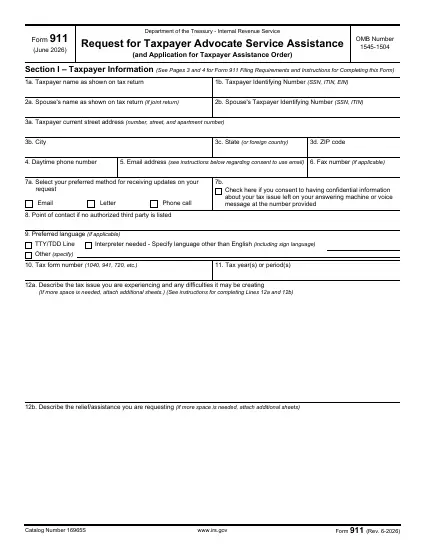
The form opens in our PDF editor with its own fields ready to type into. To download it, the filled PDF is sent to GuruPDF to prepare the file and is deleted from our servers one hour later. You can fill it in without an account; downloading the filled PDF needs a free account. A free account gets 15 credits a day, enough for one form a day.
- Country
- United States
- Edition
- Rev. 6-2026
- Pages
- 4
- Fillable fields
- 57
- Last checked at the source
- November 13, 2026
GuruPDF is an independent PDF editor, not a government agency, and is not affiliated with any government. This page explains the form in plain words; it is not legal or tax advice. Always check the official instructions before you file.
Who uses Form 911
- Taxpayers whose IRS problem is causing financial hardship, such as risk of losing housing, utilities or transportation to work
- Taxpayers facing an immediate threat of adverse IRS action
- Taxpayers whose issue is delayed more than 30 days beyond normal processing, or who received repeated interim letters without a resolution
- Businesses, trusts, estates and tax-exempt organizations with the same kinds of problems
- Representatives holding a Form 2848 or Form 8821 who request help for a client
Before you start
- Your name and taxpayer identifying number (SSN or ITIN; EIN for a business) as on the tax return, and your spouse's for a joint return
- Your current mailing address, daytime phone number and, if you agree to email contact, your email address
- The tax form number (for example 1040 or 941) and the tax years or periods involved
- A clear account of the problem: what the IRS has or has not done, and the date you first contacted the IRS if there has been a delay
- The specific action you want taken
- Copies of documents that support your request, and a copy of any Form 2848 or 8821 if a representative is involved
How to fill out Form 911
Section I, lines 1a to 6: taxpayer information
Enter the taxpayer's name as shown on the tax return on line 1a and the SSN, ITIN or EIN on line 1b. For a jointly filed return, enter the spouse's name and number on lines 2a and 2b. Lines 3a to 3d are your current mailing address, line 4 your daytime phone number and line 6 your fax number, if any. Enter an email address on line 5 only if you consent to send and receive encrypted email about your tax issue; leave it blank if you do not.
Section I, lines 7a to 9: contact preferences
On line 7a, choose how you prefer to receive updates: email, letter or phone call. Check line 7b only if you agree to have confidential information left on your voicemail; do not check it if others can hear your messages. On line 8, an entity names the individual authorized to act for it, unless a third party is listed in Section II. On line 9, note any special needs, such as TTY/TDD, sign language or an interpreter in another language.
Section I, lines 10 and 11: the return involved
On line 10, enter the number of the federal tax return or form related to the request, for example Form 1040 for an individual income tax issue. On line 11, enter the tax year or period: the calendar or fiscal year for income tax, or the calendar quarter for an employment tax issue.
Section I, lines 12a and 12b: the problem and the help you want
On line 12a, describe the federal tax issue, the difficulties it is causing, and the actions the IRS has taken or not taken. If the IRS has delayed resolving it for more than 30 days, give the date you first contacted the IRS. On line 12b, describe the relief or assistance you are asking for and the specific action you believe is needed. Attach more sheets and supporting documents if needed.
Lines 13a to 14b: signatures
Above the signature lines you authorize TAS to contact third parties about the request. The taxpayer, or a corporate officer with their title on line 13b, signs and dates on lines 13a and 13c. For a joint request both spouses sign; if only one spouse asks for help, only that spouse signs. A business request is signed by a properly authorized officer.
Section II: Third Party Information
Complete this section only if a representative acts for you. Part A is for a representative under Form 2848, Power of Attorney, and Part B for an appointee under Form 8821, which authorizes someone to receive your tax information but not to represent you. Each part asks for the name, CAF number, mailing address, phone and fax number, and only the representative signs there. Include a copy of the Form 2848 or 8821 if you have one. A representative who submits the form signs Section II, and the taxpayer then does not need to sign.
After you fill it out
Send the completed form to TAS by email, mail or fax, using the contact details printed on page 3 of the form and on TAS's own Submit a request for assistance page; there are separate fax and email instructions for sending it from overseas. TAS says email submissions are not encrypted and that it will not reply by email, but will contact you by phone or letter. TAS will tell you whether your request has been accepted. The form says that if you do not get a response within 30 days, you should email TAS with "No Response" in the subject line, and not submit a second Form 911 for the same issue.
Signing: The taxpayer, or a corporate officer with their title, signs and dates lines 13a to 13c; for a joint request the spouse also signs and dates lines 14a and 14b, and a business request is signed by a properly authorized officer. When an authorized representative submits the request, the representative signs in Section II and the taxpayer does not need to sign. The form can be emailed, faxed or mailed; neither the form nor TAS's request page says whether a typed or electronic signature is accepted.
Watch out for
- Signing Form 911 does not stop any deadline. The form says it does not suspend the time to act, such as petitioning the Tax Court or requesting a Collection Due Process hearing.
- Do not file more than one Form 911 for the same issue; TAS says that can delay your request.
- TAS says not to use the form until you have made reasonable efforts to resolve the issue through normal IRS channels, or to seek legal or tax preparation advice or the reversal of a legal or technical decision.
- TAS will not consider frivolous arguments, and the form warns that raising them can bring a penalty.
- TAS's case acceptance page lists situations it is not currently accepting, such as paper returns the IRS has not yet processed. Check it before you send the form.
Questions about Form 911
Does the Taxpayer Advocate Service charge for help?
No. The form says TAS assistance is always free.
When does TAS accept a case?
Generally when the problem causes financial hardship, when an IRS system or procedure has failed (for example, a delay of more than 30 days beyond normal processing time, or a promised response date that passed), or when you need help to be treated fairly and to protect your rights. An advocate makes the final decision after you submit the form.
Can I email Form 911?
Yes. The form lists an email address as well as a fax number and a mailing address. TAS warns that email submissions and attachments are not encrypted, and it replies by phone or letter rather than by email.
Can my tax professional file Form 911 for me?
Yes. An authorized representative completes Section II, attaches a copy of Form 2848, Form 8821 or another power of attorney, enters their CAF number and signs Section II. The taxpayer does not need to sign in that case.
What if I hear nothing back?
The form says that if you do not receive a response within 30 days, email TAS with "No Response" in the subject line instead of sending another Form 911.
Official information
- Submit a request for assistance (Taxpayer Advocate Service)
- Can TAS help me with my tax issue?
- TAS case acceptance
- Taxpayer Advocate Service (IRS)
Page text last reviewed November 13, 2026.
Related forms
- Form 2848Power of Attorney and Declaration of RepresentativeIRSFill online
- Form 8821Tax Information AuthorizationIRSFill online
- Form 3911Taxpayer Statement Regarding RefundIRSFill online
- Form 12153Request for a Collection Due Process or Equivalent HearingIRSFill online
- Form 14039Identity Theft AffidavitIRSFill online