HM Revenue & Customs
Fill out SA100 tax return online
Tax Return 2026
The SA100 is HMRC's main Self Assessment tax return on paper. This edition, Tax Return 2026, covers the tax year 6 April 2025 to 5 April 2026 (2025–26). It reports income that is not fully taxed through wages or pensions, such as savings interest, dividends and pensions, and claims reliefs such as pension contributions and Gift Aid; self-employment, property, capital gains and other income go on separate supplementary pages that you send with it. HMRC says most people file online, but you can print this form, sign it and post it to HMRC instead.
This form has no fillable fields, so it opens in our PDF editor with the Text tool ready: click where an answer goes and type. To download it, the filled PDF is sent to GuruPDF to prepare the file and is deleted from our servers one hour later. You can fill it in without an account; downloading the filled PDF needs a free account. A free account gets 15 credits a day, enough for one form a day.
- Country
- United Kingdom
- Edition
- SA100 2026 (tax year 6 April 2025 to 5 April 2026), HMRC 12/25
- Pages
- 10
- Fillable fields
- Type anywhere
- Last checked at the source
- November 13, 2026
GuruPDF is an independent PDF editor, not a government agency, and is not affiliated with any government. This page explains the form in plain words; it is not legal or tax advice. Always check the official instructions before you file.
Who uses SA100 tax return
- People HMRC has asked to send a Self Assessment tax return for 2025–26
- Self-employed people, partners and landlords, who also fill in the matching supplementary pages
- People with untaxed income such as savings interest, dividends, foreign income or tips
- People who owe the High Income Child Benefit Charge or need to report a Capital Gains Tax disposal
- Anyone who chooses or needs to file on paper rather than through HMRC's online service
Before you start
- Your 10-digit Unique Taxpayer Reference (UTR) and National Insurance number
- Your employer reference, if you have one, and P60 or P45 details for any employment
- Statements of interest, dividends, pensions and state benefits for 6 April 2025 to 5 April 2026
- Records of pension contributions and Gift Aid donations you want to claim relief for
- The amount of Child Benefit received, if the High Income Child Benefit Charge applies
- Your bank or building society details, if you expect a repayment
- Any supplementary pages you need (for example SA102 Employment, SA103 Self-employment, SA105 UK property, SA108 Capital Gains)
How to fill out SA100 tax return
Information sheet and the top of page TR 1
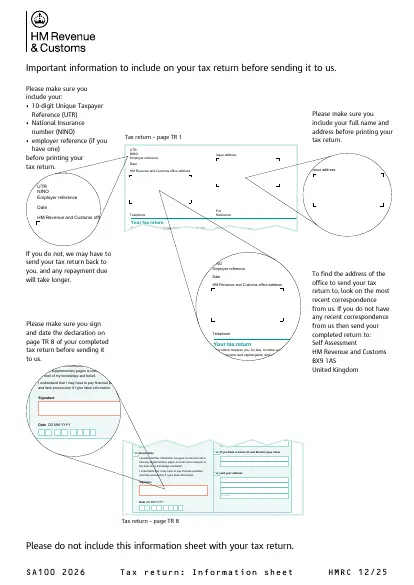
Page 1 is an information sheet: HMRC asks you not to send it back. The top of page TR 1 has boxes for your UTR, National Insurance number (NINO), employer reference and your name and address in the issue address panel; the information sheet asks you to make sure these are filled in before printing, or HMRC may have to send the return back. Apart from those few boxes this is a flat form, so you type each answer in the box next to its printed number. The form's rules: whole pounds only, round income down and expenses and tax paid up, and leave a box blank if it does not apply (do not strike through empty boxes).
Page TR 1: your personal details
Box 1 is your date of birth. Box 2 is for a corrected name or address if it differs from the front of the form, with the date you changed address. Box 3 is your phone number and box 4 your National Insurance number, which you leave blank if the correct number is already shown at the top.
Page TR 2: what makes up your tax return
Answer Yes or No to questions 1 to 9 to find out which supplementary pages you need: Employment (with the number of pages), Self-employment, Partnership, UK property, Foreign, Trusts etc, Capital Gains Tax summary (and whether computations are provided), Residence and foreign income and gains (FIG) regime etc, and Additional information. The last question asks whether you need to get separate supplementary pages, which you download from GOV.UK.
Page TR 3: Income
Boxes 1 to 7 cover dividends and interest: taxed and untaxed UK interest, untaxed foreign interest up to £2,000, UK company dividends, other dividends, and foreign dividends up to £500 with the foreign tax taken off. Boxes 8 to 16 cover UK pensions, annuities and state benefits: State Pension (the amount for the year, not the weekly amount), lump sums, other pensions and the tax taken off, taxable Incapacity Benefit and contribution-based Employment and Support Allowance, Jobseeker's Allowance and other taxable benefits. Boxes 17 to 21 are for other UK income not covered by supplementary pages: other taxable income, allowable expenses, tax taken off, the benefit from pre-owned assets (box 20) and a description of that income (box 21).
Page TR 4: Tax reliefs
Boxes 1 to 4 are payments into pension schemes that were not taken from your pay before tax, such as relief-at-source payments (box 1, with one-off payments in 1.1) and overseas pension schemes. Boxes 5 to 10 are charitable giving: Gift Aid payments in the year, any carried back or forward, and gifts of shares, securities, land or buildings to charity. Boxes 11 and 12 are not in use. Boxes 13 to 16 are for Blind Person's Allowance, including transferring surplus allowance between spouses or civil partners.
Page TR 5: loans, charges and Marriage Allowance
Fill in the Student Loan and Postgraduate Loan boxes if the notes say they apply to you, including amounts your employer deducted. The High Income Child Benefit Charge section asks for the total Child Benefit you and your partner got, the number of children on 5 April 2026, and the date payments stopped if before 6 April 2026; the form lists who should fill it in. There is a section for the Winter Fuel Payment or Pension Age Winter Heating Payment charge, and a Marriage Allowance section for transferring part of your Personal Allowance, with your spouse's or civil partner's name, National Insurance number, date of birth and the date of marriage or civil partnership.
Pages TR 6 and TR 7: finishing your tax return
Box 1 on TR 6 is any 2025–26 Income Tax already refunded or set off. Boxes 2 and 3 let you put 'X' if you do not want HMRC to collect tax you owe through your tax code. To claim a repayment, fill in boxes 4 to 14 with the bank or building society name, account holder or nominee, sort code and account number; to have a nominee receive it you must sign box 14, and the form says a photocopy of your signature will not do. On TR 7 you can give your tax adviser's details (boxes 15 to 18, optional) and anything else HMRC should know in box 19.
Page TR 8: signing your form
Put 'X' in box 20 if the return contains provisional figures (and explain why in box 19), and in box 21 if you are enclosing supplementary pages. Sign and date the declaration in box 22. If you are signing for someone else, give the capacity (for example executor or receiver) in box 23, their name in box 24, and your own name and address in boxes 25 and 26.
After you fill it out
Print the return, sign and date box 22 on page TR 8, and post it with any supplementary pages to the HMRC office shown on your most recent correspondence; if you have none, use the address printed on the information sheet or on GOV.UK for people living in or outside the UK. Do not include the information sheet. This edition says HMRC must receive a paper return by 31 October 2026 (or 3 months after the date of your notice to file, if later), and an online return by 31 January 2027. HMRC says that if you miss the paper deadline, you should send your return online instead to avoid a penalty. If HMRC receives the paper return by 31 October, it works out your tax and tells you what to pay, or what you will get back, before 31 January 2027.
Signing: You sign and date the declaration in box 22 on the printed return before posting it. Someone signing on your behalf, such as an executor or receiver, fills in boxes 23 to 26. To authorise a nominee to receive a repayment you also sign box 14, and the form says a photocopy of your signature will not do.
Watch out for
- The paper deadline is earlier than the online one. This edition gives 31 October 2026 for paper and 31 January 2027 online (or 3 months after the notice, if later), and a late return is charged a penalty.
- Make sure your UTR, National Insurance number, name and address are on page TR 1, or HMRC may send the return back and any repayment will take longer.
- Enter whole pounds only, and leave boxes that do not apply blank: do not strike through them or write anything else in them.
- The SA100 alone is not always a complete return. If you answered Yes on page TR 2, you must also send the supplementary pages for that income.
- Do not enter payments on account or other payments you have made on the return; HMRC deducts them on your Self Assessment statement.
Questions about SA100 tax return
Can I still file a paper SA100?
Yes. GOV.UK says you can file online or send a paper return, and you can download the SA100 or ask HMRC for one. HMRC says 97% of people file online, which gives an extra 3 months and lets you save and finish later.
Which tax year is this SA100 for?
This is Tax Return 2026, for the tax year 6 April 2025 to 5 April 2026 (2025–26). Returns for earlier years use the edition for that year, which GOV.UK also publishes.
What if I missed the 31 October paper deadline?
HMRC's guidance says that if you miss the paper filing deadline, you should send your tax return online instead to avoid a penalty. The online deadline for 2025–26 is 31 January 2027.
Do I have to calculate my own tax?
No. The form says that if HMRC receives the paper return by 31 October 2026, or you file online, HMRC does the calculation and tells you how much to pay or how much you will get back before 31 January 2027. If you want to work it out yourself, you can ask for the Tax calculation summary pages (SA110).
How do I correct a paper return I already sent?
GOV.UK says you can correct a return within 12 months of the Self Assessment deadline. For a paper return, send the corrected pages to the address on your Self Assessment paperwork, writing 'amendment' on each page with your name and UTR.
Official information
- Complete your Self Assessment tax return for the last tax year (HMRC)
- Self Assessment tax returns: deadlines
- Who must send a tax return
- How to fill in your tax return (2026) notes, SA150
Page text last reviewed November 13, 2026.