HM Revenue & Customs
Fill out HMRC Starter Checklist online
Starter checklist
The starter checklist is the HMRC form you give a new employer when you do not have a P45 from a previous job, or when you have a student or postgraduate loan. It was previously known as the P46. This PDF version is for employees who normally live and work in the UK; HMRC publishes a separate one for employees seconded to the UK by an overseas employer. Your answers tell the employer which tax code to use on your first pay and whether to take student loan deductions. It goes only to your employer: the form says not to send it to HMRC.
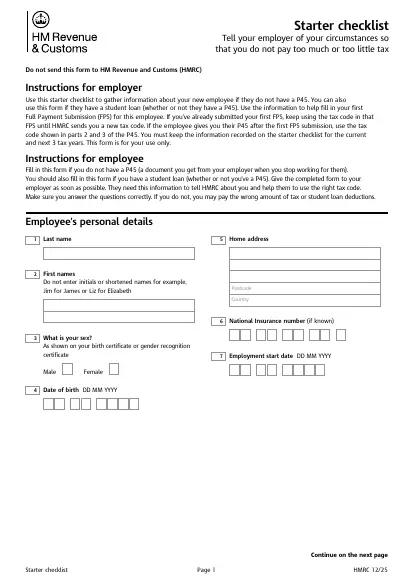
This form has no fillable fields, so it opens in our PDF editor with the Text tool ready: click where an answer goes and type. To download it, the filled PDF is sent to GuruPDF to prepare the file and is deleted from our servers one hour later. You can fill it in without an account; downloading the filled PDF needs a free account. A free account gets 15 credits a day, enough for one form a day.
- Country
- United Kingdom
- Edition
- HMRC 12/25
- Pages
- 4
- Fillable fields
- Type anywhere
- Last checked at the source
- November 13, 2026
GuruPDF is an independent PDF editor, not a government agency, and is not affiliated with any government. This page explains the form in plain words; it is not legal or tax advice. Always check the official instructions before you file.
Who uses HMRC Starter Checklist
- People starting their first job, or their first job in the UK
- New employees who have no P45 from a previous job
- People returning to work after a break or after being self-employed
- New employees whose personal details are different from those shown on their P45
- People working for more than one employer, or who also receive a pension
- Employees with a student or postgraduate loan, whether or not they have a P45
Before you start
- Your full legal first names and last name (no initials or short forms)
- Your National Insurance number, if you know it
- Your home address and date of birth
- The start date of your new job
- Whether you have had another job, a pension, Jobseeker's Allowance, Employment and Support Allowance or Incapacity Benefit since 6 April
- Your student loan plan type (Plan 1, 2, 4 or 5) and whether you have a Postgraduate Loan
How to fill out HMRC Starter Checklist
Read the instructions at the top of page 1
The top of page 1 has instructions for the employer and for the employee. As the employee, you fill in the form if you do not have a P45, or if you have a student loan, and give it to your employer as soon as possible. This is a flat form with no fields, so you type each answer in the box next to its printed number.
Questions 1 to 7: employee's personal details
Enter your last name (1) and first names (2), in full: the form says not to use initials or shortened names such as Jim for James. Question 3 asks your sex as shown on your birth certificate or gender recognition certificate, and question 4 your date of birth. Then give your home address with postcode and country (5), your National Insurance number if known (6) and your employment start date (7).
Questions 8 to 10: choose your employee statement
These questions lead you to one statement. If you have another job (8), or receive a State, workplace or private pension (9), put an 'X' in Statement C (tax code BR). Otherwise, question 10 asks whether since 6 April you have had payments from another job that has ended, or from Jobseeker's Allowance, Employment and Support Allowance or Incapacity Benefit: Yes means Statement B, No means Statement A (this is your first job since 6 April). Mark only the one statement that matches.
Questions 11 to 13: student loans
If you have no student or postgraduate loan, answer No to question 11 and go to the declaration. If you do, question 12 asks whether you are still studying on the course, left it after 6 April, have already repaid in full, or repay the Student Loans Company by Direct Debit; if any applies, go straight to the declaration. Otherwise, in question 13 mark the one plan type you are due to repay (Plan 1, 2, 4 or 5) and, if it applies, the Postgraduate loan box as well. The guidance beside it explains which plan matches each student finance body and course start date.
Declaration
Enter your full name in capital letters, sign and date the declaration confirming the information is correct. Page 4 is guidance for your employer on which tax code to apply for each statement and how to handle student loan plans.
After you fill it out
Give the completed checklist to your new employer, or email or post it to them; ask them when they need it. Do not send it to HMRC. Your employer uses it to add you to payroll, work out the tax code for your first pay and any student loan deductions, and tell HMRC you have started. The employer keeps it for the current and next 3 tax years. HMRC also offers an online version of the starter checklist on GOV.UK, and says that if you have already had your first pay, you should not use the checklist but check your tax code with its online service instead.
Signing: The employee signs and dates the declaration on page 3. The form goes to your employer, not HMRC, and HMRC's page says you can email, post or give it to them, so ask your employer whether they need a signed paper copy.
Watch out for
- Do not send the starter checklist to HMRC. It is only for your employer.
- Choose only one statement (A, B or C). The wrong statement can mean paying too much or too little tax until HMRC sends a new tax code.
- Mark only one student loan plan type, plus the Postgraduate loan box if it applies, or you may repay more than you need to.
- If you have a P45 from your last job, give it to your new employer; the checklist is for when you do not have one (or have a student loan).
Questions about HMRC Starter Checklist
Is the starter checklist the same as a P46?
Yes. HMRC says the starter checklist was previously known as the P46.
Do I need it if I have a P45?
Usually not: give the P45 to your new employer. You still fill in the checklist if you have a student or postgraduate loan, and HMRC says an employer may ask for it even when you give them a P45.
Which statement should I choose?
Statement A if this is your first job since 6 April and you have had no Jobseeker's Allowance, Employment and Support Allowance or Incapacity Benefit; Statement B if since 6 April you had another job (without a P45) or one of those benefits; Statement C if you have another job now or receive a State, workplace or private pension.
How do I know my student loan plan?
The form explains it by where you applied and when your course started, for example Student Finance England Plan 2 for courses started between 1 September 2012 and 31 July 2023, and Plan 5 from 1 August 2023. You can also check your plan by signing in to manage your student loan balance on GOV.UK.
I was sent to work in the UK by an overseas employer. Which form do I use?
HMRC publishes a separate starter checklist for employees seconded to work in the UK by an overseas employer, on the same GOV.UK page.
Official information
- Starter checklist if you're starting a new job (HMRC)
- Tax codes
- Check which student loan repayment plan you are on
Page text last reviewed November 13, 2026.