Unique Identification Authority of India
Fill out Aadhaar Form 1 online
FORM 1: Aadhaar Enrolment and Update – For (a) Resident Indian, or (b) Non-Resident Indian having Proof of Address in India (aged 18 years and above)
Aadhaar Form 1 is the UIDAI form for enrolling for an Aadhaar number, or updating the details of an existing one, for adults aged 18 and above who are either resident in India or Non-Resident Indians with proof of an address in India. You fill it in and take it to an Aadhaar enrolment centre with your original documents. There the documents are checked and copied electronically and handed back, your details are entered into the enrolment software, and a verifier at the centre signs the form. Children, NRIs without an Indian address and foreign nationals living in India use other UIDAI forms.
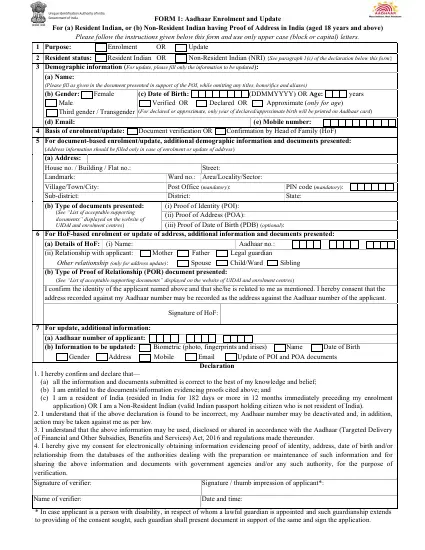
This form has no fillable fields, so it opens in our PDF editor with the Text tool ready: click where an answer goes and type. To download it, the filled PDF is sent to GuruPDF to prepare the file and is deleted from our servers one hour later. You can fill it in without an account; downloading the filled PDF needs a free account. A free account gets 15 credits a day, enough for one form a day.
- Country
- India
- Edition
- UIDAI Form 1 (English)
- Pages
- 2
- Fillable fields
- Type anywhere
- Last checked at the source
- November 13, 2026
GuruPDF is an independent PDF editor, not a government agency, and is not affiliated with any government. This page explains the form in plain words; it is not legal or tax advice. Always check the official instructions before you file.
Who uses Aadhaar Form 1
- Residents of India aged 18 or above enrolling for Aadhaar for the first time
- Non-Resident Indians (valid Indian passport holders) aged 18 or above who have proof of an address in India
- Aadhaar holders updating their name, date of birth, gender, address, mobile number, email, biometrics or POI and POA documents
- Adults whose address is recorded through the Head of Family (HoF), such as a parent, spouse or sibling with an Aadhaar
Before you start
- Original documents for proof of identity (POI) and proof of address (POA), and proof of date of birth if you have it, from UIDAI's list of acceptable documents
- For an NRI: a valid Indian passport, which is the only POI UIDAI accepts for NRIs, and an email address
- Your address with PIN code and post office, as on your POA document
- For an update: your Aadhaar number and the details that change
- For HoF-based enrolment or address update: the Head of Family's name and Aadhaar number, a proof of relationship document, and the HoF's signature on the form
How to fill out Aadhaar Form 1
Items 1 and 2: purpose and resident status
This flat form has no fields: you type each answer next to its printed label, and put a tick or an X in the box you choose. The form asks for upper-case (block or capital) letters. In item 1, choose either Enrolment or Update; in item 2, either Resident Indian or Non-Resident Indian (NRI). Choose only one in each.
Item 3: demographic information
For an update, fill in only what is to be updated. (a) Name: as on the document you present as proof of identity, leaving out titles such as Mr, Shri or Smt, honorifics such as Dr or Prof., qualifications and aliases. (b) Gender: Female, Male or Third gender / Transgender. (c) Date of birth as DDMMYYYY, or your age, and tick Verified (you present a proof of date of birth), Declared or Approximate; for declared or approximate, only the year of birth is printed on the Aadhaar card. (d) Email, which is mandatory for an NRI, and (e) mobile number, which is optional; no SMS is sent to a non-Indian number.
Items 4 and 5: basis of enrolment and documents
Item 4: choose Document verification or Confirmation by Head of Family (HoF). For document-based enrolment or update, item 5(a) is the address, filled in only when enrolling or updating the address: house, street, landmark, area, village or city, and the mandatory post office and PIN code. Village, sub-district, district and state are filled in automatically by the enrolment software from the PIN code, and the Aadhaar letter is sent by India Post to this address. Item 5(b) names the documents you present as POI, POA and, optionally, proof of date of birth.
Item 6: Head of Family (HoF) based enrolment or address update
Fill this in only when the Head of Family confirms your identity or address. Give the HoF's name and Aadhaar number, tick the relationship (mother, father or legal guardian; and for an address update also spouse, child or ward, or sibling), and name the proof of relationship document. The HoF must be 18 or older and signs the confirmation in this section, consenting to their Aadhaar address being recorded as yours.
Item 7: for an update
Enter your Aadhaar number in 7(a) and, in 7(b), tick everything that is to be updated: biometrics (photo, fingerprints and irises), name, date of birth, gender, address, mobile, email, or update of POI and POA documents.
Declaration and signatures
Read the declaration: it confirms the information and documents are correct, states whether you are a resident (in India for 182 days or more in the 12 months before applying) or an NRI, and gives consent for verification of your documents. After printing, the applicant signs or gives a thumb impression; the verifier at the centre fills in their name and signs, with the date and time. A lawfully appointed guardian of a person with disability signs on their behalf with supporting documents.
After you fill it out
Take the filled-in form and your original documents to an Aadhaar enrolment centre. The originals are checked, copied electronically and returned to you, the operator enters your details into the enrolment software and a verifier signs the form. The last part of the form lists which enrolment and update services are free and which carry a charge. UIDAI says its Aadhaar app also offers some updates, such as mobile number and address. Find enrolment centres, document lists and the other forms on UIDAI's website.
Signing: The applicant signs or gives a thumb impression on the paper form, the verifier at the enrolment centre signs it, and for HoF-based cases the Head of Family signs the confirmation in item 6. A lawful guardian signs for a person with disability.
Watch out for
- Original documents must be presented at the centre; they are returned after an electronic copy is made and checked.
- An NRI who has no proof of address in India uses Form 2, not Form 1, and a valid Indian passport is the only POI accepted for NRIs.
- If the declaration is found to be incorrect, the Aadhaar number may be deactivated and action may be taken under the law.
- The PIN code and post office are mandatory, and the Aadhaar letter is posted to the address you give.
Questions about Aadhaar Form 1
Can I submit Aadhaar Form 1 online?
No. The form is filled in and taken to an Aadhaar enrolment centre, where your original documents are verified and your details entered by the operator. Some updates, such as mobile number and address, are also available in UIDAI's Aadhaar app.
Which form should a child or a foreign national use?
Form 1 is only for residents and NRIs with an Indian address who are 18 or older. UIDAI publishes separate forms for children under 5 and from 5 to 18, for NRIs with proof of address outside India, and for resident foreign nationals.
What if I have no proof of date of birth?
You can give a declared date of birth or an approximate age instead, and tick Declared or Approximate in item 3(c). In that case only the year of birth is printed on the Aadhaar card.
What does Head of Family based enrolment mean?
If you cannot show your own documents, a family member aged 18 or above with an Aadhaar can confirm your identity and relationship (for enrolment: mother, father or legal guardian) or your address (for an address update, also spouse, child or ward, or sibling), with a proof of relationship document. They sign the confirmation in item 6.
Official information
Page text last reviewed November 13, 2026.