Income Tax Department (form published by Protean eGov Technologies, formerly NSDL e-Gov)
Fill out Form 93 (PAN application) online
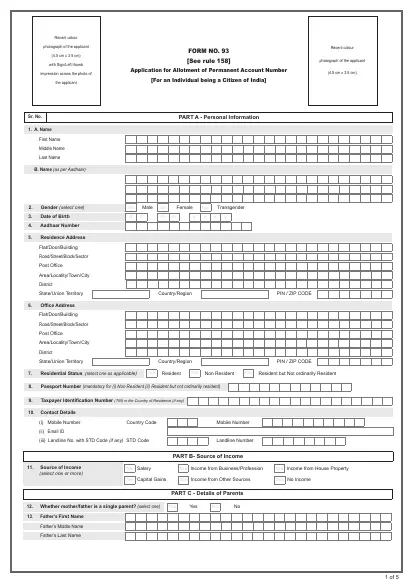
Application for Allotment of Permanent Account Number [For an Individual being a Citizen of India]
Form No. 93 is the application for a new Permanent Account Number (PAN) by an individual who is a citizen of India, including Indian citizens living abroad. It replaced Form 49A for individuals from 1 April 2026, under the Income-tax Rules, 2026 (companies and other Indian entities use Form No. 94). The form is published by Protean eGov Technologies (formerly NSDL e-Gov), which runs PAN services for the Income Tax Department alongside UTIITSL. The paper form is printed, two photographs are pasted on, the left one is signed across by hand, and it is handed in with proof of identity, address and date of birth.
This form has no fillable fields, so it opens in our PDF editor with the Text tool ready: click where an answer goes and type. To download it, the filled PDF is sent to GuruPDF to prepare the file and is deleted from our servers one hour later. You can fill it in without an account; downloading the filled PDF needs a free account. A free account gets 15 credits a day, enough for one form a day.
- Country
- India
- Edition
- Income-tax Rules, 2026 (from 1 April 2026)
- Pages
- 5
- Fillable fields
- Type anywhere
- Last checked at the source
- November 13, 2026
GuruPDF is an independent PDF editor, not a government agency, and is not affiliated with any government. This page explains the form in plain words; it is not legal or tax advice. Always check the official instructions before you file.
Who uses Form 93 (PAN application)
- Indian citizens applying for their first PAN
- Indian citizens living outside India (non-residents) who need a PAN
- Parents or guardians applying for a minor, as representative assessee
- Representative assessees applying for a person of unsound mind or other person covered by section 303
Before you start
- Two recent colour photographs, 4.5 cm x 3.5 cm, with a white background
- Your Aadhaar number and your name exactly as it appears on Aadhaar
- Proof of identity, proof of address and proof of date of birth (Protean lists the accepted documents)
- Your residence address and, if any, office address with PIN code
- Your mobile number with country code and your email ID (both mandatory)
- Your father's and mother's full names
- Your Assessing Officer (AO) code: area code, AO type, range code and AO number
- Passport number, if you are a non-resident or resident but not ordinarily resident
How to fill out Form 93 (PAN application)
Photographs and how to type the form
This flat form has no fields: you type each answer in its printed boxes. The guidelines ask for BLOCK LETTERS, in English only, with one character in each box and a blank box after each word, so type in capitals and line the characters up with the boxes. Page 1 has two boxes for recent colour photographs (4.5 cm x 3.5 cm, white background), which are pasted on after printing, never stapled or clipped. The guidelines say the applicant signs or puts a left thumb impression across the LEFT photo, so that part of the signature is on the photo and part on the form, while the RIGHT photo stays clean, with no mark. These are done by hand on the printed form.
Part A: personal information (items 1 to 10)
Item 1A is your full name split into first, middle and last name, with no titles (Shri, Smt, Dr) and no abbreviations; item 1B is your name exactly as on Aadhaar, which is the name printed on the PAN card. If Aadhaar shows initials, expand them in 1A, as the worked examples on page 4 show. Then tick your gender (item 2), enter your date of birth as DDMMYYYY (item 3) and your Aadhaar number (item 4). Item 5 is your residence address (mandatory) and item 6 your office address (optional, except for a sole proprietor). Tick your residential status in item 7; item 8, passport number, is mandatory for a non-resident or resident but not ordinarily resident; item 9 is your tax identification number abroad, if any; item 10 is your mobile number with country code, email ID and any landline with STD code.
Part B: source of income (item 11)
Tick at least one box: Salary, Income from Business/Profession, Income from House Property, Capital Gains, Income from Other Sources, or No Income. You may tick more than one.
Part C: details of parents (items 12 to 15)
Item 12 asks whether your mother or father is a single parent. The guidelines say both parents' details are required except in single-parent cases, and that a parent's death, divorce or separation does not make you a single-parent case. Give your father's name in item 13 (a married woman gives her father's name, not her husband's) and your mother's name in item 14, each as first, middle and last name. In item 15, tick whose name, father's or mother's, is printed on the PAN card.
Parts D and E: AO code and representative assessee (items 16 to 21)
Item 16 is the code of your jurisdictional Assessing Officer: area code, AO type, range code and AO number. The guidelines say these can be obtained from an Income Tax Office, the PAN centres managed by UTIITSL or Protean, or their websites. Part E is filled in only when a representative assessee applies, and is mandatory for a minor or a person of unsound mind: the RA's name, PAN (or Aadhaar if they have no PAN), address and contact details. Note 5 says a non-resident or resident but not ordinarily resident must give a representative assessee with an Indian address in Part E.
Parts F and G: communication address, documents and declaration (items 22 to 24)
In item 22, tick where the PAN card is sent: residence, representative assessee's or office address (an office address needs proof of office address). In items 23 and 24, tick the proofs you are enclosing: identity, address and date of birth for the applicant, and identity and address for a representative assessee; they go with the form as annexures A-1 to A-3. In the verification, type your name and capacity (Self or Representative Assessee), the place and the date, and your name and, if relevant, designation.
Signature or thumb impression (page 2)
After printing, the applicant or representative assessee signs or puts a left thumb impression inside the box on page 2, as well as across the left photograph on page 1. The guidelines say a thumb impression must be attested by a Magistrate, a Notary Public, an Oath Commissioner or a Gazetted Officer under official seal and stamp.
After you fill it out
Protean says a duly filled and signed Form 93 can be submitted, with the proofs, at any TIN Facilitation Centre or PAN centre it manages; UTIITSL also accepts PAN applications at its offices. The same application can also be made online on the Protean or UTIITSL portals, where you choose either to send the signed acknowledgement with photographs and documents by post, or to complete it paperless with Aadhaar e-KYC and e-Sign. The department also offers Instant e-PAN on its e-filing portal, a free paperless service for people with an Aadhaar number linked to a mobile number. Under the government's PAN 2.0 project, PAN services are to move onto a single portal of the Income Tax Department, so check the official pages for the routes open today. Fees and dispatch charges are listed on those pages.
Signing: The applicant (or representative assessee) signs or puts a left thumb impression twice by hand: across the left photograph on page 1 and inside the box on page 2. A thumb impression must be attested by a Magistrate, Notary Public, Oath Commissioner or Gazetted Officer under official seal and stamp. Paperless online applications are signed with Aadhaar e-Sign instead.
Watch out for
- Form 49A is no longer used: UTIITSL says the old forms (49A, 49AA and the old change request) are not accepted after 31 March 2026.
- Do not sign or mark the right-hand photograph; it must stay clear. Photographs are pasted, not stapled or clipped.
- The form is only for someone who has never been allotted a PAN. Protean says you can check on the Income Tax Department's website whether a PAN was already allotted to you.
- Aadhaar is mandatory for every applicant who has one, and the name as per Aadhaar is the name printed on the PAN card.
- Indian citizens use Form 93 even when living abroad; foreign citizens use Form 95.
Questions about Form 93 (PAN application)
Is Form 93 the new Form 49A?
Yes, for individuals. The department's transition FAQ says Form 49A was split into Form No. 93 (Indian citizens) and Form No. 94 (Indian companies and entities). New PAN applications made on or after 1 April 2026 use the new forms; applications pending on 31 March 2026 stay valid.
Can I apply for a PAN online instead?
Yes. The Income Tax Department lists online applications through the Protean portal and through UTIITSL, and Instant e-PAN on the e-filing portal, which is free and paperless for anyone with an Aadhaar linked to an active mobile number. Instant e-PAN issues an e-PAN, which the department says is a valid form of PAN.
Where do I get my AO code?
The guidelines on the form say the Area Code, AO Type, Range Code and AO Number can be obtained from an Income Tax Office, the PAN centres managed by UTIITSL or Protean, or the UTIITSL and Protean websites.
Can I give only my mother's name?
Only if your mother is a single parent. Protean's FAQ says you then tick the single-parent box, give only your mother's name and tick the box to print the mother's name on the card. In other cases both parents' details are required, and you may still choose to print your mother's name in item 15.
I am an Indian citizen living abroad. Which form do I use?
Form 93. Protean says Indian citizens located outside India should also use it. Item 8 (passport number) is mandatory for a non-resident, and Note 5 asks for a representative assessee with an Indian address in Part E.
Official information
- Apply for PAN (Income Tax Department)
- PAN services: apply online, guidelines and documents (Protean)
- Steps for online PAN application, Form 93 (Protean)
- Instant e-PAN (e-filing portal)
- PAN services (UTIITSL)
Page text last reviewed November 13, 2026.
Related forms
- Form 95 (PAN for foreign citizens)Application for Allotment of Permanent Account Number [For an Individual not being a Citizen of India]Income Tax DepartmentType anywhere
- PAN CR-01 formRequest For Changes Or Correction in PAN Data [For an Individual]Income Tax DepartmentType anywhere
- Form 97Form for declaration to be filed by any person (other than a company or firm) or a foreign company covered by sub-rule (2) to rule 159, who does not have a permanent account number and who enters into any transaction specified in rule 159Income Tax DepartmentType anywhere
- Aadhaar Form 1FORM 1: Aadhaar Enrolment and Update – For (a) Resident Indian, or (b) Non-Resident Indian having Proof of Address in India (aged 18 years and above)UIDAIType anywhere