Ministry of Road Transport and Highways, Government of India
Fill out Form 2 online
Form of application for learner's licence or driving licence or addition of a new class of vehicle or renewal of driving licence or change of address or name
Form 2 under the Central Motor Vehicles Rules, 1989 is the application to the Licensing Authority (the RTO) for a new learner's licence or driving licence, adding a class of vehicle, renewal, a duplicate licence, or changing the address or name on a licence. It also carries the applicant's self-declaration of physical fitness, a consent declaration by the parent or guardian of a minor, and an annexure listing the documents to attach. Applications can also be made online on Sarathi, Parivahan's licence portal, which lets you print the pre-filled application form; the blank form is published on Parivahan's list of downloadable forms. It is a flat form: answers are typed beside the printed labels, then it is printed and signed.
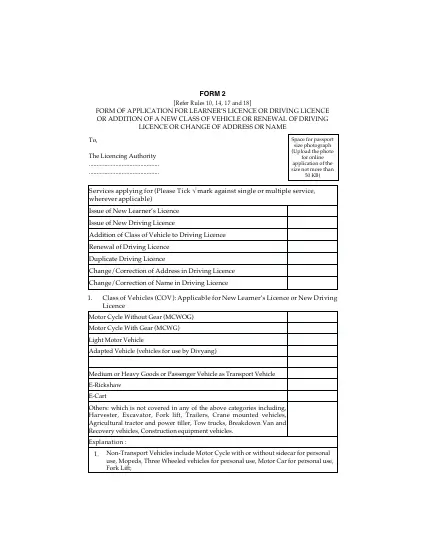
This form has no fillable fields, so it opens in our PDF editor with the Text tool ready: click where an answer goes and type. To download it, the filled PDF is sent to GuruPDF to prepare the file and is deleted from our servers one hour later. You can fill it in without an account; downloading the filled PDF needs a free account. A free account gets 15 credits a day, enough for one form a day.
- Country
- India
- Pages
- 6
- Fillable fields
- Type anywhere
- Last checked at the source
- November 13, 2026
GuruPDF is an independent PDF editor, not a government agency, and is not affiliated with any government. This page explains the form in plain words; it is not legal or tax advice. Always check the official instructions before you file.
Who uses Form 2
- People applying for their first learner's licence or driving licence
- Licence holders adding a class of vehicle, such as a transport vehicle
- Licence holders renewing, or asking for a duplicate of a lost or damaged licence
- Licence holders changing or correcting the address or name on their licence
- Parents or guardians consenting to a minor's learner's licence
Before you start
- A passport-size photograph
- Your Aadhaar number, or Aadhaar application number if you have applied
- Proof of address and age from the annexure list (for example Aadhaar, passport, electoral roll, school or birth certificate)
- Your existing learner's or driving licence number, class of vehicle and validity, if you have one
- Form 1A medical certificate if you are renewing above 40 or applying for a transport licence
- Driving school details and certificate (Form 5), if you are adding a transport vehicle class
- For a change of name: the existing name, the new name and the supporting documents listed in the annexure
How to fill out Form 2
To the Licensing Authority, and services applied for
This flat form has no fields, so you type each answer beside its printed label. Type the name and place of the Licensing Authority (your RTO) on the two dotted lines at the top and paste a photograph in the box. Then tick the services you want: new learner's licence, new driving licence, addition of class of vehicle, renewal, duplicate driving licence, or change or correction of address or of name. You can tick more than one.
Item 1: class of vehicle
For a new learner's or driving licence, tick each class of vehicle (COV): motor cycle without gear (MCWOG), motor cycle with gear (MCWG), light motor vehicle, adapted vehicle for use by Divyang, medium or heavy goods or passenger vehicle as transport vehicle, e-rickshaw, e-cart, or others such as tractors, cranes and construction equipment vehicles. The explanation under the list defines non-transport, transport, light, medium and heavy vehicles.
Items 2 and 3: personal details
Item 2 is in capital letters: your Aadhaar number (or Aadhaar application number), first, middle and last name, son/wife/daughter of, date of birth (dd/mm/yyyy), identification mark, gender, educational qualification, blood group, mobile number, and optionally email and landline. In item 3, tick father, mother, husband or guardian and give that person's first, middle and last name.
Item 4: address
Give your present address, which is printed on the licence, and your permanent address only if it is different: house or flat number, street or locality and police station, landmark, village or town, sub-district, taluk or mandal, district, state and PIN code. Proof of address must be enclosed for a new learner's or driving licence and for a change of address.
Items 5 to 7: driving school, existing licence, documents
Item 5 is only for adding a class of vehicle in the transport category: the driving school's name, your enrolment number and date, the certificate number and date, and the training period. Item 6 is your existing learner's or permanent licence: number, class of vehicles, issuing authority and validity. In item 7, list or tick the documents you attach, using the annexure at the end of the form.
Declaration and self-declaration of physical fitness
Answer YES or NO to organ or tissue donation, and keep have or have not in the sentence about being disqualified from holding a driving licence. Then answer the physical fitness questions (a) to (f) Yes or No: epilepsy or sudden loss of consciousness, eyesight at 25 metres, loss of a hand or foot or weak limbs, night blindness, deafness, and any other disease or disability. Note 1 asks you to give full particulars where an answer points to a condition. Date the declaration; the applicant's signature or thumb impression is added by hand.
Parent or guardian declaration (minors only)
If the applicant is a minor, the parent or guardian completes the declaration under section 7(2) of the Motor Vehicles Act, 1988: the minor's name, son or daughter of, the parent's or guardian's name and relationship. It accepts responsibility for the minor's driving and gives consent to the learner's licence. Leave the For office use only section blank: the licensing authority records exemptions, the preliminary and driving test results and whether the licence is issued or refused.
After you fill it out
Parivahan's FAQ describes the online route: on Sarathi, choose your state, apply for the learner's licence, new driving licence or services on an existing licence (renewal, duplicate, change of address, addition of class), upload the documents, pay the fees, and visit the RTO on the scheduled date with your original documents and the fee slip. The FAQ says e-signed documents are generated after the application (Form 2) is submitted, and that whether you must also print the form is a matter of state policy, so check with your state transport department or RTO before using a paper Form 2. A printed form is signed by hand by the applicant and, for a minor, by the parent or guardian.
Signing: For an application made on Sarathi, Parivahan's FAQ says e-signed documents are generated after the application (Form 2) is submitted. On a printed form the applicant signs the declaration and the physical fitness declaration (signature or thumb impression), and the parent or guardian signs the minor's consent; the licensing authority signs the office section.
Watch out for
- Proof of address must be enclosed for a new learner's or driving licence and for a change of address (item 4).
- A Form 1A medical certificate is required for renewal above 40 years of age and for a transport licence, per the annexure.
- Parivahan's learner's licence page says an applicant under 18 can be granted a learner's licence only for a motor cycle without gear, and only with the written consent of the person who has their care (the declaration on page 4).
- The declaration says the facts and documents are true; give full particulars of any medical condition the fitness questions point to (Note 1).
- A lost or damaged licence needs a copy of the police complaint, per item 9 of the annexure.
Questions about Form 2
Can I apply for a driving licence online?
Yes. Parivahan's FAQ walks through applying on Sarathi (sarathi.parivahan.gov.in): select your state, choose the service, fill in the application, upload documents, then visit the RTO on the scheduled date with originals and the fee slip. Services depend on what each state has set up.
Is Form 2 still used if I apply online?
Parivahan's FAQ says e-signed documents are generated after the application (Form 2) is submitted on Sarathi, and that printing the form after applying online is a matter of state policy. The blank form remains on Parivahan's list of downloadable forms.
When can I apply for a permanent driving licence after the learner's licence?
Parivahan's FAQ says a learner's licence is valid for six months and you can apply for a new driving licence after 30 days, while the learner's licence is still valid.
Do I need a medical certificate with Form 2?
Form 2 includes your own self-declaration of physical fitness. A Form 1A medical certificate from a registered medical practitioner is also needed if you are 40 or older (Parivahan's FAQ) or are applying for a transport licence (the annexure).
Can one Form 2 cover several services?
Yes. The form asks you to tick single or multiple services, for example renewal together with a change of address.
Official information
- Sarathi: driving licence services by state
- Downloadable forms (Parivahan, MoRTH)
- Licence and registration FAQ (Parivahan)
- Learner's licence (Parivahan)
Page text last reviewed November 13, 2026.