Department of Posts, Ministry of Communications
Fill out SB-7 form online
SB-7 Withdrawal Form
SB-7 is India Post's withdrawal form. The account holder (or guardian) uses it to take money or interest out of a Post Office account: the form lists Savings (SB), Time Deposit (TD), Monthly Income Scheme (MIS), Senior Citizens Savings Scheme (SCSS) and NSS accounts. The left side, the application, is filled in by the depositor; the right side is a payment order for office use with an acquittance that the depositor or their messenger signs on receiving the money. It is a flat form: answers are typed beside the printed labels, then it is printed, signed and handed in at the post office with the passbook.
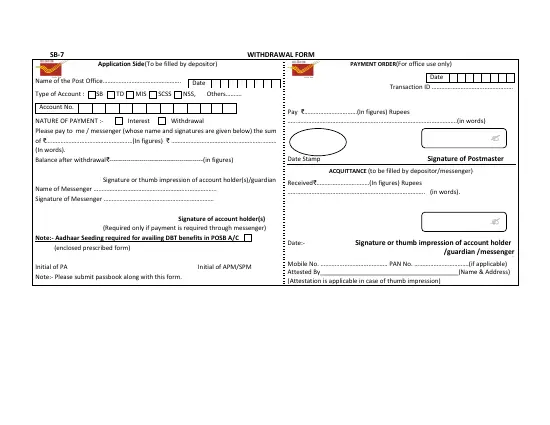
This form has no fillable fields, so it opens in our PDF editor with the Text tool ready: click where an answer goes and type. To download it, the filled PDF is sent to GuruPDF to prepare the file and is deleted from our servers one hour later. You can fill it in without an account; downloading the filled PDF needs a free account. A free account gets 15 credits a day, enough for one form a day.
- Country
- India
- Pages
- 1
- Fillable fields
- Type anywhere
- Last checked at the source
- November 13, 2026
GuruPDF is an independent PDF editor, not a government agency, and is not affiliated with any government. This page explains the form in plain words; it is not legal or tax advice. Always check the official instructions before you file.
Who uses SB-7 form
- Post Office savings account holders withdrawing cash
- TD, MIS, SCSS and NSS account holders drawing interest or making a withdrawal
- Guardians operating an account for a minor
- Account holders sending a messenger to collect the payment
Before you start
- Your passbook, which must be submitted with the form
- The name of your post office and your account number
- The amount you want, in figures and in words
- Your mobile number, and PAN if applicable
- If someone else will collect the money: that messenger's name and signature
- If you sign with a thumb impression: a person to attest it with their name and address
How to fill out SB-7 form
Application side: account details
This flat form has no fields, so you type each answer beside its printed label. On the left, under Application Side (to be filled by depositor), type the name of the post office and the date (DD MM YYYY). Tick the type of account: SB, TD, MIS, SCSS, NSS or Others (write which), and type the account number.
Nature of payment and amount
Tick Interest or Withdrawal. In the sentence Please pay to me / messenger, type the amount in figures and in words, then the balance after withdrawal in figures. Your signature or thumb impression as account holder(s) or guardian goes below, by hand after printing.
Messenger (only if someone collects for you)
Fill this only if the payment is to be made through a messenger: type the messenger's name. The messenger signs on the line Signature of Messenger, and the account holder(s) sign again below, as the form says this is required only for payment through a messenger.
Acquittance, mobile number and PAN
On the right, leave the Payment Order (for office use only) blank. Under Acquittance (to be filled by depositor/messenger), type the amount received in figures and in words and the date; the account holder, guardian or messenger signs or puts a thumb impression when receiving the money. Add your mobile number and PAN (if applicable). Attested By (name and address) is filled only when a thumb impression is used.
After you fill it out
Print the form, sign it (or use a thumb impression, attested as the form says) and hand it in at your post office together with your passbook, as the note at the bottom requires. The post office fills in the payment order, the postmaster signs and stamps it, and the money is paid to you or your messenger, who signs the acquittance on receipt. India Post publishes separate forms for withdrawals or loans from RD, PPF and SSA accounts and for closing an account; they are on its forms page.
Signing: The account holder(s) or guardian sign or put a thumb impression by hand on the application side and the acquittance; a thumb impression must be attested by a person who gives their name and address. A messenger signs where shown, and the account holder signs again for payment through a messenger.
Watch out for
- Submit your passbook along with the form, as its note says.
- A thumb impression must be attested: the attesting person writes their name and address under Attested By.
- Payment through a messenger needs the messenger's name and signature and the account holder's signature in that box.
- The form notes that Aadhaar seeding is required for DBT benefits in a Post Office savings account, with the prescribed form enclosed.
Questions about SB-7 form
Can I use SB-7 to withdraw from my PPF or Sukanya account?
The account types printed on SB-7 are SB, TD, MIS, SCSS, NSS and Others. India Post's forms page lists a separate Application Form for Loan/Withdrawal from RD/PPF and SSA Accounts, and separate forms for closing an account on maturity or before it.
Can someone else collect the money for me?
Yes, through a messenger: you name the messenger on the form, the messenger signs, and you sign in the box for payment through a messenger. The messenger also signs the acquittance on receiving the money.
Do I need my passbook?
Yes. The note at the bottom of the form says to submit the passbook along with it.
What if I cannot sign?
You can give a thumb impression. The form says attestation is needed in that case: the person attesting fills in their name and address under Attested By.
Official information
Page text last reviewed November 13, 2026.