Inland Revenue (Te Tari Taake)
Fill out IR330 form online
Tax code declaration
The IR330 Tax code declaration is the form New Zealand employees use to tell their employer, or Work and Income, which tax code to apply to their salary, wages, main benefit or NZ Superannuation. The tax code decides how much PAYE tax, and any student loan repayment, is deducted from each payment. You fill in a separate IR330 for each source of income and choose one tax code for it, using the flowcharts on pages 2 and 3. The completed form goes to your employer or Work and Income, not to Inland Revenue.
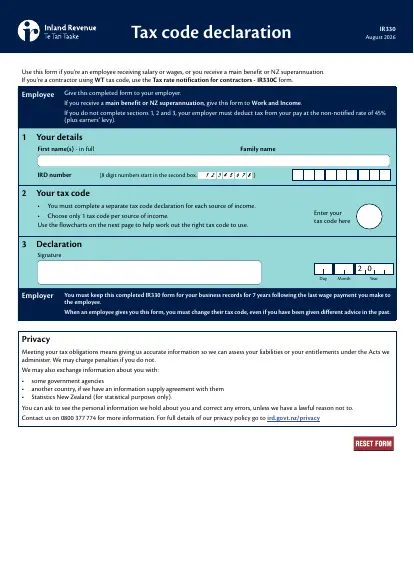
The form opens in our PDF editor with its own fields ready to type into. To download it, the filled PDF is sent to GuruPDF to prepare the file and is deleted from our servers one hour later. You can fill it in without an account; downloading the filled PDF needs a free account. A free account gets 15 credits a day, enough for one form a day.
- Country
- New Zealand
- Edition
- August 2026
- Pages
- 4
- Fillable fields
- 17
- Last checked at the source
- November 13, 2026
GuruPDF is an independent PDF editor, not a government agency, and is not affiliated with any government. This page explains the form in plain words; it is not legal or tax advice. Always check the official instructions before you file.
Who uses IR330 form
- Employees starting a new job in New Zealand
- People with a second or further job, who need a secondary tax code for it
- People receiving a main benefit, NZ Superannuation or Veteran's Pension, who give the form to Work and Income
- Employees whose circumstances changed, for example taking out or paying off a student loan
- Casual agricultural workers, election day workers and recognised seasonal workers, who have their own codes
Before you start
- Your IRD number
- Whether this job is your main or highest source of income, or a secondary job
- An estimate of your annual income from all sources for the tax year (1 April to 31 March), to work through the flowcharts
- Whether you have a New Zealand student loan
- Whether you or your partner receive Working for Families, or you receive NZ Super, Veteran's Pension or an overseas equivalent
- Your tailored tax code certificate, if Inland Revenue gave you one
How to fill out IR330 form
Section 1: Your details
Enter your first name or names in full, your family name and your IRD number. The form notes that an 8-digit IRD number starts in the second box.
Work out your tax code: main or highest source of income (page 2)
Follow the flowchart for your main or highest income from salary or wages. A main benefit from Work and Income uses M. For your main job, the answer depends on whether you are a New Zealand tax resident, whether your annual net income falls within the band printed on the form, whether you or your partner receive Working for Families or you receive NZ Super, Veteran's Pension or an overseas equivalent, and whether you have a student loan. This leads to M, M SL, ME or ME SL. Notes 1 to 5 on page 4 explain the terms.
Work out your tax code: secondary income and other codes (page 3)
If you have more than one job, use the secondary flowchart for every job except your main one. It leads to SB, S, SH, ST or SA based on your expected annual PAYE income band, with SL added if you have a student loan. Other codes apply to particular work: CAE for casual agricultural workers, shearers and shed-hands, EDW for election day workers, NSW for recognised seasonal workers, and STC if you hold a tailored tax code certificate (show the certificate to your employer).
Section 2: Your tax code
Write the one tax code you chose in the box. Use only one code per source of income, and complete a separate IR330 for each job or payment.
Section 3: Declaration
Sign the form and enter the date (day, month and the last two digits of the year after the printed '20').
After you fill it out
Give the completed form to your employer if you receive salary or wages. Give it to Work and Income if you receive a main benefit, NZ Superannuation, Veteran's Pension or a student allowance; people on NZ Super can also update their tax code on the Ministry of Social Development's website. Do not send it to Inland Revenue. Your employer must use the code you give, even if they were advised differently before, and keeps the form for 7 years after your last wage payment. Tell your employer or payer if your tax code changes.
Signing: You sign and date Section 3, the declaration. Inland Revenue's form and guidance do not say whether a typed or electronic signature is accepted, so ask your employer or Work and Income how they want to receive it.
Watch out for
- If you do not complete sections 1, 2 and 3, your employer must deduct tax at the non-notified rate of 45% (plus the earners' levy).
- Choose only one tax code per source of income, and use a secondary code for every job except your main one.
- If you or your partner receive Working for Families, or you receive a main benefit, NZ Super, Veteran's Pension or an overseas equivalent, you cannot use ME or ME SL.
- Your tax code may need to change during the year, for example when you take out or pay off a student loan or your second-job income changes.
- Contractors on the WT tax code use the IR330C Tax rate notification for contractors, not the IR330.
Questions about IR330 form
Do I send the IR330 to Inland Revenue?
No. Give it to your employer, or to Work and Income if the income is a benefit, NZ Super, Veteran's Pension or a student allowance.
What happens if I don't give my employer an IR330?
The form says that if sections 1, 2 and 3 are not completed, your employer must deduct tax at the non-notified rate of 45%, plus the earners' levy.
I have two jobs. Which tax code do I use?
Use your main code (such as M or M SL) for your main or highest-paying job, and a secondary code (SB, S, SH, ST or SA, with SL if you have a student loan) for each other job, completing a separate IR330 for each. If the standard codes would mean paying too much or too little tax, you can apply to Inland Revenue for a tailored tax code.
What is the difference between M and ME?
ME applies to your main income if you are a New Zealand tax resident with annual net income in the band printed on the form, and neither you nor your partner receive Working for Families nor you receive NZ Super, Veteran's Pension or an overseas equivalent. Otherwise the main code is M. Add SL to either if you have a student loan.
What if I picked the wrong tax code?
Fill in a new IR330 with the right code and give it to your employer or payer. Inland Revenue says you need to tell your employer or payer whenever your tax code changes.
Official information
- Complete my tax code declaration (Inland Revenue)
- About tax codes (Inland Revenue)
- Changing your tax code for NZ Super and Veteran's Pension (Work and Income)
Page text last reviewed November 13, 2026.