Australian Taxation Office
Fill out Super choice form online
Superannuation standard choice form
The Superannuation standard choice form (NAT 13080) is how an employee in Australia tells their employer which super fund to pay their super contributions into: an existing fund, the employer's default fund, or the employee's own self-managed super fund (SMSF). Employers also use it to tell employees about their default fund, which they must fill in before handing the form over. The completed form goes to the employer, who keeps it; it is not sent to the Australian Taxation Office (ATO).
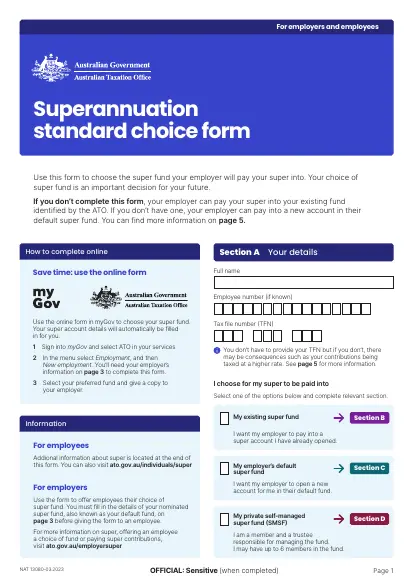
The form opens in our PDF editor with its own fields ready to type into. To download it, the filled PDF is sent to GuruPDF to prepare the file and is deleted from our servers one hour later. You can fill it in without an account; downloading the filled PDF needs a free account. A free account gets 15 credits a day, enough for one form a day.
- Country
- Australia
- Edition
- NAT 13080-03.2023
- Pages
- 5
- Fillable fields
- 35
- Last checked at the source
- November 13, 2026
GuruPDF is an independent PDF editor, not a government agency, and is not affiliated with any government. This page explains the form in plain words; it is not legal or tax advice. Always check the official instructions before you file.
Who uses Super choice form
- New employees choosing the super fund their employer will pay into
- Existing employees who want to change the fund their employer pays into
- Employers offering eligible employees a choice of fund, or telling them about a change of default fund
- Members and trustees of a self-managed super fund who want their employer to pay into it
Before you start
- Your full name, your employee number (if you know it) and, if you choose to give it, your tax file number (TFN)
- For an existing fund: the fund's name, ABN and unique superannuation identifier (USI), your member account number and the name on your account
- For an existing fund: the fund's letter of compliance, usually on its website
- For the employer's default fund: Section C already completed by your employer
- For an SMSF: its name, ABN, electronic service address (ESA), bank account name, BSB and account number, and evidence from the ATO that it is a regulated SMSF (from superfundlookup.gov.au)
How to fill out Super choice form
Section A: Your details
Enter your full name, your employee number if known, and your tax file number. You do not have to give your TFN, but the form warns that without it your contributions may be taxed at a higher rate and you will not be able to make personal contributions to your fund. Then tick one option under 'I choose for my super to be paid into': My existing super fund (go to Section B), My employer's default super fund (Section C) or My private self-managed super fund (Section D).
Section B: My existing super fund
Give the super fund name, its Australian business number (ABN), its unique superannuation identifier (USI), your member account number and your name exactly as it appears on the account. The USI identifies the fund product and is different from your member number. Attach the fund's letter of compliance, tick the box to say you have, then sign and date the declaration.
Section C: My employer's default super fund
Your employer completes the top part before giving you the form: business name and ABN, and the default fund's name, ABN and USI. If those details are missing, ask your employer to fill them in. Tick 'I choose for my employer to open a new account for me with their default super fund', then sign and date.
Section D: My private self-managed super fund (SMSF)
Give the SMSF's name, ABN and electronic service address (ESA), which lets your employer send contributions and messages through SuperStream. Enter your full name as it appears on your account and the SMSF's bank account name, six-digit BSB and account number. Attach evidence from the ATO that it is a regulated SMSF, tick the box, then sign and date the declaration.
Return the form to your employer
Complete only the one section that matches your choice; each section ends the form. Give it to your employer as soon as possible, so your super is paid into the fund you chose.
After you fill it out
Give the completed form to your employer. Do not send it to the ATO: the ATO says employers must keep completed choice forms for 5 years. If a new employee does not choose a fund, the employer generally requests the employee's stapled super fund details from the ATO, and pays into the employer's default fund only if no stapled fund exists. Instead of the paper form, employees can complete a pre-filled version in ATO online services through myGov (Employment, then New employment) and then print the completed summary and give it to their employer, or use their employer's payroll software where available.
Signing: The employee signs and dates the declaration at the end of whichever section they completed (B, C or D). The ATO does not say on the form whether an electronic signature is accepted, so ask your employer how they want to receive it.
Watch out for
- Your employer must fill in its default fund details in Section C before giving you the form.
- The name you give must match the name on your super account, which may be a previous name.
- For an existing fund you must attach the fund's letter of compliance; for an SMSF, evidence that it is an ATO-regulated fund.
- Employers cannot recommend a fund or influence your choice; only advisers licensed by ASIC can give financial advice.
- Not giving your TFN is not an offence, but your contributions may be taxed at a higher rate.
Questions about Super choice form
What happens if I don't fill in the super choice form?
If you started your job on or after 1 November 2021, your employer can pay into your existing 'stapled' super fund identified by the ATO; if you have more than one, the ATO chooses one, which may not be the one you prefer. If there is no stapled fund, or you started before 1 November 2021, your employer pays into its default fund.
Do I send the form to the ATO?
No. Give it to your employer. The ATO does not collect this form, and employers keep completed forms for 5 years.
Where do I find my fund's USI and letter of compliance?
Your fund's USI is on its website or available from the fund. Most funds publish their letter of compliance on their website; otherwise contact the fund. You can also see your super account details in ATO online services through myGov.
Can I fill in the super choice form online?
Yes. In ATO online services through myGov, choose Employment, then New employment, and complete the Super details; your existing fund details are pre-filled. You will need your employer's ABN and their default fund's USI. The ATO says you then print the completed summary and give it to your employer; do not send it to the ATO.
Can I type into the PDF form?
Yes. The ATO says you can enter the data electronically or print the form and complete it by hand. Some fields may only work with all features and JavaScript enabled in your PDF reader.
Official information
- Superannuation standard choice form (ATO)
- Offer employees a choice of super fund (ATO)
- Stapled super funds for employers (ATO)
- Choosing a super fund (ATO)
Page text last reviewed November 13, 2026.