Inland Revenue (Te Tari Taake)
Fill out KS2 form online
KiwiSaver deduction form
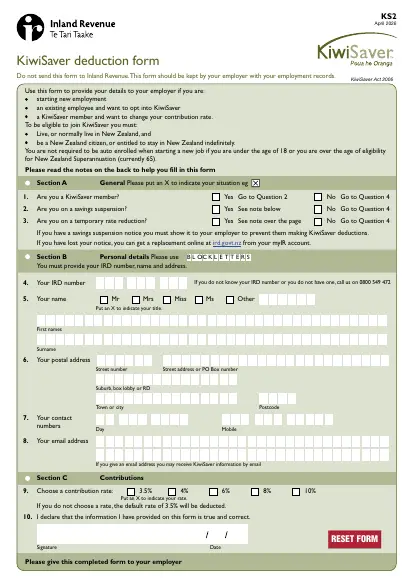
The KS2 KiwiSaver deduction form is how a New Zealand employee gives their employer the details needed for KiwiSaver deductions from their pay. You use it when you start a new job, when you are an existing employee who wants to opt into KiwiSaver, or when you are a member who wants to change your contribution rate. It asks whether you are already a member, your IRD number, name, address and contact details, and the contribution rate you choose. The completed form goes to your employer, who keeps it with their records; it is not sent to Inland Revenue.
The form opens in our PDF editor with its own fields ready to type into. To download it, the filled PDF is sent to GuruPDF to prepare the file and is deleted from our servers one hour later. You can fill it in without an account; downloading the filled PDF needs a free account. A free account gets 15 credits a day, enough for one form a day.
- Country
- New Zealand
- Edition
- April 2026
- Pages
- 2
- Fillable fields
- 38
- Last checked at the source
- November 13, 2026
GuruPDF is an independent PDF editor, not a government agency, and is not affiliated with any government. This page explains the form in plain words; it is not legal or tax advice. Always check the official instructions before you file.
Who uses KS2 form
- Employees starting a new job, whether or not they are already KiwiSaver members
- Existing employees who are not members and want to opt into KiwiSaver through their employer
- KiwiSaver members who want to change their contribution rate
- New employees aged 65 or over who want to join KiwiSaver through their employer
Before you start
- Your IRD number
- Whether you are already a KiwiSaver member
- Your savings suspension notice or temporary rate reduction letter from Inland Revenue, if you have one
- Your postal address, daytime and mobile phone numbers, and an email address if you want KiwiSaver information by email
- The contribution rate you want: 3.5%, 4%, 6%, 8% or 10% of your pay
How to fill out KS2 form
Section A: General (questions 1 to 3)
Put an X in the box that fits your situation. Question 1 asks whether you are a KiwiSaver member; if not, go to question 4. Question 2 asks whether you are on a savings suspension, and question 3 whether you are on a temporary rate reduction. If you have a savings suspension notice, show it to your employer so they do not make deductions; if you have a temporary rate reduction, show them Inland Revenue's confirmation letter so they deduct at the reduced rate (the form's notes give it as 3%).
Section B: Personal details (questions 4 to 8)
Write in block letters. Enter your IRD number (question 4), your title, first names and surname (question 5), your postal address with street or PO Box, suburb, town or city and postcode (question 6), your daytime and mobile numbers (question 7) and, optionally, your email address (question 8). The form says your IRD number, name and address are required.
Section C: Contributions (question 9)
Put an X next to the contribution rate you choose: 3.5%, 4%, 6%, 8% or 10%. The rate is deducted from each payment of your salary or wages. If you leave it blank, the default rate of 3.5% is deducted. To contribute more than 10%, you pay extra directly to your scheme provider.
Declaration (question 10)
Sign and date the declaration that the information on the form is true and correct, then give the form to your employer. If you are only changing your contribution rate, the notes say to complete sections B and C.
After you fill it out
Give the completed form to your employer; do not send it to Inland Revenue. Your employer decides whether you are eligible, uses it to complete Inland Revenue's New employee and KiwiSaver details form (IR346K) if you are being automatically enrolled or are opting in, and keeps the KS2 with their records for 7 years after your last pay. Inland Revenue recommends asking your new employer to confirm they received it. A new contribution rate applies from the next pay your employer calculates after they are notified. You can also change your rate in myIR or through your KiwiSaver provider instead.
Signing: You sign and date the declaration at question 10. Inland Revenue says written notice to your employer can be an email or letter or a completed KS2, but does not say whether a typed or electronic signature on the KS2 is accepted, so ask your employer how they want to receive it.
Watch out for
- If you choose to opt in as an existing employee or as a new employee aged 65 or over, the form says you cannot opt out afterwards.
- You can change your contribution rate only once every 3 months, unless your employer agrees to a shorter timeframe.
- People under 18 cannot join KiwiSaver through their employer; they join through a scheme provider.
- To join KiwiSaver you must live or normally live in New Zealand and be a New Zealand citizen or entitled to stay indefinitely; Inland Revenue says people on temporary, visitor, work or student visas cannot join.
- Contractors, self-employed people and people not working cannot use payroll deductions; their contributions are arranged with their KiwiSaver provider.
Questions about KS2 form
Do I send the KS2 to Inland Revenue?
No. Give it to your employer, who keeps it with their employment records. Inland Revenue is told through the employer's own KiwiSaver reporting.
What happens if I don't choose a contribution rate?
The form says the default rate of 3.5% of your pay will be deducted.
I'm already a KiwiSaver member and starting a new job. Do I need a KS2?
Your employer should start deductions anyway unless you show them a savings suspension notice. Inland Revenue still recommends giving your new employer a KS2 and asking them to confirm they received it, so deductions start correctly.
Can I opt out of KiwiSaver with this form?
No. Opting out is a separate process with Inland Revenue for people automatically enrolled by their employer. It is normally possible only on or after day 14 and on or before day 56 of starting the job; Inland Revenue may accept a late opt-out only in specific cases listed on its opting-out page. The KS2 is only for giving your details, opting in or changing your rate.
Can I change my rate without a KS2?
Yes. Inland Revenue says you can give your employer written notice by email or letter, change the rate in myIR, or ask your KiwiSaver provider. If you use myIR or your provider, Inland Revenue tells your employer.
Official information
- Change my KiwiSaver contribution rate (Inland Revenue)
- KiwiSaver employee contributions (Inland Revenue)
- Joining KiwiSaver (Inland Revenue)
Page text last reviewed November 13, 2026.