Immigration, Refugees and Citizenship Canada
Fill out IMM 1283 online
Financial Evaluation
Form IMM 1283, Financial Evaluation, is used by a Canadian citizen or permanent resident who sponsors a family member and must show they meet the minimum necessary income. It counts the people the sponsor already supports or has sponsored, compares the result with Immigration, Refugees and Citizenship Canada's (IRCC) low income cut-off table, and works out the sponsor's available income, and a co-signing spouse's or common-law partner's, from the Canada Revenue Agency Notice of Assessment or from the last 12 months. It is submitted with the sponsorship application when the guide or document checklist asks for it. Sponsors of parents and grandparents use a different form, IMM 5768, and sponsors living in Quebec do not complete IMM 1283.
The form opens in our PDF editor with its own fields ready to type into. To download it, the filled PDF is sent to GuruPDF to prepare the file and is deleted from our servers one hour later. You can fill it in without an account; downloading the filled PDF needs a free account. A free account gets 15 credits a day, enough for one form a day.
- Country
- Canada
- Edition
- June 2020
- Pages
- 7
- Fillable fields
- 287
- Last checked at the source
- November 13, 2026
GuruPDF is an independent PDF editor, not a government agency, and is not affiliated with any government. This page explains the form in plain words; it is not legal or tax advice. Always check the official instructions before you file.
Who uses IMM 1283
- Sponsors of an orphaned brother, sister, nephew, niece or grandchild, or in limited cases one other relative, whose guide lists IMM 1283
- Sponsors of a spouse or partner whose dependent child has a dependent child of their own, or of a dependent child who has a child of their own, when the minimum necessary income applies
- Sponsors of an adopted child who has children of their own
- A spouse or common-law partner who co-signs the sponsorship undertaking to help meet the income requirement
Before you start
- Your most recent Canada Revenue Agency Notice of Assessment (and your co-signer's, if you have one); CRA My Account can show it
- Pay stubs, statements of business activities, bank or investment statements and pension statements for the 12 months before your application, if you have no Notice of Assessment or its income is too low
- Names and dates of birth of everyone included in earlier sponsorship undertakings you or your co-signer signed or co-signed that are still in effect or not yet in effect
- The number of people in box 3 of the Generic Application Form for Canada (IMM 0008) of the current application
- Details of every family member who depends on you financially, whether they live with you or not
- IRCC's current low income cut-off table, on the form's instructions page
How to fill out IMM 1283
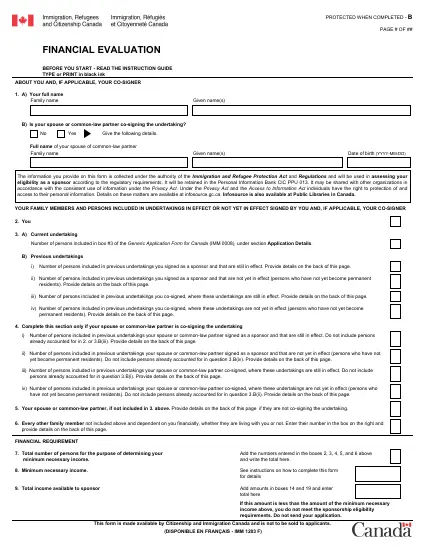
1: About you and your co-signer
In 1.A enter your family name and given names. In 1.B tick whether your spouse or common-law partner is co-signing the undertaking and, if Yes, give their name and date of birth. IRCC's instructions say a co-signer must meet the same eligibility requirements as the sponsor and is equally liable, and that a co-signer is not allowed when you sponsor a spouse, common-law or conjugal partner.
2 to 6: People counted for the income test
Box 2 already counts you. In 3.A enter the number of people in box 3 of the IMM 0008 for the current application, and in 3.B(i) to (iv) the people in your earlier undertakings, as sponsor or co-signer, that are still in effect or not yet in effect. Question 4 is only for a co-signer's own earlier undertakings, question 5 is your spouse or partner if not already counted, and question 6 is every other family member who depends on you financially. Page 2 has a table where you list each person counted in 3.B, 4, 5 and 6 with name and date of birth.
7 to 9: Financial requirement
In box 7 add boxes 2 to 6. In box 8 enter the minimum necessary income for that number of people from IRCC's low income cut-off table on the form's instructions page. Box 9 is the total of boxes 14 and 19, filled in after the income pages. The form says that if box 9 is less than box 8 you do not meet the sponsorship requirements and should not send the application.
10 and 11: Your situation over the last 12 months
In 10 tick Unemployed, Employed or Self-employed for your current situation; if unemployed, explain how you support yourself. In 11 fill section A (unemployed, other income), B (each employer that gave or will give you a T4: name, address, telephone, supervisor, position, hours, rate and income) or C (self-employment: business name, occupation, share and net income) for the 12 months before the application. Put the most recent period in the Period I column and earlier periods in Periods II and III, with From and To dates.
12 to 14: Your available income
In 12A copy line 150 from your latest Notice of Assessment, list in 12B the amounts included in it that do not count (provincial training allowance, provincial social assistance, Employment Insurance other than special benefits, and the Guaranteed Income Supplement), and enter the difference in 12C. Complete 13 if you have no Notice of Assessment or its income is below the minimum and your situation has improved: 13A adds employment and self-employment income from section 11, 13B adds rental, investment, pension, maternity, parental or sickness benefits and other regular income. In box 14 enter the greater of 12C and 13C.
15 to 19: Your co-signer's income
Complete these pages only if your spouse or common-law partner is co-signing. They mirror questions 10 to 14: the co-signer's current situation (15), their periods of unemployment, employment or self-employment over the last 12 months (16), the Notice of Assessment calculation (17) and the 12-month calculation (18). Box 19 is the greater of 17C and 18C; add boxes 14 and 19 and enter the total in box 9 on page 1.
After you fill it out
IMM 1283 is part of the sponsorship package, not a stand-alone application. IRCC's guides say the sponsor fills out the PDF forms and gives electronic copies to the person being sponsored, who uploads them to the online permanent residence application with the sponsor's other forms and the supporting income documents. Check the document checklist for your sponsorship category to confirm the form is required. The processing office may ask for more income documents.
Signing: The form has no signature line. The sponsorship application it belongs to is signed separately; in IRCC's online process the person being sponsored signs the whole application electronically, and the sponsor signs the Application to Sponsor, Sponsorship Agreement and Undertaking (IMM 1344).
Watch out for
- Parents and grandparents sponsorship uses a different form, the Financial Evaluation for Parents and Grandparents Sponsorship (IMM 5768), not IMM 1283.
- If you live in Quebec, do not submit this form to IRCC; Quebec assesses a sponsor's financial capacity itself.
- Assets, potential earnings and help from other family members are not counted, and regular Employment Insurance, social assistance, training allowances and the Guaranteed Income Supplement are excluded from income.
- If you are in bankruptcy with settlement arrangements, IRCC says income earned during the bankruptcy cannot be counted.
- The PDF may number pages and add totals automatically only in Adobe Reader; when you type the form elsewhere, check that every box and total, including boxes 7, 9, 12C, 13C and 14, holds the right figure before printing.
Questions about IMM 1283
Do I need IMM 1283 to sponsor my spouse?
Usually not. IRCC says that in most cases there is no minimum necessary income when you sponsor a spouse, partner or dependent child. It applies, and the form is needed, when the spouse or partner has a dependent child who has a dependent child of their own, or when the dependent child you sponsor has a child of their own.
Is this the form for sponsoring my parents or grandparents?
No. IRCC has a separate Financial Evaluation for Parents and Grandparents Sponsorship, form IMM 5768. IMM 1283 is listed in the guides for sponsoring spouses, partners and children (when the income test applies), adopted children and other relatives.
Which 12 months do I report?
The 12 months before the date of your application. In question 11, enter the most recent period in the Period I column and earlier periods in the next columns until the 12 months are covered.
Which number do I copy from my Notice of Assessment?
The form asks for the amount at line 150 of the last Notice of Assessment the Canada Revenue Agency issued to you for the most recent tax year. You then subtract the benefits listed in 12B that were included in it.
Can my spouse help me meet the income requirement?
Yes, by co-signing the undertaking, unless you are sponsoring a spouse, common-law or conjugal partner (no co-signer is allowed then). A co-signer must meet the same eligibility requirements, completes questions 1.B and 15 to 19, and is equally liable if the undertaking is not met.
Official information
- IMM 1283 form page and instructions, IRCC
- Guide 5196: Sponsorship of adopted children and other relatives
- Guide 5289: Sponsor your spouse, partner or dependent child
- Sponsor your relatives: Check if you're eligible
- IMM 5768, Financial Evaluation for Parents and Grandparents Sponsorship
Page text last reviewed November 13, 2026.