Immigration, Refugees and Citizenship Canada
Fill out IMM 5476 online
Use of a Representative
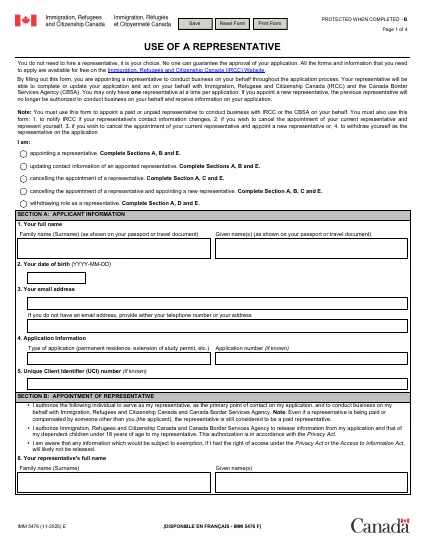
Form IMM 5476 is how you appoint a representative to deal with Immigration, Refugees and Citizenship Canada (IRCC) and the Canada Border Services Agency (CBSA) on your behalf for one application. The same form is used to update your representative's contact information, to cancel an appointment, to cancel one representative and appoint a new one, and by a representative who withdraws. Once a representative is appointed, IRCC sends all correspondence about that application to them instead of to you. Hiring a representative is optional, and IRCC says it treats every applicant the same with or without one.
The form opens in our PDF editor with its own fields ready to type into. To download it, the filled PDF is sent to GuruPDF to prepare the file and is deleted from our servers one hour later. You can fill it in without an account; downloading the filled PDF needs a free account. A free account gets 15 credits a day, enough for one form a day.
- Country
- Canada
- Edition
- (11-2025)
- Pages
- 4
- Fillable fields
- 76
- Last checked at the source
- November 13, 2026
GuruPDF is an independent PDF editor, not a government agency, and is not affiliated with any government. This page explains the form in plain words; it is not legal or tax advice. Always check the official instructions before you file.
Who uses IMM 5476
- Applicants who want a consultant, lawyer, Quebec notary, friend or family member to deal with IRCC for them
- Applicants whose appointed representative changed address, phone number or email
- Applicants who want to cancel their representative and deal with IRCC themselves, or switch to a new one
- Representatives who want to withdraw from an applicant's file
- Dependent children aged 18 or older who are represented on the same application (each completes their own form)
Before you start
- Your full name as shown on your passport or travel document, and your date of birth
- The type of application and, if you already submitted it, the application number
- Your Unique Client Identifier (UCI), if you have one
- Your representative's full name, firm or organization and contact details
- For a paid representative: their membership ID with the College of Immigration and Citizenship Consultants (CICC), a Canadian provincial or territorial law society, or the Chambre des notaires du Québec
- For a student-at-law: the supervising lawyer's name and membership ID
How to fill out IMM 5476
I am: choose what you are doing
At the top of page 1, tick one box. Appointing a representative or updating an appointed representative's contact information: complete Sections A, B and E. Cancelling a representative: Sections A, C and E. Cancelling one representative and appointing a new one: Sections A, B, C and E. A representative withdrawing from the file: Sections A, D and E.
Section A: Applicant information (questions 1 to 5)
Enter your family name and given names as shown on your passport or travel document, and your date of birth (YYYY-MM-DD). Question 3 asks for your email address; if you have none, give a telephone number or your address. Question 4 asks for the type of application (for example permanent residence or extension of a study permit) and the application number if you know it. Question 5 is your UCI, if known; IRCC notes that people who have not dealt with it since 1973 will not have one.
Section B: Appointment of representative (questions 6 to 8)
Question 6 is your representative's full name; for a CICC member, lawyer or Quebec notary, write it as it appears on that body's membership list. In question 7, tick whether the representative is unpaid (a friend or family member, or a CICC, law society or Chambre des notaires member who will not charge you) or paid, and enter the membership ID number. Someone paid by another person on your behalf still counts as paid. Question 8 is the representative's firm, mailing address, telephone, fax and email; for a student-at-law, add the supervising lawyer and their membership ID.
Section B: Representative's declaration (question 9)
The representative signs and dates the declaration on page 3 to accept the appointment. If the representative is a student-at-law, the supervising lawyer also signs and dates it.
Sections C and D: cancelling or withdrawing
Section C (question 10) is for you to cancel an appointment: enter the representative's family name, given names and firm. Section D (question 11) is for the representative who withdraws: they enter their name and firm, and if they could not get your signature in Section E, they tick the attestation and sign and date it themselves. In both cases IRCC will then use the email address you gave in Section A.
Section E: Your declaration (question 12)
You sign and date the declaration. A parent or legal guardian signs for an applicant under 18. For a sponsorship application, the sponsor's spouse or common-law partner can be included on the same form by signing in the second box. For any other application, a spouse or common-law partner needs a separate form, even if they are included in the same application.
After you fill it out
If you have not submitted your application yet, upload this form with your online application, or put it in your paper application package. If your application is already in process, IRCC says you can send the form through its web form, or mail it to the office processing a paper application. IRCC's IMM 5476 page links to both. Your representative will then receive all IRCC and CBSA correspondence about that application. You must tell IRCC with a new IMM 5476 if the representative's contact details change or the appointment ends.
Signing: The applicant signs Section E and the representative signs question 9 (plus the supervising lawyer for a student-at-law). IRCC accepts an e-signature (typed name, Fill & Sign or a similar app, a scanned image of a signature) when the form is submitted through a portal or secure account. A form submitted any other way needs a hand-signed (wet) signature, which may be scanned. A thumbprint is accepted only from someone who cannot write or make a mark.
Watch out for
- IRCC returns your application if you appoint a paid representative who is not a member in good standing of the CICC, a Canadian law society or the Chambre des notaires du Québec.
- You can have only one representative at a time per application. Appointing a new one ends the previous appointment.
- This form lets the representative act for you. If you only want IRCC to share information with someone, IRCC uses a different form: IMM 5475, Authority to Release Personal Information to a Designated Individual.
- IRCC says a representative does not bring special attention, faster processing or a more favourable outcome.
- Dependent children aged 18 or older who use the same representative must each complete their own IMM 5476.
Questions about IMM 5476
Do I have to pay a representative?
No. A friend or family member can represent you without charge, and IRCC will deal with an unpaid representative you appoint. Anyone who charges or receives any other compensation must be a member in good standing of the CICC, a Canadian provincial or territorial law society, or the Chambre des notaires du Québec.
Can I sign IMM 5476 electronically?
If the form is submitted through a portal or secure account, IRCC accepts a typed name, a signature made with Fill & Sign or a similar app, or a scanned image of a signature. If it is submitted any other way, it must be printed and signed by hand; a scan of that signed form is accepted.
How do I change or cancel my representative?
Use a new IMM 5476. To cancel and represent yourself, complete Sections A, C and E. To cancel and appoint someone else, complete Sections A, B, C and E. To update the current representative's contact details, complete Sections A, B and E.
Does my spouse need a separate form?
For a sponsorship application, no: the spouse or common-law partner can sign the second box in Section E of the same form. For any other application, IRCC requires a separate form for the spouse or common-law partner, even if they are on the same application.
I already submitted my application. How do I send this form?
IRCC's IMM 5476 page links to a web form for sending it after your application is submitted. For a paper application, you can also mail it to the IRCC office processing your file.
Official information
- Use of a Representative form (IMM 5476), IRCC
- Using an immigration or citizenship representative
- Find out if your representative is authorized
Page text last reviewed November 13, 2026.