Immigration, Refugees and Citizenship Canada
Fill out IMM 5409 online
Statutory Declaration of Common-Law Union
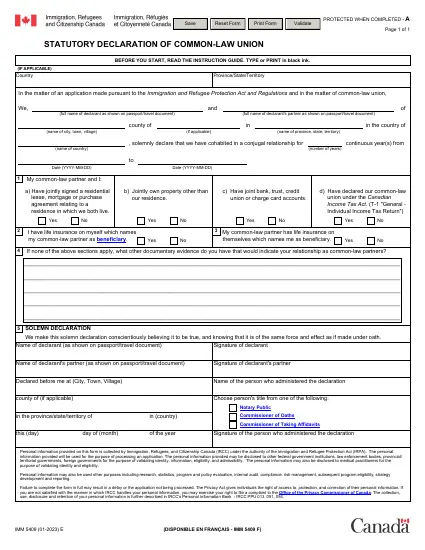
Form IMM 5409 is a one-page statutory declaration in which you and your partner solemnly declare that you have lived together in a conjugal relationship, for how many continuous years and since when, and list the joint documents that show it. Immigration, Refugees and Citizenship Canada (IRCC) asks for it when an applicant, or a sponsor's co-signer, has a common-law partner. Both partners sign it by hand in front of a notary public, commissioner of oaths or commissioner of taking affidavits, who also signs.
The form opens in our PDF editor with its own fields ready to type into. To download it, the filled PDF is sent to GuruPDF to prepare the file and is deleted from our servers one hour later. You can fill it in without an account; downloading the filled PDF needs a free account. A free account gets 15 credits a day, enough for one form a day.
- Country
- Canada
- Edition
- (01-2023)
- Pages
- 1
- Fillable fields
- 49
- Last checked at the source
- November 13, 2026
GuruPDF is an independent PDF editor, not a government agency, and is not affiliated with any government. This page explains the form in plain words; it is not legal or tax advice. Always check the official instructions before you file.
Who uses IMM 5409
- A sponsor and their common-law partner when the partner co-signs a sponsorship application
- A sponsored person (principal applicant) and their common-law partner
- Permanent residence applicants who have a common-law partner, where their program's checklist asks for it
- Study and work permit applicants with a common-law partner, where the document checklist lists it as applicable
Before you start
- Both partners' full names exactly as shown on their passports or travel documents
- The country, province or state, and city where you live
- The date your cohabitation began and the number of continuous years
- Which joint documents you have: lease, mortgage or purchase agreement, other jointly owned property, joint bank or card accounts, tax returns declaring the union, life insurance naming each other
- Access to a notary public, commissioner of oaths or commissioner of taking affidavits, in front of whom you both sign
How to fill out IMM 5409
Where you live and who you are
At the top, enter your country and province, state or territory of current residence. In the opening paragraph, write the full name of the declarant and of the declarant's partner as shown on each passport or travel document, then the city, town or village, the county if applicable, the province, state or territory, and the country.
Length of the relationship
Enter the number of continuous years you have cohabited in a conjugal relationship, and the dates from and to (YYYY-MM-DD).
Questions 1 to 3: joint documents
Answer Yes or No to each statement: 1a, you jointly signed a residential lease, mortgage or purchase agreement for the home you both live in; 1b, you jointly own property other than your residence; 1c, you have joint bank, trust, credit union or charge card accounts; 1d, you declared your common-law union on a Canadian T1 income tax return. Question 2 asks whether you have life insurance naming your partner as beneficiary, and question 3 whether your partner has life insurance naming you.
Question 4: other evidence
If none of questions 1 to 3 apply, describe the other documentary evidence you have that shows you are common-law partners. This is a set of plain text lines, so keep each entry short.
Question 5: Solemn declaration
Type both partners' names as shown on the passport or travel document, and the place (city, county if applicable, province, state or territory, country) and date where the declaration is made. Leave the signature boxes empty: both partners sign by hand in front of the official, who then enters their name, ticks their title (Notary Public, Commissioner of Oaths or Commissioner of Taking Affidavits) and signs.
After you fill it out
Print the form, then both partners sign it by hand in front of the official who administers the declaration. IRCC's program pages list IMM 5409 among the PDF forms you sign and upload with an online application, so scan the signed form and upload it where your application asks. For a paper application, include it in the package as your document checklist says.
Signing: IRCC says the form must be completed and signed with handwritten signatures. Both partners sign question 5 in front of a notary public, commissioner of oaths or commissioner of taking affidavits, who also signs and enters their name and title.
Watch out for
- IRCC requires handwritten signatures on this form, made in front of an authorized official. A typed or pasted signature does not meet that rule.
- Names must match each partner's passport or travel document.
- The PDF has a Validate button that only works in Adobe Acrobat Reader and only flags empty fields. IRCC says this form does not produce a barcode, so nothing is lost by typing in the fields and printing the form.
- It is a solemn declaration with the same force as a statement under oath, so every answer must be true.
Questions about IMM 5409
Who signs IMM 5409?
Both partners sign, by hand, in front of a notary public, commissioner of oaths or commissioner of taking affidavits. That official also signs and records their name and title.
Do we need to answer Yes to every question?
No. Questions 1 to 3 ask which joint documents you have. If none apply, question 4 asks what other documentary evidence shows your relationship.
Does the Validate button have to work?
The Validate button runs only in Adobe Acrobat Reader and only points out missing information. IRCC states that this form does not produce a barcode when validated. You can type into the fields and print the form.
How do I submit it with an online application?
After both partners have signed it in front of the official, scan the signed form and upload it in your online application. IRCC lists it among the PDF forms you sign and upload.
Who needs it in a sponsorship application?
IRCC says that if the sponsor's common-law partner co-signs, the sponsor and the partner complete it, and if the person being sponsored has a common-law partner, those two complete it.
Official information
- Statutory Declaration of Common-Law Union (IMM 5409), IRCC
- How to fill out and validate IRCC forms with a Validate button
Page text last reviewed November 13, 2026.