Immigration, Refugees and Citizenship Canada
Fill out IMM 5645 online
Family Information
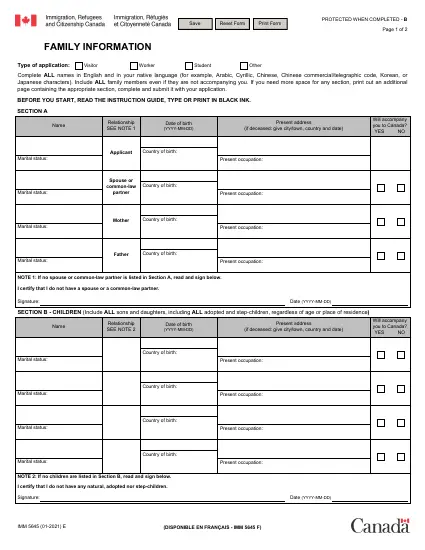
Form IMM 5645, Family Information, lists the members of your family for Immigration, Refugees and Citizenship Canada (IRCC): your spouse or common-law partner, your parents, all your children and all your brothers and sisters, with their dates of birth, marital status, addresses and occupations. IRCC has two Family Information forms for visitors, students and workers, IMM 5645 and IMM 5707, and asks each person aged 18 or older applying for a visitor visa, or for a study or work permit from outside Canada, to complete the one their application package or document checklist lists. The form is part of your application, and IRCC keeps it in your immigration record to check your family details on future applications.
The form opens in our PDF editor with its own fields ready to type into. To download it, the filled PDF is sent to GuruPDF to prepare the file and is deleted from our servers one hour later. You can fill it in without an account; downloading the filled PDF needs a free account. A free account gets 15 credits a day, enough for one form a day.
- Country
- Canada
- Edition
- (01-2021)
- Pages
- 2
- Fillable fields
- 145
- Last checked at the source
- November 13, 2026
GuruPDF is an independent PDF editor, not a government agency, and is not affiliated with any government. This page explains the form in plain words; it is not legal or tax advice. Always check the official instructions before you file.
Who uses IMM 5645
- Applicants aged 18 or older for a Canadian visitor visa (temporary resident visa) whose document checklist or country application package lists IMM 5645
- Applicants aged 18 or older for a study or work permit from outside Canada whose visa office instructions ask for IMM 5645 (IRCC's general guides for these permits list IMM 5707 instead)
- Each family member aged 18 or older who applies in their own right, for example on the same visitor visa trip
Before you start
- Full names of your spouse or common-law partner, mother, father, every child and every brother and sister, in English and in your native script (for example Arabic, Cyrillic, Chinese, Korean or Japanese characters)
- Their dates of birth, countries of birth and current marital status
- Their current addresses, or for a deceased relative, the city, country and date of death
- Their current occupations (or retired, studying, unemployed)
- Which family members will come with you to Canada
- Your document checklist or the instruction guide for the application you are submitting, to confirm it asks for IMM 5645 and not IMM 5707
How to fill out IMM 5645
Type of application
At the top of page 1, tick Visitor, Worker, Student or Other. The form asks you to write every name in English and in your native language, and to include all family members even if they are not coming with you.
Section A: you, your spouse or partner, and your parents
Fill one row each for the Applicant, your Spouse or common-law partner, your Mother and your Father: name, relationship, date of birth (YYYY-MM-DD), country of birth, marital status, present address, present occupation, and Yes or No for whether they will accompany you to Canada. IRCC's instructions say that if you are married, choose "married - physically present" or "married - not physically present" depending on whether you (or your spouse) were at the wedding. For someone who has died, write "deceased" under Present address with the city and date of death. Write "N/A" in anything that does not apply.
Note 1: no spouse or common-law partner
If you list no spouse or common-law partner in Section A, sign and date the statement under Note 1: "I certify that I do not have a spouse or a common-law partner."
Section B: Children
List ALL your sons and daughters, whatever their age or where they live: adopted children, step-children (your spouse's or partner's children), married children, children adopted by others, children in the custody of a former spouse or partner, and children who are already Canadian citizens or permanent residents. Give the same details as in Section A. If you have no children, sign and date the statement under Note 2.
Section C: Brothers and sisters
On page 2, list all brothers and sisters, including half-brothers and half-sisters and step-brothers and step-sisters, with the same details. If you need more rows in any section, print an extra page of that section, complete it and submit it with your application.
Section D: Certification
Sign and date the certification that the information is complete, accurate and factual. The form states that once signed it becomes part of your immigration record and will be used to verify your family details on future applications.
After you fill it out
Submit the form with the visitor visa, study permit or work permit application it belongs to: upload it with your other documents if you apply online, or put it in your package if you apply on paper. IRCC's visitor visa guide says to complete whichever Family Information form (IMM 5707 or IMM 5645) the application package for your country lists, so check your document checklist first. The form is not sent to IRCC on its own.
Signing: You sign and date Section D, and also Note 1 if you have no spouse or common-law partner and Note 2 if you have no children. IRCC's instructions say that if you apply online you do not print the form to sign it, and follow its guidance on signing an online application; if you apply on paper you sign and date the boxes by hand. A form that is not signed and dated is sent back.
Watch out for
- List every child and every sibling, including adopted, step and half relatives and those who will not come with you. The form and IRCC's instructions both say ALL.
- Answer every question. Write "N/A" or "Not applicable" where something does not apply rather than leaving it blank.
- Write names both in English and in your native script; IRCC asks for both.
- The form becomes part of your immigration record and is used to check your family details on future applications, so differences between applications can be noticed.
- IRCC warns that an incomplete form may delay your application or mean it is not processed.
Questions about IMM 5645
Who has to fill out IMM 5645?
IRCC asks each person aged 18 or older who applies for a temporary resident (visitor) visa, or for a study or work permit from outside Canada, to complete a Family Information form. There are two versions, IMM 5645 and IMM 5707: IRCC's visitor visa guide says to complete the one listed in the application package for your country, and its general study and work permit guides list IMM 5707. Use IMM 5645 when your document checklist or visa office instructions name it.
Do I list children who already live in Canada or are adults?
Yes. Section B covers all sons and daughters regardless of age or place of residence, including children who are Canadian citizens or permanent residents, married children, adopted and step-children.
What if a parent or sibling has died?
List them anyway. Under Present address write "deceased" and give the city, country and date of death.
What if there are not enough rows?
Print an additional page containing that section, complete it and submit it with your application, as the form instructs.
I am not married and have no children. Do I leave those parts empty?
Sign and date the statement under Note 1 (no spouse or common-law partner) and the one under Note 2 (no children) instead of leaving those sections unexplained.
What is the difference between IMM 5645 and IMM 5707?
Both are IRCC's Family Information form for visitors, students and workers and ask about the same family members. Which one you submit depends on your application: IRCC's guides tell you to use the form listed in your document checklist or in the application package for your country.
Official information
- Family Information form (IMM 5645), IRCC
- How to apply for a visitor visa, IRCC
- Guide 5256: Applying for a visitor visa (paper application)
- IRCC application forms and guides
Page text last reviewed November 13, 2026.