Canada Revenue Agency
Fill out Form ON428 online
Form ON428 Ontario Tax 2025
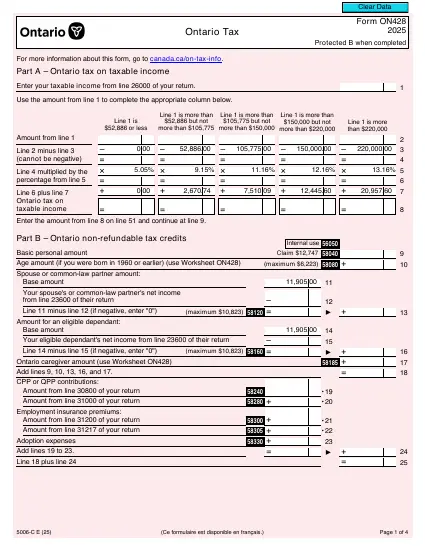
Form ON428 is the Ontario provincial tax form that goes with the T1 Income Tax and Benefit Return. The Canada Revenue Agency (CRA) collects Ontario's personal income tax, and this form calculates it for the 2025 tax year: Ontario tax on your taxable income, Ontario non-refundable tax credits, the Ontario surtax and tax reduction, the LIFT credit and the Ontario health premium. The result on line 90 goes on line 42800 of your federal return. It is part of the Ontario income tax package, and the CRA says to complete it after steps 1 to 5 of your return.
The form opens in our PDF editor with its own fields ready to type into. To download it, the filled PDF is sent to GuruPDF to prepare the file and is deleted from our servers one hour later. You can fill it in without an account; downloading the filled PDF needs a free account. A free account gets 15 credits a day, enough for one form a day.
- Country
- Canada
- Edition
- Tax year 2025
- Pages
- 4
- Fillable fields
- 158
- Last checked at the source
- November 13, 2026
GuruPDF is an independent PDF editor, not a government agency, and is not affiliated with any government. This page explains the form in plain words; it is not legal or tax advice. Always check the official instructions before you file.
Who uses Form ON428
- People who were residents of Ontario on December 31, 2025, and file a paper return
- Non-residents of Canada in 2025 who earned employment income only in Ontario
- Non-residents whose business income came from a permanent establishment only in Ontario
- People preparing a final return for an Ontario resident who died in 2025
Before you start
- Your 2025 Ontario T1 return (5006-R) completed through step 5, including taxable income (line 26000), net income (line 23600) and your CPP or QPP and EI amounts
- Worksheet ON428, which calculates the age amount, caregiver amount, dividend tax credit and other lines
- Your spouse's or common-law partner's or eligible dependant's net income, if you claim an amount for them
- Your federal Schedule 9 (lines 13 and 14) if you claim donations
- Schedules ON(S11) and ON(S2) for tuition carried forward and amounts transferred from a spouse, if they apply
- Schedule ON428-A for the LIFT credit, and Forms T1206, T691 or T2036 if you have split income, minimum tax or provincial foreign tax credit
- The number of your dependent children born in 2007 or later and of dependants with a mental or physical impairment, for the Ontario tax reduction
How to fill out Form ON428
Part A – Ontario tax on taxable income
Enter your taxable income from line 26000 of your return on line 1. Use the column whose income range matches line 1: subtract the base amount on line 3, multiply by the rate on line 5, and add the fixed amount on line 7. Line 8 is your Ontario tax on taxable income; it is copied to line 51 in Part C.
Part B – Personal credits (lines 9 to 25)
Claim the basic personal amount on line 58040 and, if you were born in 1960 or earlier, the age amount on line 58080 using Worksheet ON428. The spouse or common-law partner amount (line 58120) and the amount for an eligible dependant (line 58160) are the base amount printed on the form minus that person's net income. Add the Ontario caregiver amount (line 58185), your CPP or QPP contributions (lines 58240 and 58280) and EI premiums (lines 58300 and 58305) copied from your return, and adoption expenses (line 58330).
Part B – Other credits and medical expenses (lines 26 to 46)
Add the pension income amount (line 58360), the disability amount for yourself (line 58440) or transferred from a dependant (line 58480), interest paid on student loans (line 58520), your unused tuition and education amounts with Schedule ON(S11) (line 58560), and amounts transferred from your spouse or common-law partner with Schedule ON(S2) (line 58640). For medical expenses, enter your eligible expenses on line 58689 and subtract the lesser of 3% of your net income and the amount printed on line 40; add the allowable amount for other dependants (line 58729). Multiply the total on line 44 by the Ontario credit rate on line 45.
Part B – Donations and total credits (lines 47 to 50)
Multiply the amount from line 13 of your federal Schedule 9 and the amount from line 14 by the two rates printed on lines 47 and 48; the total goes on line 58969. Add it to line 46: line 50 (line 61500) is your Ontario non-refundable tax credits, which you carry to line 52.
Part C – Ontario tax, surtax and dividend credit (lines 51 to 73)
Subtract your credits from your tax on taxable income, and add Ontario tax on split income from Form T1206 (line 61510). Lines 56 to 60 calculate the Ontario minimum tax carryover, using the Ontario dividend tax credit from Worksheet ON428 (line 61520) and line 40427 of your return. On page 3, calculate the Ontario surtax on lines 66 to 68 only if line 65 is more than the threshold printed there, subtract the dividend tax credit, and add the Ontario additional tax for minimum tax purposes on line 72 if you filled out Part 5 of Form T691.
Part C – Ontario tax reduction and foreign tax credit (lines 74 to 83)
The form lists when to enter 0 on line 80 instead, for example if you were not a resident of Canada at the beginning of the year or of Ontario on December 31, 2025, were bankrupt in 2025, or have an amount on line 72. Otherwise start from the basic reduction printed on line 74, add the amount for each dependent child born in 2007 or later (line 60969) and each dependant with a mental or physical impairment (line 60970), and complete lines 77 to 80. If you had a spouse or common-law partner on December 31, 2025, only the one with the higher net income claims lines 75 and 76. Subtract any provincial foreign tax credit from Form T2036 on line 82.
Part C – LIFT credit, health premium and Ontario tax (lines 84 to 90)
Subtract the low-income individuals and families tax (LIFT) credit from Schedule ON428-A (line 62140) and, for farmers, the community food program donation tax credit (line 62150, 25% of qualifying donations also claimed as charitable donations). Then use the chart at the bottom of page 4 to find your Ontario health premium from your taxable income and enter it on line 89. Line 90 is your Ontario tax: enter it on line 42800 of your return.
After you fill it out
Attach Form ON428, with the schedules it asks for (such as ON(S11), ON(S2), ON428-A or T2036), to your paper T1 return and mail them together to the CRA; the CRA's paper-filing page explains where paper returns go. Other Ontario credits, such as the CARE tax credit, the seniors' public transit tax credit and the fertility treatment tax credit, are claimed on a separate Form ON479, and the Ontario energy and property tax credit, the Northern Ontario energy credit and the senior homeowners' property tax grant are applied for on Form ON-BEN; both are in the same Ontario tax package and are attached to the same return. If you file with certified tax software, the software completes ON428 for you.
Signing: Form ON428 has no signature line. You sign the certification on the T1 return it is attached to.
Watch out for
- If you lived in Ontario on December 31, 2025, but part of your business income was earned at a permanent establishment outside Ontario, the CRA says to use Form T2203, Provincial and Territorial Taxes for Multiple Jurisdictions, instead of ON428.
- Newcomers and emigrants who reduced a federal credit (such as the basic personal amount) must reduce the matching Ontario credit in the same way.
- Only one person can claim the Ontario tax reduction for a given dependent child or dependant with an impairment, and with a spouse or common-law partner, only the higher-income one claims it.
- The Ontario health premium is part of your Ontario income tax: you calculate it with the chart on page 4 and include it on line 89, so it is part of your total tax payable for the year.
- Calculated lines are not guaranteed to fill in automatically: enter every amount yourself and check the arithmetic before you print.
Questions about Form ON428
Who has to complete Form ON428?
The CRA says you complete it if you were a resident of Ontario at the end of the year, or if you were a non-resident of Canada in 2025 and earned employment income only in Ontario or received business income from a permanent establishment only in Ontario.
Do I need ON428 if I file online?
If you file with tax software, the CRA says you do not need the income tax package, so you do not fill out this PDF. The Ontario package with ON428 is for paper returns or if you need the forms.
Where do I claim the Ontario Trillium Benefit?
Not on ON428. You apply for the Ontario energy and property tax credit, the Northern Ontario energy credit and the Ontario senior homeowners' property tax grant by completing Form ON-BEN and attaching it to your 2025 return. Other Ontario credits are claimed on Form ON479. Both are in the Ontario tax package.
Who pays the Ontario health premium?
The CRA says you pay it if you were a resident of Ontario at the end of the year and your taxable income on line 26000 of your return is more than the lowest amount in the chart on page 4 of the form. You calculate it on ON428 and it is part of your Ontario tax.
I moved to Ontario during 2025. Which provincial form do I use?
The CRA says you complete Form ON428 if you were a resident of Ontario at the end of the year (December 31, 2025). If you lived in another province or territory on that date, you use that province's or territory's Form 428 instead (or no Form 428 if it was Quebec, which has its own provincial return).
Official information
- 5006-C ON428 – Ontario Tax (CRA)
- Ontario tax information for 2025
- Ontario – 2025 income tax package
- 5006-R Income Tax and Benefit Return for Ontario
- 5006-D Worksheet ON428
Page text last reviewed November 13, 2026.
Related forms
- T1 Income Tax and Benefit ReturnT1 2025 Income Tax and Benefit ReturnCRAFill online
- Form TD1ON2026 Ontario Personal Tax Credits ReturnCRAFill online
- T1 Schedule 9T1-2025 Schedule 9 Donations and GiftsCRAFill online
- T1 Schedule 11T1-2025 Schedule 11 Federal Tuition Amount and Canada Training CreditCRAFill online
- Form T1-ADJT1 Adjustment RequestCRAFill online