Canada Revenue Agency
Fill out Form T1-ADJ online
T1 Adjustment Request
Form T1-ADJ, T1 Adjustment Request, is the paper way to ask the Canada Revenue Agency (CRA) to change an individual income tax and benefit return after it has been assessed, for example to add a missing slip or claim a deduction you forgot. You list each line you want changed with its previous amount, the change and the revised amount, and send the form by mail with supporting documents. The CRA says most changes are faster online with Change my return or ReFILE, and the form itself is for requests that fall outside those services.
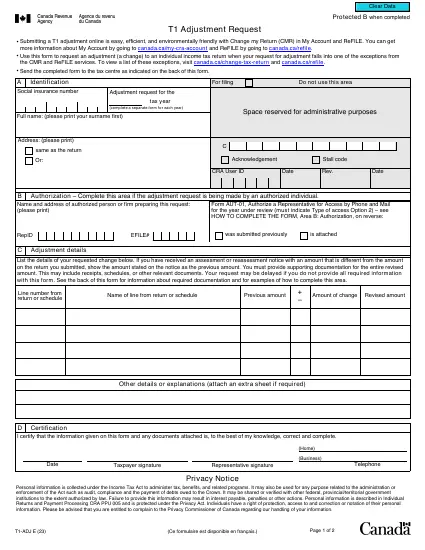
The form opens in our PDF editor with its own fields ready to type into. To download it, the filled PDF is sent to GuruPDF to prepare the file and is deleted from our servers one hour later. You can fill it in without an account; downloading the filled PDF needs a free account. A free account gets 15 credits a day, enough for one form a day.
- Country
- Canada
- Edition
- T1-ADJ E (23)
- Pages
- 2
- Fillable fields
- 44
- Last checked at the source
- November 13, 2026
GuruPDF is an independent PDF editor, not a government agency, and is not affiliated with any government. This page explains the form in plain words; it is not legal or tax advice. Always check the official instructions before you file.
Who uses Form T1-ADJ
- People who received a slip, such as an extra T4, after filing their return
- People who forgot to claim a deduction, credit or expense
- People whose return cannot be changed online, such as a return for 2015 or earlier, a bankruptcy return, an optional return for a deceased person or a return filed with the wrong province
- Non-residents and other international filers who cannot use the online services
- Authorized representatives making a request for someone else
Before you start
- Your notice of assessment or reassessment for the year you want to change
- Your social insurance number and the tax year (one form per year)
- The line numbers and names of the lines you want to change, with the previous amounts
- Supporting documents for the whole revised amount: slips, receipts or schedules
- Your representative's RepID or EFILE number and Form AUT-01, if someone else makes the request
How to fill out Form T1-ADJ
Area A – Identification
Enter your social insurance number and the tax year the request is for; complete a separate form for each year. Print your full name, surname first, and either tick "same as the return" or write your address. Leave the "For filing / Do not use this area" boxes blank.
Area B – Authorization
Fill in this area only if a person or firm is making the request for you: enter their name and address and their RepID or EFILE number. The CRA must be authorized to deal with them through Form AUT-01 with access Option 2; tick whether it was submitted previously or is attached. The printed form calls AUT-01 "Authorize a Representative for Access by Phone and Mail"; the CRA's site now titles it "Authorize a Representative for Offline Access".
Area C – Adjustment details
For each change, enter the line number from the return or schedule, the name of the line, the previous amount, a plus or minus sign, the amount of change and the revised amount. If your notice of assessment shows a different amount from your return, use the amount on the notice as the previous amount. Use minus for losses. Explain anything else under "Other details or explanations", attaching an extra sheet if needed; do not send a recalculation of your taxes.
Area D – Certification
You or your authorized representative sign and date the form, and enter a home and business telephone number.
After you fill it out
Print the form, sign it, and mail it with all supporting documents to the tax centre that serves your area, using the chart on page 2 of the form; the CRA's address finder says to use the address printed on a form when there is one. Send it separately from a current-year return. When the CRA has reviewed the request, it sends a notice of reassessment showing the changes made, or a letter explaining why no changes were made. If you can, the CRA suggests Change my return in your CRA account or ReFILE in certified tax software instead, which are faster. The CRA's T1-ADJ page also links a web version of the form (T1-ADJ Webform).
Signing: The form must be signed and dated in Area D by you or your authorized representative. T1-ADJ is not on the CRA's list of forms that accept an electronic signature, and the fillable form has no signature field, so print it and sign it by hand.
Watch out for
- Wait for your notice of assessment before asking for a change, and do not file a second return for the same year.
- Supporting documents must cover the entire revised amount, including amounts you claimed before without sending receipts.
- Use one form per tax year.
- The CRA says a refund cannot be issued for an adjustment request made more than 10 calendar years after the end of the tax year.
- The CRA says a return change (online or with T1-ADJ) cannot be used to apply for benefits or credits, make or revise an election, allocate a refund to other CRA accounts, or update personal information such as your mailing or email address, direct deposit, marital status or name; those are updated separately.
Questions about Form T1-ADJ
Should I use T1-ADJ or change my return online?
The CRA says most changes can be made online with Change my return in your CRA account or with ReFILE in certified tax software, and that this is faster. Use the paper form when your situation is one of the exceptions, such as a return for 2015 or earlier, a bankruptcy return, an optional return for a deceased person or a return filed with the wrong province or territory.
When can I send a T1-ADJ?
Only after you receive your notice of assessment for that year. If you already sent a request, wait for the CRA's answer before asking for another change.
Where do I send the form?
By mail to the tax centre that serves your area. Page 2 of the form has a chart that matches your tax services office, or your country if you live outside Canada, to a tax centre. The CRA's address finder also says to check the form itself for a mailing address first.
Can someone else request the change for me?
Yes. Fill in Area B with their name and address and RepID or EFILE number. They must be authorized with Form AUT-01 at access Option 2, already on file or attached to the request, and they can sign Area D.
Official information
- T1-ADJ T1 Adjustment Request (CRA)
- Changing a tax return
- Find a CRA address (tax centres)
- AUT-01 Authorize a Representative for Offline Access
Page text last reviewed November 13, 2026.