Canada Revenue Agency
Fill out Form RC151 online
Canada Groceries and Essentials Benefit Application for Individuals Who Become Residents of Canada
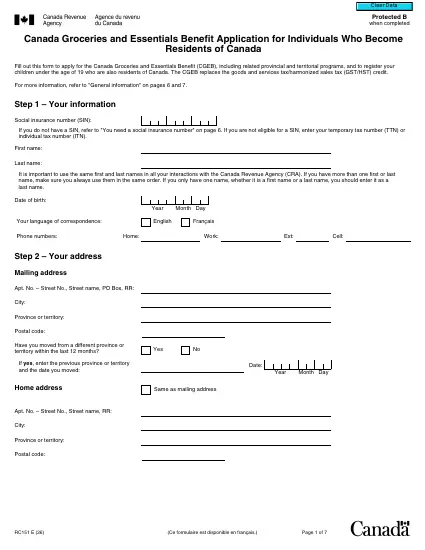
Form RC151 is the application new residents of Canada use to get the Canada Groceries and Essentials Benefit (CGEB), the tax-free quarterly payment that replaced the GST/HST credit in July 2026, together with the related provincial and territorial programs. It also registers your children under 19 who are residents of Canada. Most people never apply, because the Canada Revenue Agency (CRA) checks eligibility when it assesses their tax return; a newcomer or returning resident applies with this form for the first year they are a resident, before filing a first return. This is the 2026 version (RC151 E (26)), mailed to your CRA tax centre.
The form opens in our PDF editor with its own fields ready to type into. To download it, the filled PDF is sent to GuruPDF to prepare the file and is deleted from our servers one hour later. You can fill it in without an account; downloading the filled PDF needs a free account. A free account gets 15 credits a day, enough for one form a day.
- Country
- Canada
- Edition
- Edition 2026
- Pages
- 7
- Fillable fields
- 96
- Last checked at the source
- November 13, 2026
GuruPDF is an independent PDF editor, not a government agency, and is not affiliated with any government. This page explains the form in plain words; it is not legal or tax advice. Always check the official instructions before you file.
Who uses Form RC151
- Newcomers to Canada applying for the CGEB for the year they became residents
- Returning residents of Canada who re-established residential ties
- New residents who want to register their children under 19 for the CGEB
- New residents with children under 19, who apply on the paper form (the CRA's online version is for new residents with no children)
- A new resident whose spouse or common-law partner lives outside Canada
Before you start
- Your social insurance number (SIN), or your temporary tax number (TTN) or individual tax number (ITN) if you are not eligible for a SIN
- Your spouse's or common-law partner's SIN (or TTN or ITN), name and date of birth, if you have one
- The date you (and your spouse or partner) became residents of Canada, or for returning residents the dates you left and came back and your former province or territory
- Your marital status on the day you became a resident and the date it began
- Each child's name, date of birth, place of birth and the date they started living with you
- Proof of birth for any child the CRA has never paid benefits for
- Your world income, and your partner's, for the part of the year before you arrived and for one or two years before, converted to Canadian dollars
- Any letter you received from the CRA about your residency status (attach a copy)
How to fill out Form RC151
Step 1 – Your information
Enter your social insurance number (SIN), or your temporary tax number (TTN) or individual tax number (ITN) if you are not eligible for a SIN, then your first name, last name and date of birth. The form asks you to use the same names in the same order in all your dealings with the CRA, and to enter a single name as a last name. Choose English or Français for correspondence and give your home, work and cell phone numbers.
Step 2 – Your address
Enter your mailing address and answer whether you moved from a different province or territory within the last 12 months; if yes, give the previous province or territory and the date you moved. Tick "Same as mailing address" or enter your home address separately.
Step 3 – Your marital status
Select your marital status on the date you became a resident of Canada (married, living common-law, separated, widowed, divorced or single, each defined on the form) and enter the date it began, leaving the date blank if you have always been single. If your status has changed since you became a resident, select the new status and the date of the change. If you are married or living common-law, enter your spouse's or partner's SIN (or TTN or ITN), name and date of birth, their address if it differs from yours, and tick the box if they are a non-resident of Canada.
Step 4 – Your residency status
In section A (Newcomer to Canada), enter the date you, and your spouse or partner, became residents of Canada. In section B (Returning resident of Canada), enter the province or territory you lived in before you left, the date you cut your residential ties (became a non-resident) and the date you re-established them. The form explains that significant residential ties include a home, a spouse or partner, or dependants in Canada.
Step 5 – Information about the child(ren)
For each child, enter the name, gender, date of birth, city of birth and province, territory or country of birth. Answer whether the child lives with you more than 60% of the time and give the start date or tick "Since birth"; otherwise select 40% to 60% of the time (shared custody, with its start date) or less than 40%, which the CRA does not count as eligible for that child. The form has room for two children; use Form RC66-1 or a separate sheet for more. Do not list a child you already registered on Form RC66 or an earlier RC151 unless they returned to your care or the time they spend with you changed.
Step 6 – Your income
Enter income from all sources that was not reported on a Canadian tax return, in Canadian dollars at the Bank of Canada exchange rate, or 0 if there was none. Section A covers January 1 of the year you became a resident up to that date; section B the year before; section C, two years before, only if you became a resident between January 1 and May 31. Leave out your spouse's or partner's income in a section if they did not become a resident that year or do not reside in Canada.
Step 7 – Signature
Sign and date the form to certify that the information is correct and complete. The form notes that making a false statement is a serious offence.
After you fill it out
Mail the form, with proof of birth for any new child and any other documents, to the CRA tax centre that serves your area (the chart on page 7 of the form and the CRA's tax centre page list them). The CRA's "How to get the benefit" page says only one application per household is needed, and that a new resident with no children can instead apply with the online version of RC151; a new resident who is eligible for the Canada child benefit can apply with Form RC66, which the CRA also uses to decide the CGEB. The CRA sends a notice explaining how much you will get and how it was calculated. To keep receiving payments, you and your spouse or partner must file a tax return for the year you arrived and every year after. The form has no banking section; the CRA's direct deposit page explains how to set it up.
Signing: You, the applicant, sign and date Step 7. The paper form is mailed to the CRA, and RC151 is not on the CRA's list of forms that accept an electronic signature, so print the completed form and sign it by hand. If you use the CRA's online version of RC151 instead, you submit it electronically there.
Watch out for
- You need a SIN to apply. If Service Canada will not give you or your partner one, the form says to attach a letter explaining why, with a clear photocopy of an identity document such as a passport, driver's licence, visitor record, birth certificate or an Immigration, Refugees and Citizenship Canada document.
- Proof of birth is required for any child the CRA has never paid benefits for. Documents in a language other than English or French need a copy of the original and an acceptable English or French translation.
- If you have a spouse or common-law partner who is also a resident of Canada, only one of you can get the CGEB for both of you; the form says the amount is the same whichever of you receives it. If your partner is a non-resident, the CRA calculates the benefit as if you were single.
- If you are under 19, you are generally eligible only if you have (or had) a spouse or common-law partner, or are (or were) a parent living with your child.
- Tell the CRA right away if you move, your marital status changes, a child starts or stops living with you, or your banking information changes, or your payments may stop or be wrong.
Questions about Form RC151
Is the Canada Groceries and Essentials Benefit the same as the GST/HST credit?
Yes. The CRA says the CGEB replaced the GST/HST credit in July 2026 and that, under its new name, the eligibility, payment calculation and structure are the same. Older CRA pages and forms may still use the old name.
Do I need to apply if I already live in Canada?
No. The CRA says that in most cases you do not apply: you are automatically considered when you file your tax return each year, even with no income to report. Only new residents may need to apply, for their first year as a resident.
Can I apply online instead?
The CRA offers an online version of Form RC151. Its "How to get the benefit" page points new residents with no children to the online form, and new residents with children under 19 to the paper RC151, or to Form RC66 if they are eligible for the Canada child benefit.
What if I have more than two children?
Use Form RC66-1, Additional Children, or attach a separate sheet with the same information the form asks for each child.
When are the payments made?
The form says CGEB payments are normally issued in July, October, January and April. The CRA's payment dates page gives the exact dates.
Official information
- Form RC151 (CRA)
- Canada Groceries and Essentials Benefit: How to get the benefit
- Canada Groceries and Essentials Benefit: Who is eligible
- Newcomers to Canada: taxes and benefits
- Tax centre addresses for benefit forms
Page text last reviewed November 13, 2026.
Related forms
- Form RC66Canada Child Benefit ApplicationCRAFill online
- Form RC66SCHStatus in Canada and Income Information for the Canada Child Benefit ApplicationCRAFill online
- Form NAS2120Application for a Social Insurance NumberService CanadaFill online
- Form RC325Address and Telephone Number Change RequestCRAFill online
- Form RC65Marital Status ChangeCRAFill online