Service Canada (Employment and Social Development Canada)
Fill out Form ISP-1000 online
Application for a Canada Pension Plan Retirement Pension
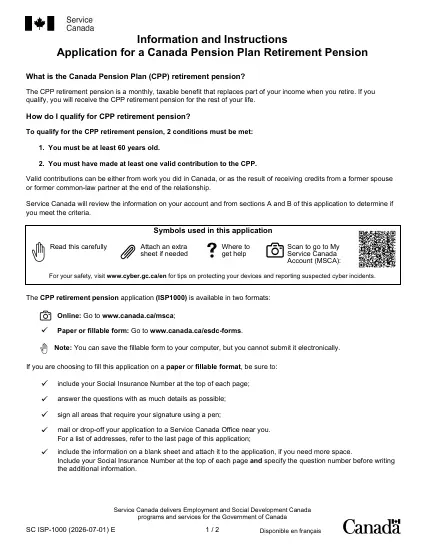
Form ISP-1000 is the paper application for the Canada Pension Plan (CPP) retirement pension, a monthly, taxable benefit that replaces part of your income when you retire and is paid for the rest of your life. You qualify if you are at least 60 and have made at least one valid contribution to the CPP, from work in Canada or from credits received from a former spouse or common-law partner. The form collects your personal and banking details, information that may raise or protect your pension (pension sharing, foreign benefits, credit splitting, the child rearing provision), the month you want the pension to start, and any voluntary tax deduction. You mail it to Service Canada or drop it off at a Service Canada Centre.
The form opens in our PDF editor with its own fields ready to type into. To download it, the filled PDF is sent to GuruPDF to prepare the file and is deleted from our servers one hour later. You can fill it in without an account; downloading the filled PDF needs a free account. A free account gets 15 credits a day, enough for one form a day.
- Country
- Canada
- Edition
- (2026-07-01)
- Pages
- 14
- Fillable fields
- 111
- Last checked at the source
- November 13, 2026
GuruPDF is an independent PDF editor, not a government agency, and is not affiliated with any government. This page explains the form in plain words; it is not legal or tax advice. Always check the official instructions before you file.
Who uses Form ISP-1000
- People aged 60 or older who contributed to the CPP and want to start their retirement pension
- People who must apply on paper, for example because they live outside Canada or have a power of attorney or trustee managing their CPP account
- People who prefer a paper application to applying online in My Service Canada Account
- Parents who stayed home or worked less to care for children under 7 and want the child rearing provision considered
Before you start
- Your Social Insurance Number (the form asks for it at the top of every page)
- Your banking details for direct deposit (branch, institution and account numbers) or a void cheque
- If you lived or worked in another country: the country, the dates and your insurance number there
- Your marital status and whether you were ever separated, divorced or in a common-law relationship that ended
- For the child rearing provision: each child's full name, SIN and date of birth, and the date of entry into Canada for a child born abroad
- The month you want your pension to start
- Whether you want federal income tax deducted, as a dollar amount or a percentage
How to fill out Form ISP-1000
Section A – Information about you (A1 and A2)
In A1, enter your Social Insurance Number, preferred language (English or French), an optional salutation, your first, middle and last names, date of birth (YYYY-MM-DD), full name at birth if different, home address, mailing address if different, telephone numbers, the best time to call, and an optional email address. If you now live outside Canada, give the last province or territory you lived in. In A2, enter your branch, institution and account numbers and the name(s) on the account for direct deposit; the account must be in your name or a joint account. You can attach a void cheque instead, or leave it blank to be paid by cheque.
Section B – B1 to B3: pension sharing, other countries and credit splitting
B1 asks whether you want to share your retirement pension with a spouse or common-law partner who is at least 60; answering yes does not apply for it, Service Canada sends you a separate form. B2 asks for any other country where you lived or worked, with the dates, your insurance number there and whether you applied for or received a benefit from it (use a separate sheet for more countries). B3 asks whether you were ever separated, divorced or in a common-law relationship that ended, and your current marital status, so a credit split can be considered.
Section B – B4: child rearing provision
If you worked less or stopped working because you were the primary caregiver of a child under 7, list each child in A) with full name, SIN, date of birth and, for a child born abroad, the date the child entered Canada. Questions B) to E) ask who received the Family Allowance (before 1993) or the Canada Child Benefit (since 1993), periods when you did not receive it or were not the primary caregiver, and whether you were the primary caregiver. Annex A at the end of the form has a table showing which questions to answer. Part F) is a waiver signed only by your current or former spouse or partner who received the Family Allowance; do not sign it yourself.
Section C – Your Canada Pension Plan retirement pension
Choose one start option: as soon as you qualify (as early as the month after your 60th birthday), at age 65 (the month after your 65th birthday), or as of a month you enter (YYYY-MM). The form explains that the pension is reduced by 0.6% for each month it starts before 65 and increased by 0.7% for each month it starts after 65, with no further increase after 70. If you apply after 65, retroactive payments cannot start earlier than the month after your 65th birthday.
Section D – Federal Voluntary Income Tax Deduction
The CPP retirement pension is taxable. Answer yes or no to having federal income tax deducted from each monthly payment, and if yes, enter either a dollar amount or a percentage. This service is available to Canadian residents only, and you can change the amount later.
Section E – Declaration and signature
Read the privacy notice, then sign and date the declaration (YYYY-MM-DD). If you sign with a mark such as an X, a witness who read the application to you fills in their name, telephone number and address and signs. An authorized representative, such as a guardian, a trustee or a person with power of attorney for property, can sign for you, but legal documents proving their authority must be submitted.
After you fill it out
Go through the checklist on the form: your SIN at the top of every page and every added sheet, your date of birth, and the signed declaration. Mail the application to the Service Canada office for your province or territory, listed on the last page of the form, or drop it off at a Service Canada Centre; from outside Canada, use the office for the province where you last lived. Send copies of documents rather than originals, with your SIN written on each. Service Canada reviews the application, contacts you if it needs more information and then mails you a letter with its decision. The date it receives your application can affect when your pension starts. Service Canada's CPP pages list current processing times and the online application in My Service Canada Account.
Signing: You sign and date Section E. Service Canada asks you to sign every area that needs a signature with a pen, so type the answers, print the form and sign it by hand. The fillable PDF can be saved but cannot be submitted electronically. A witness signs only if you sign with a mark, and your current or former spouse or partner signs B4 F) only to waive their child rearing rights.
Watch out for
- If you worked in Quebec only, or worked in Quebec and another province and now live in Quebec (or lived last in Quebec before moving abroad), you contact Retraite Québec for the Quebec Pension Plan instead.
- A pension that starts before 65 is permanently reduced, and a credit split with a former spouse or partner is permanent; the form explains both before you choose.
- Answering yes to pension sharing in B1 is not an application for pension sharing; Service Canada sends a separate form.
- If you cannot give a SIN for a child listed for the child rearing provision, you must send proof of birth for that child, and proof of the date of entry for a child born outside Canada.
- The form says to write your Social Insurance Number at the top of every page and on every document or copy you send.
Questions about Form ISP-1000
When can I start my CPP retirement pension?
As early as the month after your 60th birthday. The form says it is your choice: it is reduced for each month it starts before 65 and increased for each month after 65, up to age 70. There is no financial advantage to waiting past 70.
Can I apply online instead?
Yes, in My Service Canada Account, unless you are in a situation that requires the paper form. Service Canada lists these on its apply page, for example living outside Canada, having a third party such as a power of attorney or trustee managing your CPP account, or a CPP disability benefit that ended before you turned 65.
How early can I apply?
Service Canada says you can apply up to 12 months before the start date you choose, and recommends applying in advance so the pension starts on time.
Can I keep working while I receive the CPP retirement pension?
Yes. Service Canada says the pension is not reduced if you work, and if you are 60 to 70 and still contributing you may get the Post-Retirement Benefit automatically, without applying.
Does this form also apply for Old Age Security?
No. The Old Age Security pension is a separate benefit for people 65 and older. Service Canada may enrol you automatically; if it does not, you apply with Form ISP-3550.
Official information
- CPP retirement pension: Apply
- CPP retirement pension: Do you qualify
- CPP retirement pension overview
- Form ISP-1000 in the Service Canada forms catalogue
Page text last reviewed November 13, 2026.