Service Canada (Employment and Social Development Canada)
Fill out Form ISP-3550 online
Application for the Old Age Security Pension and the Guaranteed Income Supplement
Form ISP-3550 is the paper application for the Old Age Security (OAS) pension, a monthly payment for people aged 65 or older who meet the legal status and residence requirements, and for the Guaranteed Income Supplement (GIS), a non-taxable amount added to the OAS pension for people living in Canada with a low income. Most people are enrolled automatically and receive a letter; you use this form if you did not get that letter, if Service Canada asks you to apply, or if you want to choose or delay your start date. It asks about your legal status, where you have lived since age 18, your income and spouse or partner for the GIS, and how you want to be paid. You mail it to Service Canada.
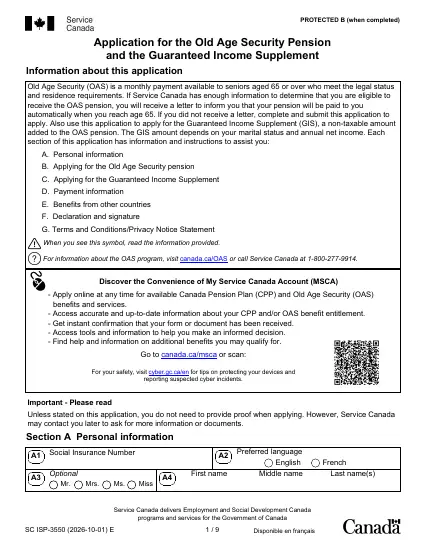
The form opens in our PDF editor with its own fields ready to type into. To download it, the filled PDF is sent to GuruPDF to prepare the file and is deleted from our servers one hour later. You can fill it in without an account; downloading the filled PDF needs a free account. A free account gets 15 credits a day, enough for one form a day.
- Country
- Canada
- Edition
- (2026-10-01)
- Pages
- 10
- Fillable fields
- 181
- Last checked at the source
- November 13, 2026
GuruPDF is an independent PDF editor, not a government agency, and is not affiliated with any government. This page explains the form in plain words; it is not legal or tax advice. Always check the official instructions before you file.
Who uses Form ISP-3550
- People turning 65 who did not receive an automatic enrolment letter, or who turned 65 without their pension starting
- People whose enrolment letter has incorrect information, or who received a letter asking them to apply
- People who want to delay their OAS pension start date, up to age 70
- People applying from outside Canada, or whose OAS account is managed by a third party such as a power of attorney or trustee
- Low-income seniors living in Canada who want to apply for the Guaranteed Income Supplement
Before you start
- Your Social Insurance Number and date of birth
- Proof of your legal status in Canada if you were born outside Canada (for example a citizenship certificate, a Canadian passport issued in 1970 or later, or a Record of Landing or permanent resident card)
- If you were sponsored: your IRCC Unique Client Identifier (UCI), the sponsorship category, the date you became a permanent resident and the length of the undertaking
- The countries where you have lived since age 18, with dates and any insurance number there
- For the GIS: your marital status, and your spouse's or common-law partner's name, SIN, date of birth and date of marriage or union
- Dates of any retirement or pension income reduction in the last two years or next two years, and any foreign income
- Your banking details for direct deposit, or a void cheque
How to fill out Form ISP-3550
Section A – Personal information (A1 to A9)
Enter your Social Insurance Number (A1), preferred language (A2), an optional salutation (A3), your first, middle and last names (A4), date of birth and last name at birth if different (A5), home address (A6), mailing address if different (A7), telephone numbers (A8) and an optional email address (A9).
Section B – OAS pension start date, legal status and sponsorship (B1 to B3)
In B1, choose "As soon as I am eligible" or enter the month you want the pension to start (YYYY-MM). Delaying can raise the monthly amount by 0.6% for each month, up to age 70, but you cannot get the GIS while you delay. In B2, tick your status: question 1 if you live in Canada (Canadian citizen, permanent resident, Status Indian or other), question 2 if you live outside Canada (your status before you left). In B3, say whether you were ever admitted under a sponsorship agreement; if yes, every detail in B3 is mandatory, including any break in the sponsorship.
Section B – Residence history (B4 to B7)
If you were born outside Canada, B4 asks the date you first entered Canada and the immigration document you had. B5 asks whether you have always lived in Canada since age 18; if yes, go to Section C. If not, list in B6 every country where you have resided since 18, including Canada, with dates, whether you also worked there, whether you applied for a benefit there and your insurance number. Do not list absences from Canada shorter than six months. In B7, describe absences that may count as Canadian residence, such as military or diplomatic service, study abroad or work for a Canadian employer.
Section C – Applying for the Guaranteed Income Supplement (C1 to C6)
If you do not want to apply for the GIS, tick the box in C1 and go to Section D. Otherwise answer C2 (retirement in the last two years or next two years, with the date), C3 (a reduction in pension income, with the date) and C4 (income from another country, its type and the yearly amount in the currency it is paid in). In C5, tick your marital status and the date it began; in C6, say whether you and your spouse or partner live apart for reasons beyond your control, such as a move to a long-term care facility.
Section C – Your spouse or common-law partner (C7 to C11)
If you have a spouse or common-law partner, enter their name, SIN, date of birth, date of marriage or common-law union and home address if different (C7). Then answer the same questions about them: retirement (C8), pension income reduction (C9), foreign income (C10) and, if they live in Canada, whether they were ever sponsored (C11).
Section D – Payment information (D1 to D3)
In D1, give your branch, institution and account numbers and the name(s) on the account for direct deposit, or attach a void cheque; otherwise you are paid by cheque. D2 is only for people who are not residents of Canada for tax purposes and asks whether your net world income for 2025 was above the amount printed on the form. D3, for Canadian residents, asks whether to deduct income tax from each monthly payment and how much, as a dollar amount or a percentage. Section E has no questions; it explains benefits from other countries.
Section F – Declaration and signature (F1 to F3)
You sign and date F1. If you are applying for the GIS and have a spouse or common-law partner, they sign and date F2; if they are already eligible for the OAS pension, this also counts as their GIS application. F3 is for a witness, when you or your spouse sign with a mark, or for a person authorized to sign on your or your spouse's behalf, who also gives their name, relationship and address and must send proof of their authority, such as a power of attorney.
After you fill it out
Check the list in the Reference Guide (ISP-3550A): your SIN in A1, every question that applies to you, your spouse's or partner's signature in F2 if needed, proof of legal status for B2, and your banking details or void cheque. Mail the application to the Service Canada office listed on the last page of the form for your province or territory; from outside Canada, use the office for the province where you last lived. Send copies of documents rather than originals, with your SIN written on each: Service Canada's apply page asks for certified true copies, and the Reference Guide says it may ask for an original or certified copy at any time. Service Canada may contact you for more information and then sends you a letter with its decision. The earliest you can apply is 11 months before the date you want your pension to start.
Signing: You sign and date F1, your spouse or common-law partner signs F2 when you apply for the GIS, and a witness or authorized person signs F3 when needed. Service Canada says to sign every section that requires a signature with a pen, so type the answers, print the form and sign it by hand.
Watch out for
- Most people do not need to apply: Service Canada enrols them automatically and sends a letter around their 64th birthday. If a month has passed since your 64th birthday with no letter, Service Canada asks you to contact it to find out whether you need to apply.
- If you delay your OAS pension, you cannot get the GIS during the delay, and your spouse or partner cannot get the Allowance during that time either.
- Since October 1, 2025, a person under a sponsorship agreement cannot receive the GIS, the Allowance or the Allowance for the Survivor for the whole length of the agreement, so every question in B3 must be answered if you were sponsored.
- If you were born outside Canada, you must send documents proving your legal status with the application.
- To keep receiving the GIS without interruption, you must file your income tax return every year.
Questions about Form ISP-3550
Do I have to apply for Old Age Security?
Usually not. If Service Canada has your information, you get a letter around your 64th birthday saying you are enrolled automatically. You apply with this form, or online in My Service Canada Account, if you did not get the letter, were asked to apply, or want to change or delay your start date.
Who qualifies for the OAS pension?
You must be 65 or older. If you live in Canada, you must be a Canadian citizen or legal resident when the application is approved and have lived in Canada for at least 10 years since age 18. If you live outside Canada, you must have been a citizen or legal resident when you left and have lived in Canada for at least 20 years since 18. Social security agreements with other countries may help if you do not meet the residence requirement.
Should I apply for the GIS on the same form?
The Reference Guide says there is no disadvantage to applying. Service Canada gets your income from the CRA; if you do not qualify now, it reviews your income every year and pays the GIS automatically if you become eligible, as long as you file your tax return each year.
Can I apply online instead?
Yes, in My Service Canada Account, if you are at least one month past your 64th birthday, not already receiving OAS, and do not have a third party managing your OAS account. People applying from outside Canada must use the paper form.
Is this the same as applying for the Canada Pension Plan?
No. The CPP retirement pension is a separate benefit based on your contributions, and you apply for it with Form ISP-1000 or online.
Official information
- Old Age Security: Apply, delay, or change your start date
- Old Age Security: Do you qualify
- Guaranteed Income Supplement overview
- Form ISP-3550 and Reference Guide ISP-3550A (forms catalogue)
Page text last reviewed November 13, 2026.