Service Canada (Employment and Social Development Canada)
Fill out Form ISP-3025 online
Application for the Guaranteed Income Supplement
Form ISP-3025 is the paper application for the Guaranteed Income Supplement (GIS), a non-taxable monthly amount added to the Old Age Security (OAS) pension of low-income seniors who live in Canada. It is for people who already receive, or have applied for, the OAS pension; people applying for both benefits at once use Form ISP-3550. Service Canada gets your income information from the Canada Revenue Agency, so the form asks only about residence, recent drops in income, foreign income, sponsorship and your spouse or common-law partner. A spouse or partner who signs the form is also applying for the GIS if they receive the OAS pension.
The form opens in our PDF editor with its own fields ready to type into. To download it, the filled PDF is sent to GuruPDF to prepare the file and is deleted from our servers one hour later. You can fill it in without an account; downloading the filled PDF needs a free account. A free account gets 15 credits a day, enough for one form a day.
- Country
- Canada
- Edition
- (2025-06-06)
- Pages
- 8
- Fillable fields
- 107
- Last checked at the source
- November 13, 2026
GuruPDF is an independent PDF editor, not a government agency, and is not affiliated with any government. This page explains the form in plain words; it is not legal or tax advice. Always check the official instructions before you file.
Who uses Form ISP-3025
- People 65 or older who receive the OAS pension, live in Canada and have a low income
- People who were not enrolled in the GIS automatically, or who received a letter from Service Canada inviting them to apply
- People who applied for the OAS pension but never applied for the GIS
- People who cannot apply online, for example because a power of attorney or trustee manages their OAS account
- Couples, since the spouse or common-law partner can apply on the same form by signing it
Before you start
- Your Social Insurance Number and date of birth
- Your spouse's or common-law partner's SIN, date of birth and the date of your marriage or common-law union
- The countries where you (and your spouse or partner) lived in the last two years, with dates, if not only Canada
- The date of any retirement or drop in pension income in the last two years, or expected in the next two
- The type and yearly amount of any income from another country, in the currency it is paid in
- If you were sponsored to come to Canada: your IRCC Unique Client Identifier (UCI), the sponsorship category, the date you became a permanent resident and the length of the undertaking
How to fill out Form ISP-3025
Section A – Personal information (A1 to A8)
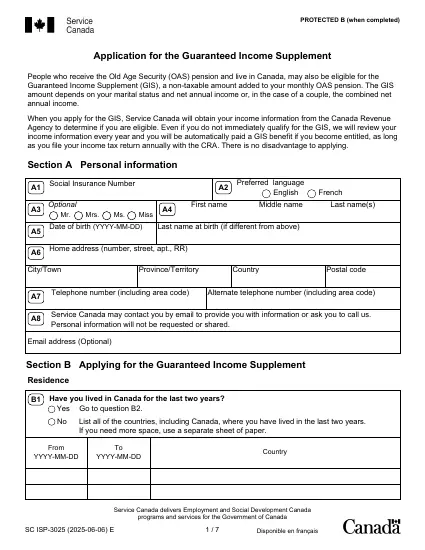
Enter your Social Insurance Number (A1), preferred language (A2), an optional title and your first, middle and last names (A3, A4), date of birth and last name at birth if different (A5), home address (A6), telephone numbers (A7) and an optional email address (A8).
Section B – Residence and income (B1 to B4)
B1 asks whether you have lived in Canada for the last two years; if not, list every country, including Canada, where you lived in that time, with from and to dates. B2 asks whether you retired in the last two years or expect to in the next two, and B3 whether your pension income dropped or will drop, each with the date (YYYY-MM). If you answer yes, Service Canada sends a separate form to estimate your income after the drop, which may increase your GIS. In B4, report any income from another country, with its type and yearly amount in the currency it is paid in, even if it is not taxable in Canada.
Section B – Sponsorship and marital status (B5 and B6)
B5 asks whether you were ever admitted to Canada under a sponsorship agreement. If yes, every part is required: your IRCC Unique Client Identifier (UCI), the category of sponsorship, whether the agreement was with Quebec, the date you became a permanent resident, the length of the undertaking in years, and any break in the sponsorship (the reference guide lists what counts as a break and the immigration documents that show these details). In B6, tick your current marital status, with the date for widowed, separated or divorced.
Section B – Your spouse or common-law partner (B7 to B12)
Skip to Section C if you have no spouse or common-law partner; otherwise every question here must be answered. B7 asks your spouse's or partner's names, SIN, date of birth, the date of your marriage or common-law union, their address if different, phone and optional email. B8 to B12 repeat the residence, retirement, pension reduction, foreign income and sponsorship questions for them.
Section C – Declarations and signatures (C1 to C3)
Sign and date C1 as the applicant. Your spouse or common-law partner signs and dates C2; their signature also counts as their own GIS application if they currently qualify for the OAS pension. C3 is for a witness when someone signs with a mark such as an X, or for a person authorized to act for the applicant or the spouse, who gives their name, relationship and mailing address and must send proof of authority, such as a power of attorney or trusteeship.
Section D – Terms and conditions and privacy notice
Read Section D before signing: it explains the penalties for false or misleading statements and how your personal information is handled. By signing Section C you declare that you have read and agree to it. The reference guide at the end of the form explains questions B1 to B12 with examples.
After you fill it out
Mail the signed application to the Service Canada office for your province or territory, listed on the last page of the form, with copies of any documents required; from outside Canada, use the office for the province where you last lived. Service Canada gets your income from the Canada Revenue Agency, so it is important that you, and your spouse or partner, file an income tax return every year. If you do not qualify now, Service Canada reviews your income every year and starts paying the GIS automatically if you become entitled, as long as your tax returns are filed. Service Canada's GIS pages list the online application in My Service Canada Account and how to contact them.
Signing: You sign and date C1, and your spouse or common-law partner signs and dates C2. Service Canada's apply page says a downloaded fillable form must be printed and signed, and asks you to sign every section that needs a signature with a pen. A witness or an authorized person signs C3 when someone signs with a mark or signs on another person's behalf.
Watch out for
- This form is only for the GIS. If you have not applied for the OAS pension yet, use Form ISP-3550, which covers both.
- Service Canada says that since October 1, 2025, a person under a sponsorship agreement cannot receive the GIS, the Allowance or the Allowance for the Survivor for the entire length of the agreement, so every part of B5 is required if you were sponsored.
- Foreign income must be reported in full, in the currency it is paid in, even if it is not paid in Canada or not taxable in Canada.
- Your GIS depends on income information from the Canada Revenue Agency: if you or your spouse or partner do not file a tax return each year, the supplement may not be calculated or continued.
- Someone applying on your behalf must send proof that they are authorized, such as a power of attorney or trusteeship document.
Questions about Form ISP-3025
Who can get the Guaranteed Income Supplement?
Service Canada says you must be 65 or older, receive the OAS pension, live in Canada, not be under a sponsorship agreement, and have an annual income below the threshold for your situation. The thresholds change and are listed on its GIS eligibility page.
Do I need to apply, or is it automatic?
Service Canada tries to enrol people automatically and sends a letter after your 64th birthday. You need to apply if the letter invites you to, if its information is wrong, or if you applied for the OAS pension but never for the GIS.
Can I apply online instead?
Yes, in My Service Canada Account, if you are at least one month past your 64th birthday, have not already applied, and do not have a third party such as a power of attorney or trustee managing your OAS account. Otherwise you use the paper form.
Does my spouse or partner need a separate application?
No. If you have a spouse or common-law partner, they answer B7 to B12 and sign C2. Their signature is also considered their GIS application if they currently qualify for the OAS pension.
Is the GIS taxable?
No. The form describes the GIS as a non-taxable amount added to your monthly OAS pension.
Official information
- Guaranteed Income Supplement: Apply
- Guaranteed Income Supplement: Do you qualify
- Guaranteed Income Supplement overview
- Form ISP-3025 in the Service Canada forms catalogue
Page text last reviewed November 13, 2026.