Canada Revenue Agency
Fill out Form RC1 online
Request for a Business Number and Certain Program Accounts
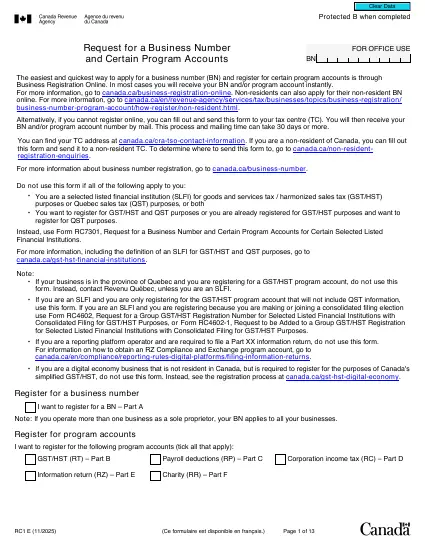
Form RC1 is the paper request for a business number (BN) from the Canada Revenue Agency (CRA) and for the program accounts most businesses need: GST/HST (RT), payroll deductions (RP), corporation income tax (RC), information returns (RZ) and charity (RR). Every applicant fills in Part A about the business and its owners and signs Part G; Parts B to F are filled in only for the accounts you want. The CRA says the quickest way is Business Registration Online, and this form is for those who cannot register online; the BN and account numbers then arrive by mail. This is the November 2025 version (RC1 E (11/2025)).
The form opens in our PDF editor with its own fields ready to type into. To download it, the filled PDF is sent to GuruPDF to prepare the file and is deleted from our servers one hour later. You can fill it in without an account; downloading the filled PDF needs a free account. A free account gets 15 credits a day, enough for one form a day.
- Country
- Canada
- Edition
- 11/2025
- Pages
- 13
- Fillable fields
- 325
- Last checked at the source
- November 13, 2026
GuruPDF is an independent PDF editor, not a government agency, and is not affiliated with any government. This page explains the form in plain words; it is not legal or tax advice. Always check the official instructions before you file.
Who uses Form RC1
- Sole proprietors, partnerships, corporations and trusts that need a business number and cannot use Business Registration Online
- Businesses that must register for GST/HST, or want to register voluntarily
- Employers opening a payroll deductions account before paying employees
- Businesses owned by another business, for example a partnership whose partner is a corporation, which the CRA says cannot register online
- Canadian businesses whose owners are all non-residents
- Organizations that need an information return account (such as T5 or T5018) or a charity program account
Before you start
- The business's legal name, any operating or trade names, and its physical address (not a PO box or rural route), mailing address and the address of its records
- The name, social insurance number (SIN), title and phone numbers of the sole proprietor, every partner, or every director or officer
- For a corporation: the certificate of incorporation or amalgamation (number, date and jurisdiction), or a copy to attach
- A detailed description of the main business activity and up to three main products or services with their share of revenue
- Your expected annual revenue from taxable supplies in Canada and worldwide, the fiscal year-end and the date GST/HST registration should start
- For payroll: how often you will pay, the expected number of employees and payroll for the next 12 months, and the date of the first payment
- An email address for each program account if you want the CRA's email notifications
How to fill out Form RC1
Page 1 – What you are registering for
Tick "I want to register for a BN – Part A" and tick each program account you want: GST/HST (RT) – Part B, Payroll deductions (RP) – Part C, Corporation income tax (RC) – Part D, Information return (RZ) – Part E, and Charity (RR) – Part F. You need a BN to have any program account. For extra payroll, information return or charity accounts, fill in those parts on another RC1 and attach it.
Part A – General business information
In A1, tick one ownership type (individual, partnership, trust, corporation or other), say whether you are incorporated and, if so, whether you attach the certificate or fill in Part D, and tick your type of operation if one applies. In A2, list the sole proprietor, all partners, or all directors or officers with their SIN, title and phone numbers, plus any corporations controlling the business or partnerships, corporations and other entities that are partners. In A3, give the legal name, operating names, physical, mailing and records addresses and language. In A4, describe the major business activity (the form asks for at least a noun, a verb and an adjective) and up to three products or services with a percentage of revenue.
Part A5 – GST/HST information
Answer the yes/no questions that decide whether you must or may register for the GST/HST: whether you supply property or services in Canada or export them, whether your worldwide taxable revenues pass the small-supplier limit printed on the form, whether you are a public service body, whether everything you sell is exempt, whether you run a taxi, ride-sharing or limousine service, whether you are a non-resident, whether you wish to register voluntarily, and the questions about the digital economy, accommodation and distribution platforms and fulfillment warehouses.
Part B – GST/HST program account (RT)
In B1, tick the box if the account details are the same as Part A3, or give a separate name, an email address and the addresses for this account. In B2, enter your annual revenue from taxable supplies in Canada and worldwide (0 if none), the fiscal year-end (December 31 if left blank), any election to change it, and the effective date of registration. In B3, tick the reporting period that matches your revenue and, if you want to file more often, the option you choose. If the effective date is more than 30 days before you apply, the form lists the documents you must add.
Part C – Payroll deductions program account (RP)
In C1, give the account's name (or tick that it matches Part A3), email address and addresses. In C2, answer what type of payment you make (payroll, RRSP, RRIF or other), how often you pay, the maximum number of employees you expect in the next 12 months, the expected total salaries, the date of the first payment, whether the business is year-round or seasonal (and which months), whether a corporation is a subsidiary or affiliate of a foreign corporation, and whether you are a franchisee.
Parts D, E and F – Corporation, information return and charity accounts
Part D is for a corporation income tax account: name as on the certificate, email and addresses, the certificate number and date of incorporation or amalgamation (if you did not attach a copy), the jurisdiction, and in D4 whether it is a condominium corporation, which must send the documents listed there. The form says you do not need Part D if you incorporated federally or in a province that has partnered with the CRA. Part E opens one information return account: tick one type (the T5 group, TFSA, T5018 or partnerships) and its effective date. Part F requests a charity, Canadian amateur athletic association or national arts service organization account.
Part G – Certification
Enter the name and SIN of an owner, partner or corporate director (a non-resident without a Canadian SIN leaves it blank), tick what the person signing is (owner, partner, director, officer, trustee, representative or third party requestor), and give their name, title and telephone number. The person signs and dates (YYYYMMDD) to certify the information is correct and complete; the form says it is not processed without this part.
After you fill it out
Mail the signed form to your CRA tax centre; non-residents send it to a non-resident tax centre. The CRA's registration page and the form point to the tax centre contact pages. The form says the BN and program account numbers are then sent to you by mail, and that the CRA may contact you to confirm the information or ask for more. Most notices are delivered electronically to My Business Account by default. Before using this form, check whether you already have a BN (federal and some provincial incorporations get one automatically), and whether you can register faster with Business Registration Online through your CRA account. Having a charity (RR) account does not make you a registered charity: you must still apply for registration through My Business Account.
Signing: An owner, partner, corporate director or officer, trustee, representative or third party requestor signs and dates Part G; the form is not processed without it. RC1 is sent on paper and is not on the CRA's list of forms that accept an electronic signature, so print it and sign it by hand.
Watch out for
- A business physically located in Quebec does not register for GST/HST with this form: GST/HST there is administered by Revenu Québec, unless you are a selected listed financial institution.
- The physical address must be the actual location of the business; a PO box, rural route, suburban service or general delivery address is not accepted as a physical address.
- The SIN is mandatory for a sole proprietor registering for a GST/HST account. The CRA says owners, directors, partners or trustees with a temporary SIN starting with 9 must use Business Registration Online instead.
- Do not use this form if you are a selected listed financial institution registering for GST/HST and QST (use Form RC7301), a reporting platform operator filing a Part XX return, or a non-resident digital business registering for simplified GST/HST.
- This form cannot register Underused Housing Tax or Luxury Tax accounts, and other accounts such as excise duty or insurance premium tax have their own registration process.
Questions about Form RC1
Can I get a business number online instead?
Yes. The CRA says Business Registration Online, reached through your CRA account (Business account, Register a business), is the fastest way and usually gives the BN instantly. You must save or print the BN yourself. Form RC1 is for those who cannot complete registration online.
Do I need a new BN for each of my businesses?
Not as a sole proprietor: the form says one BN applies to all the businesses you operate as a sole proprietor. If you already have a BN, the CRA says you use it to add the program accounts you need rather than getting a new one.
Do I have to register for the GST/HST?
Part A5 walks through the questions. In general the form says you must register when your worldwide taxable revenues, including those of associates, pass the small-supplier limit printed there (a different limit applies to public service bodies), or if you run a taxi, ride-sharing or limousine service, whatever your revenue. You can also register voluntarily, which means charging GST/HST and filing returns.
My corporation was just incorporated. Do I fill in Part D?
Not if you incorporated federally or in a province that has partnered with the CRA: the form says a BN and corporation income tax account are then assigned automatically. Otherwise, attach the certificate of incorporation or amalgamation or fill in Parts D2 and D3.
Who can sign the form?
Part G lets an owner, a partner, a corporate director, a corporate officer, an officer of a non-profit organization, a trustee, a representative or a third party requestor sign. The name and SIN of an owner, partner or corporate director must also be given.
Official information
- Form RC1 (CRA)
- Register as a resident with a Canadian business
- Business registration with the CRA
- Register as a non-resident doing business in Canada
Page text last reviewed November 13, 2026.