Canada Revenue Agency
Fill out Form AUT-01 online
Authorize a Representative for Offline Access
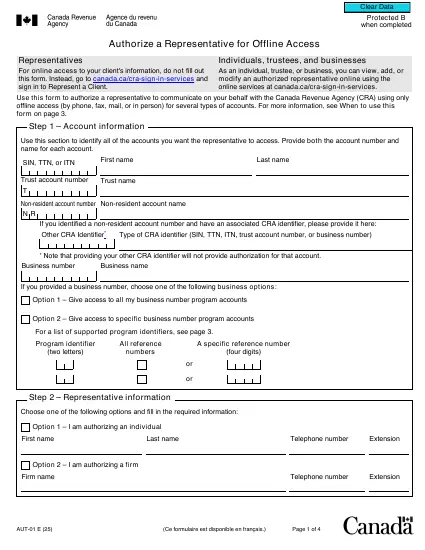
Form AUT-01 is how you give a representative, such as an accountant, a bookkeeper, a family member or a firm, permission to communicate with the Canada Revenue Agency (CRA) on your behalf using offline access only: by phone, fax, mail or in person. It covers individual tax and benefit accounts, trust accounts, non-resident accounts and business number program accounts. It does not give online access; for that, you or your representative use the CRA's online services instead. You fill out one form for each representative and send it to your CRA tax centre within six months of signing it.
The form opens in our PDF editor with its own fields ready to type into. To download it, the filled PDF is sent to GuruPDF to prepare the file and is deleted from our servers one hour later. You can fill it in without an account; downloading the filled PDF needs a free account. A free account gets 15 credits a day, enough for one form a day.
- Country
- Canada
- Edition
- Edition 2025
- Pages
- 4
- Fillable fields
- 49
- Last checked at the source
- November 13, 2026
GuruPDF is an independent PDF editor, not a government agency, and is not affiliated with any government. This page explains the form in plain words; it is not legal or tax advice. Always check the official instructions before you file.
Who uses Form AUT-01
- Individuals who want an accountant, a relative or a friend to call or write to the CRA about their tax and benefit account
- Parents or legal guardians of a taxpayer under 16, and legal representatives such as an executor or power of attorney
- Sole proprietors, partners, corporate directors and officers authorizing someone for business number program accounts
- Trustees authorizing a representative for a trust account
- Holders of non-resident accounts who want someone to deal with the CRA for them
Before you start
- Your SIN, temporary tax number (TTN) or individual tax number (ITN), and your name exactly as the CRA has it
- Any trust account number (starting with T) or non-resident account number (starting with NR), with the account name
- Your business number and business name, and the two-letter program identifiers you want to include (the list is on page 3 of the form)
- The representative's name, or the firm's name, and telephone number
- Whether you want to allow information only (Level 1) or information and certain account changes (Level 2)
- An expiry date, if you want the authorization to end on its own
How to fill out Form AUT-01
Step 1 – Account information
Identify every account the representative may access, giving both the account number and the name for each. For your own tax and benefit account, enter your SIN, TTN or ITN with your first and last name. There are also lines for a trust account number and trust name, and for a non-resident account number and name; if you give a non-resident account, you can add another CRA identifier, which the form notes does not authorize that other account. For a business number, enter it with the business name and choose Option 1 (all program accounts) or Option 2 (specific program identifiers, each with all reference numbers or one four-digit reference number).
Step 2 – Representative information
Choose Option 1 to authorize an individual and enter their first name, last name, telephone number and extension, or Option 2 to authorize a firm and enter the firm name, telephone number and extension. Each form names one representative; the CRA asks for a separate form for each one.
Step 3 – Level of access
Choose one level. Level 1 lets the CRA disclose information about your account to the representative. Level 2 also lets the representative ask for certain changes to be made on your account.
Step 4 – Authorization expiry date
This step is optional. Enter an expiry date as YYYYMMDD if you want the authorization to end on that date. Without one, it stays in place until you, or someone with signing authority, change or cancel it.
Step 5 – Certification
You must have signing authority for every account listed in Step 1. Tick the option that describes you: taxpayer; parent or legal guardian of a taxpayer under the age of 16; legal representative (such as an executor, power of attorney or trustee); owner (such as a sole proprietor or partner); officer of a non-profit organization; corporate director or corporate officer; or individual with delegated authority for the business account. Enter your first name, last name and telephone number, then sign and date the form (YYYYMMDD).
After you fill it out
Send the signed form to the CRA tax centre listed on page 4 of the form for your situation (it depends on your province, whether you are completing the form in French, and whether a non-resident account is involved). For a non-resident account the CRA also accepts the form by fax at the Sudbury Tax Centre, as its authorization page explains. The CRA must receive it within six months of the date you signed it, or it will not process it. Keep a copy. You can later see your representative's level of access in the CRA's online services. To end the authorization, use the online services or send Form AUT-01X, Cancel Authorization for a Representative.
Signing: The person with signing authority for the accounts in Step 1 signs and dates Step 5. The form is sent on paper by mail (or fax for non-resident accounts), and AUT-01 is not on the CRA's list of forms that accept an electronic signature, so print it and sign it by hand. The CRA will not process the form if the signer's name does not match its records.
Watch out for
- This form gives offline access only. If you want the representative to see your information online, or to submit documents electronically, do not use this form: authorize them through the CRA's online services instead.
- The CRA must receive the form within six months of the date you signed it, or it will not process it.
- The CRA will not process the form if your name does not match the one in its records, so check your information on file before signing.
- Do not use this form to authorize someone for tax ruling or interpretation requests. A selected listed financial institution with a GST/HST account that includes QST information uses Form RC7259 instead.
- Only fill out a new form if something changes; you remain responsible for monitoring what your representative does on your accounts.
Questions about Form AUT-01
Does Form AUT-01 give my accountant online access to my CRA account?
No. It gives offline access only: by phone, fax, mail or in person. For online access, you add the representative in My Account or My Business Account, or the representative sends a request through Represent a Client, which you then confirm.
What is the difference between Level 1 and Level 2?
Level 1 allows access to information only: the CRA can tell your representative about your account. Level 2 allows access to information and lets the representative ask the CRA to make certain changes on your account.
Can I authorize several people on one form?
No. Step 2 takes one individual or one firm, and the CRA says to fill in and sign a separate form for each representative.
How long does the authorization last?
Until you or someone with signing authority changes or cancels it, unless you entered an expiry date in Step 4. To cancel it, use the CRA's online services or send Form AUT-01X.
Can a parent sign for a child?
Yes, the certification has a box for a parent or legal guardian of a taxpayer under the age of 16. A legal representative, such as an executor or a person holding a power of attorney, ticks the legal representative box.
Official information
- Form AUT-01 (CRA)
- Authorize a representative: How to give authorization
- Level of access you can give a representative
- Cancel authorization for a representative
Page text last reviewed November 13, 2026.