Canada Revenue Agency
Fill out Form TD1 online
2026 Personal Tax Credits Return
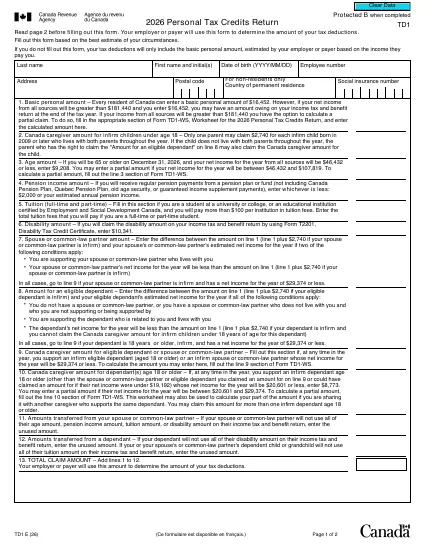
Form TD1 is the federal Personal Tax Credits Return for 2026. You fill it out when you start working for a new employer or start receiving a pension or other payments, and whenever your tax credits change. Your employer or payer uses the total claim amount on line 13 to work out how much federal income tax to deduct from each payment. You give the form to your employer or payer; it is not sent to the Canada Revenue Agency (CRA).
The form opens in our PDF editor with its own fields ready to type into. To download it, the filled PDF is sent to GuruPDF to prepare the file and is deleted from our servers one hour later. You can fill it in without an account; downloading the filled PDF needs a free account. A free account gets 15 credits a day, enough for one form a day.
- Country
- Canada
- Edition
- Tax year 2026
- Pages
- 2
- Fillable fields
- 30
- Last checked at the source
- November 13, 2026
GuruPDF is an independent PDF editor, not a government agency, and is not affiliated with any government. This page explains the form in plain words; it is not legal or tax advice. Always check the official instructions before you file.
Who uses Form TD1
- Employees starting a job with a new employer in Canada
- Pensioners and people receiving other payments, such as employment insurance benefits, from a new payer
- Employees whose credits have changed, for example because they now support a dependant
- People who want more tax deducted from each payment
- People living in the Northwest Territories, Nunavut, Yukon or another prescribed zone who claim the northern residents deduction
- Non-residents working in Canada
Before you start
- Your social insurance number (SIN), date of birth, home address and postal code
- Your employee number, if your employer gave you one
- An estimate of your net income from all sources for 2026
- The estimated 2026 net income of your spouse or common-law partner and of any dependant you support
- The tuition fees you will pay, if you are a student
- Whether you will claim the disability amount with an approved Form T2201
- Form TD1-WS, Worksheet for the 2026 Personal Tax Credits Return, if you need to calculate a partial amount
- Whether you already claimed credits on another TD1 with a second employer or payer
How to fill out Form TD1
Identification
At the top of page 1, enter your last name, first name and initials, date of birth (YYYY/MM/DD), employee number, address, postal code and social insurance number. The "For non-residents only – Country of permanent residence" box is only for people who do not live in Canada.
Line 1: Basic personal amount
Every resident of Canada can enter the basic personal amount printed on line 1. The form warns that if your net income from all sources will be above the limit printed there, entering the full amount may leave you with an amount owing when you file your return. In that case you may calculate a partial claim in the line 1 section of Form TD1-WS and enter the result instead.
Lines 2 to 6: children, age, pension, tuition and disability
Line 2 is the Canada caregiver amount for infirm children under 18; only one parent may claim it for each child. Line 3 is the age amount for people who will be 65 or older on December 31, 2026, with a partial amount worked out on Form TD1-WS when income is in the range the form gives. Line 4 is the pension income amount for regular pension payments (not CPP, QPP, old age security or guaranteed income supplement). Line 5 is the tuition you will pay as a full-time or part-time student, and line 6 is the disability amount, which you enter only if you will claim it with Form T2201, Disability Tax Credit Certificate.
Lines 7 to 10: spouse, dependants and caregivers
Line 7 is the spouse or common-law partner amount: the difference between your line 1 amount and your partner's estimated net income, if you support a partner who lives with you and has income below that amount. Line 8 is the amount for an eligible dependant: a relative who lives with you and whom you support, when you have no spouse or common-law partner, or have one who does not live with you and whom you are not supporting or being supported by. Line 9 is the Canada caregiver amount for an infirm spouse or common-law partner, or an infirm eligible dependant aged 18 or older, whose net income will be at or below the limit printed on the line; the amount is calculated in the line 9 section of Form TD1-WS. Line 10 is the Canada caregiver amount for other infirm dependants aged 18 or older, and it can be shared with another caregiver using the worksheet.
Lines 11 to 13: transfers and total claim amount
On line 11, enter any part of your spouse's or common-law partner's age, pension income, tuition or disability amount that they will not use on their own return. On line 12, enter the unused disability amount of a dependant, or the unused tuition amount of your or your partner's dependent child or grandchild. Add lines 1 to 12 and enter the result on line 13, TOTAL CLAIM AMOUNT.
Page 2: other employers, low income and non-residents
Tick "More than one employer or payer at the same time" if you already claimed your credits on another 2026 TD1 and your total income will be more than those credits; then enter "0" on line 13 and leave lines 2 to 12 blank. Tick "Total income is less than the total claim amount" if your income from all employers and payers for the year will be below your line 13 amount; your employer will then not deduct tax. Non-residents answer whether 90% or more of their world income will be included in their taxable income earned in Canada in 2026; if not, they enter "0" on line 13.
Page 2: prescribed zone, additional tax and reductions
If you live in the Northwest Territories, Nunavut, Yukon or another prescribed northern zone for more than six months in a row beginning or ending in 2026, enter your deduction for living in a prescribed zone, using the daily amounts printed on the form. Under "Additional tax to be deducted", enter any extra amount you want withheld from each payment. To have less tax deducted for items not on this form, such as RRSP contributions or child care expenses, the form tells you to use Form T1213 to get a letter of authority instead.
Certification
Read the certification, then sign and date page 2. The form states that it is a serious offence to make a false return.
After you fill it out
Give the signed form to your employer or payer, not to the CRA. The CRA tells employers to keep it with your payroll records and to use the total claim amount to calculate your federal deductions; the claim codes they look up in the payroll tables are not shown on the form. If your total claim amount is more than the basic personal amount, also fill out the TD1 for your province or territory of employment (or of residence, if you are a pensioner); people working in Quebec also complete Revenu Québec's Form TP-1015.3-V. Your employer may ask you to send a scanned copy or to use its own electronic TD1. You do not need a new TD1 every year unless your credits change, and the CRA says your employer must get a new one within seven days of a change.
Signing: You sign and date the Certification on page 2. On paper, print the form and sign it by hand. The CRA also lets employers collect TD1 forms through their own electronic system that confirms who you are (for example a password-protected self-service portal) and records your certification, so follow your employer's instructions.
Watch out for
- If you have more than one employer or payer at the same time, you cannot claim the same credits again on a second TD1.
- If you do not give your employer a TD1, tax is deducted allowing only the basic personal amount.
- Claiming more than the basic personal amount means you also need the provincial or territorial TD1, which has its own lines and amounts.
- Form TD1-WS is for your own calculations: keep it, do not give it to your employer.
- The CRA says an employer who believes a TD1 contains false information must deduct tax allowing only the basic personal amount.
Questions about Form TD1
Do I need to fill out a new TD1 every year?
No. The CRA says you only fill out a new TD1 when your federal, provincial or territorial personal tax credit amounts change, when you start with a new employer or payer, or when you want to change how much tax is deducted. The amounts behind each claim code in the payroll tables are indexed every year, and if you do not hand in a new TD1, your employer keeps using the claim code it used the year before.
What happens if I do not fill out Form TD1?
Your employer or payer will deduct tax allowing only the basic personal amount, estimated from the income they pay you. You may then pay more tax during the year than you need to if you are entitled to other credits.
I have two jobs. What do I put on the second TD1?
You cannot claim the same credits twice. If your total income from all sources will be more than the credits you claimed on your first TD1, tick "More than one employer or payer at the same time" on page 2 of the second form, enter "0" on line 13 and leave lines 2 to 12 blank.
Do I send Form TD1 to the CRA?
No. You give it to your employer or payer, who keeps it with your records and uses it to calculate your deductions. The CRA only sees it if it asks your employer for it.
Which provincial TD1 do I need?
Employees use the TD1 for their province or territory of employment; pensioners use the one for their province or territory of residence. You need it if your federal total claim amount is more than the basic personal amount. In Quebec, the federal TD1 is used together with Revenu Québec's Form TP-1015.3-V.
Official information
- TD1 2026 Personal Tax Credits Return (CRA)
- TD1-WS Worksheet for the 2026 Personal Tax Credits Return
- All 2026 provincial and territorial TD1 forms
- Get the completed TD1 forms from the individual (CRA guidance for employers)
Page text last reviewed November 13, 2026.
Related forms
- Form TD1ON2026 Ontario Personal Tax Credits ReturnCRAFill online
- Form TD1BC2026 British Columbia Personal Tax Credits ReturnCRAFill online
- Form TD1AB2026 Alberta Personal Tax Credits ReturnCRAFill online
- T1 Income Tax and Benefit ReturnT1 2025 Income Tax and Benefit ReturnCRAFill online
- Form T2201Disability Tax Credit CertificateCRAFill online
- Form NAS2120Application for a Social Insurance NumberService CanadaFill online