Canada Revenue Agency
Fill out Form T1213 online
Request to Reduce Tax Deductions at Source
Form T1213 asks the Canada Revenue Agency (CRA) to let your employer or payer deduct less income tax at source because you have deductions or credits that are not part of Form TD1, such as RRSP contributions you make yourself, child care expenses, support payments, employment expenses or charitable donations. If the CRA approves the request, it issues a letter of authority, and your employer reduces the tax it deducts by the amount stated in that letter. This is the 2026 edition of the form; you enter the year your request is for at the top, and the request has to be made again every year.
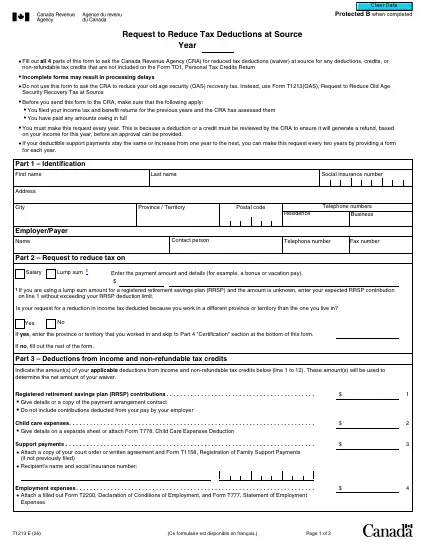
The form opens in our PDF editor with its own fields ready to type into. To download it, the filled PDF is sent to GuruPDF to prepare the file and is deleted from our servers one hour later. You can fill it in without an account; downloading the filled PDF needs a free account. A free account gets 15 credits a day, enough for one form a day.
- Country
- Canada
- Edition
- Edition 2026
- Pages
- 2
- Fillable fields
- 42
- Last checked at the source
- November 13, 2026
GuruPDF is an independent PDF editor, not a government agency, and is not affiliated with any government. This page explains the form in plain words; it is not legal or tax advice. Always check the official instructions before you file.
Who uses Form T1213
- Employees who make RRSP contributions themselves, outside payroll, during the year
- Parents who pay child care expenses
- People who pay deductible support payments under a court order or written agreement
- Employees with employment expenses supported by Form T2200
- People with regular donations, medical expenses or interest on investment loans
- People who live in one province or territory and work in another, and have too much tax deducted
Before you start
- Your social insurance number, address and residence and business telephone numbers
- Your employer's or payer's name, a contact person there, and their telephone and fax numbers
- Whether the request is for your salary or for a lump-sum payment such as a bonus or vacation pay, and that payment's amount
- Supporting documents for each amount you claim, for example an RRSP payment arrangement contract, Form T778 or child care details, your support court order or written agreement and Form T1158, or Forms T2200 and T777
- Lists of medical expenses and of donations (naming the registered charities), and lender statements for investment loans, if they apply
- Confirmation that your returns for previous years are filed and assessed and that any amount you owe is paid
How to fill out Form T1213
Year and the checks on page 1
Enter the year your request is for in the Year box at the top. The form asks you to fill out all 4 parts, because incomplete forms may delay processing. Before you send it, your income tax and benefit returns for previous years must be filed and assessed by the CRA, and any amounts you owe must be paid in full.
Part 1 – Identification
Enter your first name, last name and social insurance number, your address, city, province or territory and postal code, and your residence and business telephone numbers. Under Employer/Payer, enter the employer's or payer's name, a contact person, and their telephone and fax numbers.
Part 2 – Request to reduce tax on
Tick Salary or Lump sum. For a lump sum, enter the payment amount and details, for example a bonus or vacation pay; if you will put a lump sum into an RRSP and do not know the amount yet, the form says to enter your expected RRSP contribution on line 1 without going over your RRSP deduction limit. Then answer whether you are asking because you work in a different province or territory than the one you live in. If yes, enter the province or territory you worked in and skip to Part 4; if no, continue with Part 3.
Part 3 – Lines 1 to 4
Enter the amounts that apply. Line 1 is RRSP contributions: give details or a copy of the payment arrangement contract, and do not include contributions your employer deducts from your pay. Line 2 is child care expenses, with details on a separate sheet or Form T778. Line 3 is support payments: attach your court order or written agreement and Form T1158 if you have not filed it before, and give the recipient's name and social insurance number. Line 4 is employment expenses, with a filled-out Form T2200 and Form T777.
Part 3 – Lines 5 to 12
Line 5 is carrying charges and interest on investment loans, with statements from the lender. Line 6 is medical expenses and line 7 donations, each with a list of the expenses or of the registered charities and amounts. Line 8 is the clergy residence deduction (attach Form T1223), line 9 RPP buy-back contributions for past service (say whether they are for 1989 or earlier or for 1990 or later, and attach the Past Service Pension Adjustment certification for the later years), and line 10 the foreign tax credit (Form T2209 or a letter with the calculation). Line 11 is any other deduction or credit, such as moving expenses or carried-forward tuition, which you name under Specify. On line 12, enter other income on which payers will make no tax deductions, such as interest or net rental or self-employment income; the CRA uses these amounts to work out the net amount of your waiver.
Part 4 – Certification
Sign and date the form. By signing, you ask that your employer or payer be authorized to reduce your tax deductions at source and certify that the information on the form and in any attached document is correct and complete.
After you fill it out
Send the form with copies of all supporting documents and keep the originals. The form lists two ways: online, through My Account (or Represent a Client for representatives) using the Submit documents service and the topic "Contact Centre and International Correspondence", or by mail or fax to the Sudbury Tax Centre at the address and fax numbers printed on page 2. If the CRA approves the request, you get a letter of authority. Give it to your employer or payer: the CRA tells employers to keep the letter with your records, not to send the CRA a copy, and to reduce the tax deducted by the amount the letter specifies.
Signing: Sign and date Part 4 – Certification. Form T1213 is not on the CRA's list of forms that accept an electronic signature, so print the form and sign it by hand; you can then upload a copy through My Account, or mail or fax it.
Watch out for
- You must make the request every year. If your deductible support payments stay the same or increase, the form says you can ask every two years by providing a form for each year.
- Do not use this form to reduce the old age security recovery tax deducted from your OAS pension; use Form T1213(OAS) instead.
- The CRA expects your previous years' returns to be filed and assessed and any balance owing to be paid before you send the form.
- Incomplete forms or missing supporting documents may delay processing.
- T1213 only covers deductions and credits that are not on Form TD1. To change the credits on your TD1, or to have more tax deducted, give your employer a revised TD1.
Questions about Form T1213
What is the difference between Form T1213 and Form TD1?
Form TD1 covers personal tax credits such as the basic personal amount, and you give it straight to your employer. Form T1213 is for deductions and credits that are not on the TD1, such as RRSP contributions, child care or support payments. It goes to the CRA, which answers with a letter of authority for your employer.
Do I have to send a new T1213 every year?
Yes. The form explains that the CRA has to review each deduction or credit against your income for the year to make sure it will produce a refund before it approves a reduction. The exception is deductible support payments that stay the same or increase: you can then ask every two years by sending a form for each year.
Can I send Form T1213 online?
Yes. The form says individuals or their representatives can upload it with the supporting documents through My Account or Represent a Client, using Submit documents and the topic "Contact Centre and International Correspondence". You can also mail or fax it to the Sudbury Tax Centre.
What does my employer do with the CRA's letter?
The CRA tells employers to keep the letter of authority with your payroll record, not to send a copy to the CRA, and to reduce the income tax deducted at source by the amount the letter specifies.
Can pension income splitting reduce the tax withheld from my pension?
No. The CRA says it cannot approve a reduction of tax withheld at source based on an election to split pension income. The split is made on Form T1032 when you file your returns.
Official information
- T1213 Request to Reduce Tax Deductions at Source (CRA)
- Increase or reduce income tax deducted at source (CRA guidance for employers)
- T1213(OAS) Request to Reduce Old Age Security Recovery Tax at Source
- Sign in to your CRA account (My Account)
Page text last reviewed November 13, 2026.
Related forms
- Form TD12026 Personal Tax Credits ReturnCRAFill online
- Form T778Child Care Expenses DeductionCRAFill online
- Form T2200Declaration of Conditions of EmploymentCRAFill online
- T1 Schedule 7T1-2025 Schedule 7 RRSP, PRPP, and SPP Contributions and Transfers, and HBP and LLP ActivitiesCRAFill online
- Form T1032Joint Election to Split Pension IncomeCRAFill online
- T1 Income Tax and Benefit ReturnT1 2025 Income Tax and Benefit ReturnCRAFill online