Canada Revenue Agency
Fill out Form T2200 online
Declaration of Conditions of Employment
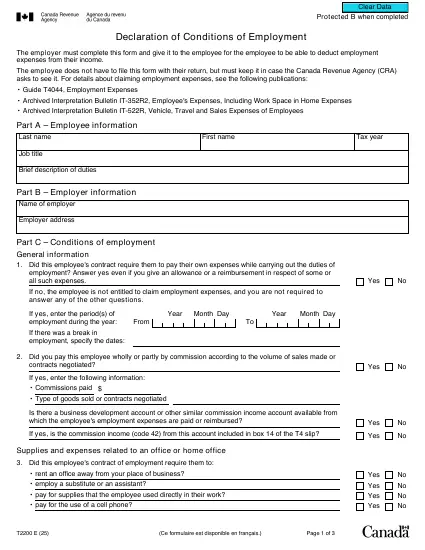
Form T2200, Declaration of Conditions of Employment, is completed and signed by an employer so that an employee can deduct employment expenses on their income tax return, such as home office, motor vehicle, travel, supply or tool expenses. This edition is for the 2025 tax year. The employer confirms what the employment contract required the employee to pay for and what was reimbursed. The employee keeps the signed form and does not send it with their return unless the Canada Revenue Agency (CRA) asks for it.
The form opens in our PDF editor with its own fields ready to type into. To download it, the filled PDF is sent to GuruPDF to prepare the file and is deleted from our servers one hour later. You can fill it in without an account; downloading the filled PDF needs a free account. A free account gets 15 credits a day, enough for one form a day.
- Country
- Canada
- Edition
- Edition 2025
- Pages
- 3
- Fillable fields
- 118
- Last checked at the source
- November 13, 2026
GuruPDF is an independent PDF editor, not a government agency, and is not affiliated with any government. This page explains the form in plain words; it is not legal or tax advice. Always check the official instructions before you file.
Who uses Form T2200
- Employers asked by an employee to certify their conditions of employment
- Employees claiming home office (work-space-in-the-home) expenses on Form T777
- Employees who must pay their own motor vehicle, travel or supply costs
- Commission employees claiming expenses
- Employed tradespersons, apprentice mechanics and forestry workers claiming tools or power saw costs
Before you start
- The employee's name, job title and a brief description of duties
- The tax year and the periods of employment during the year, including any break
- Which expenses the employment contract or a written or verbal agreement required the employee to pay
- Whether the employee worked from home more than 50% of the time for at least four consecutive weeks
- Amounts and types of expenses reimbursed or paid as allowances, and whether they were included on the T4 slip
- Commissions paid and motor vehicle allowance details, if any
- The name, title and telephone number of the person authorized to sign for the employer
How to fill out Form T2200
Part A – Employee information
Enter the employee's last name, first name, the tax year, job title and a brief description of their duties.
Part B and Part C questions 1 and 2 – Employer and general information
In Part B, enter the employer's name and address. Question 1 asks whether the employee's contract required them to pay their own expenses (answer yes even if some were reimbursed); if no, the employee cannot claim employment expenses and the rest of the form is not needed. If yes, enter the periods of employment and any break. Question 2 asks whether the employee was paid wholly or partly by commission, the commissions paid, the type of goods sold or contracts negotiated, and about any business development or commission account used to pay expenses.
Questions 3 to 5 – Supplies and home office
Question 3 asks whether the contract required the employee to rent an office away from your place of business, employ a substitute or assistant, pay for supplies used directly in their work, or pay for a cell phone. Question 4 asks whether you required the employee to use part of their home for work (a written or verbal agreement is enough), whether they worked there more than 50% of the time for at least four consecutive weeks, and whether they used it regularly and continually for in-person meetings with clients or other people while doing their work. Question 5 asks about reimbursements of these expenses, with amount, type and whether each was included on the T4 slip. If the employee only had home office expenses, the form says to skip to Part D.
Questions 6 to 11 – Motor vehicle, travel and other expenses
Question 6 asks whether you normally required the employee to travel away from your place of business, and the area of travel. Question 7 asks whether they had to be away for at least 12 consecutive hours from the municipality where they normally reported for work. Question 8 covers motor vehicle allowances (fixed amount, per-kilometre rate and the amount included on the T4), question 9 a company vehicle and any costs the employee paid for it, question 10 reimbursed expenses, and question 11 other expenses the employee paid without any allowance or reimbursement.
Questions 12 to 14 – Tradespersons, apprentice mechanics and forestry
Question 12 asks whether the employee worked as a tradesperson and had to buy and provide tools as a condition of employment, and whether the tools on the list the employee gave you meet that condition. Question 13 asks the same for a registered apprentice mechanic. For both, the form asks you to sign and date the employee's list of tools. Question 14 asks whether a forestry employee had to provide a power saw.
Part D – Employer declaration
The authorized person certifies that the information is correct and complete to the best of their knowledge, and enters their name, title, telephone number and extension, the date and their signature, so the CRA can call to verify the information.
Part E – Employee
The employee completes this section only if the CRA asks them to send in the form: name, social insurance number, date and home address.
After you fill it out
The employer gives the completed and signed form to the employee. The employee does not file it with their return but keeps it in case the CRA asks to see it, and claims the expenses on Form T777, Statement of Employment Expenses, which is filed with the return (the total goes on line 22900). An employee with more than one employer asks each one for a separate T2200. The CRA's home office pages say the temporary flat rate method ended with 2022, so a home office claim for 2023 and later years uses the detailed method and needs a T2200.
Signing: The employer's authorized person signs Part D; the CRA says it is up to the employer to decide who is authorized. The form states that the CRA will accept an electronic signature applied in accordance with its guidance, and T2200 is on the CRA's list of forms that accept one. The employee does not sign the form.
Watch out for
- Form T2200 is completed and signed by the employer, not by the employee. Guide T4044 explains the conditions under which a shareholder-employee may certify it for themselves.
- If the answer to question 1 is no, the employee is not entitled to claim employment expenses.
- Do not send Form T2200 with the tax return; keep it, with receipts, in case the CRA asks.
- Each employer completes a separate form for the employee.
- Tradespersons and apprentice mechanics need a list of tools signed and dated by the employer attached to the form.
Questions about Form T2200
Do I need a T2200 to claim home office expenses?
Yes, for 2023 and later years. The CRA says the temporary flat rate method does not apply after 2022, and the detailed method requires a completed and signed Form T2200 from your employer along with Form T777.
Do I send Form T2200 with my tax return?
No. You keep it with your records in case the CRA asks to see it. Only Form T777 is filed with your return.
Can my employer sign electronically?
Yes. The CRA accepts an electronic signature on Form T2200 if it is applied according to its guidance on electronic signatures, and employers are not required to provide a handwritten signature.
My employer reimbursed some of my expenses. Can I still claim?
Question 1 asks the employer to answer yes even if an allowance or reimbursement covered some or all of the expenses. The employer then lists reimbursed amounts in questions 5 and 10, and Guide T4044 explains how reimbursements affect what you can deduct.
Official information
- T2200 Declaration of Conditions of Employment (CRA)
- Guide T4044, Employment Expenses
- Home office expenses for employees
- Using electronic signatures (CRA)
Page text last reviewed November 13, 2026.